
Dynamic Client
The all-in-one Minecraft client built for everyone.
Screenshots
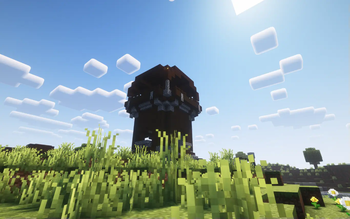
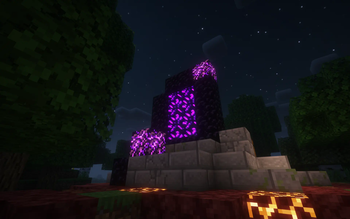
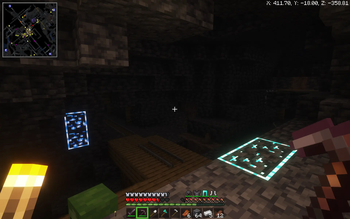


About this Modpack

The all-in-one Minecraft client built for everyone.
Whether you're a redstone engineer, PvP warrior, builder, or casual player—Dynamic Client gives you the ultimate experience with performance boosts, modern visuals, redstone tools, PvP features, and more.
⭐️ What Makes It Special?
Dynamic Client packs together:
- ⚡ Performance Enhancements (Sodium-based)
- 🔴 Redstone Tweaks
- 🗡️ PvP Features (like keystrokes & status timers)
- 🎨 Visual & General Upgrades (shaders, UI, resource packs)
- 🗺️ Built-in Minimap and World Map
- 🛠️ Tools like Replay Mod, Jade, World Edit, and more!
🔧 General Improvements
- ✨ Shaders support — immersive lighting and graphics
- 🖼️ Built-in resource pack installer — drag & drop made easy
- 💡 Dynamic Lights — light up the world with items in hand
- 🧾 Jade HUD — see block/item info instantly
- 📹 Replay Mod — record and replay your gameplay
- 📦 OptiFine-like features — without the mess
- 🧱 WorldEdit — creative building made powerful
- 🧭 Minimap and World Map — never get lost again
- 📜 Improved command block UI — cleaner and more functional
- 🌐 Join servers from older or newer Minecraft versions seamlessly.
⚡ Performance Improvements
- 🧪 Built on Sodium, Lithium and more for max FPS
- 🔄 Smooth gameplay on low-end PCs and high-end rigs alike
🔴 Redstone Improvements
- ⏩ Redstone Tweaks — improve redstone usability and behavior
- 🕹️ Game4speed to slow down and see your builds
🗡️ PvP Improvements
- ⌨️ Keystrokes overlay (disabled by default — toggle on if needed by pressing f10)
- ⏱️ Status effect timers — know when your buffs/debuffs end
- 🎯 UI changes like lower fire and shields to see your opponets while protecting yourself
🎮 But here’s the best part:
Dynamic Client is a hybrid modpack-client, meaning:
- You can add your own favorite mods (like a mod that adds more mobs).
- You can install your own resource packs or data packs to match your vibe.
- You can tweak it, customize it, and truly make it your Minecraft.
- And you can do all these IN GAME!
🔧 How to Install the Dynamic Client on Modrinth
There are two ways to install the Dynamic Client depending on whether you have the Modrinth App installed or not. Follow the guide below for your case:
✅ Case 1: You Have the Modrinth AppInstalled
- Open modrinth app.
- Click on the browse icon on the bar on the left.
- Search for "Dynamic Client".
- Click "install".
- Once installed, click "Play" in the Modrinth App and enjoy the Dynamic Client!
🚫 Case 2: You Don't Have the Modrinth App
- Go to the modrinth website and download the Modrinth App .
- Once downloaded run the installation file.
- After installation Open the Modrinth app.
- Sign into your minecraft/microsoft account
- Click on the browse icon on the bar on the left.
- Search for "Dynamic Client".
- Click "install".
- Once installed, click "Play" in the Modrinth App and enjoy the Dynamic Client!
🙌 Credits
- Massive thanks to all the mod developers whose amazing work powers this client.
Dynamic Client
2025 Core Studios
All Rights Reserved
Available Versions
How to Set Up a Dynamic Client Server
Order Server
Choose at least 4 GB RAM (6 GB recommended for Dynamic Client). Based on player count: per 8 players.
Install Modpack in Dashboard
Open the modpack browser in the dashboard, search for "Dynamic Client" and click "Install". The fabric loader and Minecraft 1.21.5 are configured automatically.
Start Server & Play
Start the server – all mods are loaded automatically. Share the server IP with friends and play together!
Frequently Asked Questions
Dynamic Client server crashes or won't start – what to do?
Most common causes: insufficient RAM or wrong fabric loader. Check latest.log for "OutOfMemoryError" → increase RAM to at least 6 GB. For "Mixin" or "ClassNotFoundException" errors: modpack version and loader don't match. With Mado Hosting, loader and Minecraft version are auto-configured on modpack install – preventing most startup issues.
How much RAM does a Dynamic Client server really need?
Minimum 4 GB, recommended 6 GB for stable performance. per 8 players. Important: Minecraft modpacks need more RAM than vanilla – plan extra per additional player. With Mado Hosting, you can scale RAM up live at any time without data loss (from €8/month).
Can I add custom mods to Dynamic Client without conflicts?
Yes, but check compatibility: only use mods for the same loader (fabric) and same Minecraft version (1.21.5). Common issues: ID conflicts with recipe mods and incompatible coremod versions. The Mado dashboard mod browser only shows compatible mods and warns about known conflicts.
Dynamic Client server lagging – performance tips
1) Increase RAM to 6 GB+. 2) Reduce server view-distance to 8 (server.properties). 3) Pre-generate chunks with the "Chunky" plugin. 4) Use /spark profiler to check which mods consume the most tick time. With Mado Hosting, all servers run on NVMe SSDs with dedicated CPU cores – eliminating hardware as a bottleneck.
Similar Modpacks

![Better MC [FABRIC] - BMC2](https://cdn.modrinth.com/data/shFhR8Vx/a19c2bcb51d38f32f138d3607e91cb2b7b8e387f_96.webp)
![Better MC [FORGE] - BMC4](https://cdn.modrinth.com/data/4BV47HRn/7f5ef7cc61b2593609aabef3ed07a866a4f11b73_96.webp)


Rent Dynamic Client Server
Start your own server with automatic modpack installation.
Supported Versions
Start your Dynamic Client Server now
From €8.00/month with 6 GB RAM for the best performance.
Configure Server →