
Eclipse Client
Remade a launcher gameplay : mods like popular clients
Screenshots
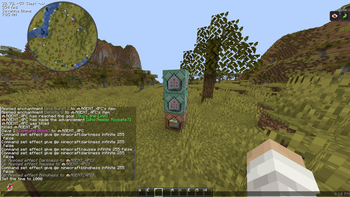
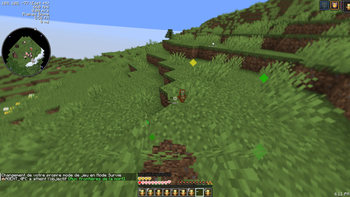
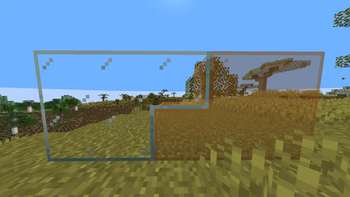
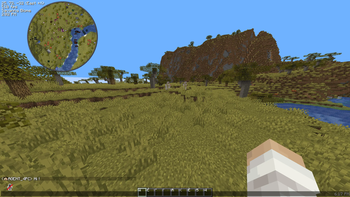
About this Modpack
How to use
If you want to convert a .mrpack ➡️ .zip you can go on this site.
And to active the modpack follow this video.
How to support
Click on the heart for support the pack
Upgrade my Modpack
Distant horizons
or
Voxy
to enhance your render distance !
The modpack is completly Client Side else the Voice Chat (Simple Voice Chat)
What is Eclipse Client ?
I tried to make a funny modpack playable like a popular client.
Features :
🖥️Screen
- 👁️Clear overlay like portal, pumkin, spyglass, nausea, darkness, blindness, freeze and vignette
- 🚫Remove fog and clear lava, water and snowpowder
- 🔥Customize fire and shield offset
- 💡Customize Gamma
- 🗿Small totem pop and extensive customizability of the pop animation.
⚔️PvP :
- 🛜Crystal, Anchor and Cart optimizer
- 📦Customize hitbox look
- 💥Hide explosion effecs
- 🐞Fix shield glitch
- 🛡️Shield statue
- 💖Show health
ℹ️HUD :
- 🌍Show Coordinate, Framerate, speed, Biome, Light Level, Hour (in game)
- 🫗Show Potion effect
- ⛑️Minimalist vanilla-like widget to display your armor items and their durability
- ⌨️Displays keybinds on hotbar slots
- 🛜Adds a configurable numerical ping display to the player list
- 🍎Food/hunger-related HUD improvements
✅Utilities :
- ⚙️Add setting profile
- 🖱️Add zoom, minimap (waypoint), mouse tweaks and mod menu
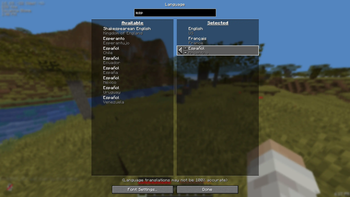
- 🉑Remove loading screen and adds fallbacks for languages
- 🎙️Add voice chat
- 🧠Client feature (friend, chat, cosmetic, host world for free)
- 🔴Rec your game to do cinematic
- 💬Chat imporved (more meesage, animation, hour, copy message)
- 🛜See the ping of other player
- 📦See in shulker box
- 🖥️Better command block UI and NBT suggestion
💖Aesthetic :
- 👋🏻Add animations for third person and other player
- 🧊Render the player skin layer in 3d
- 💬Add head when player send a message
- 👓Add shader, motion blur, connected and emessive texture
- 🍎Item physic
- 🔦Dynamic light
🧬Optimizations
- Sodium
- Lithium
- Immediatly fast
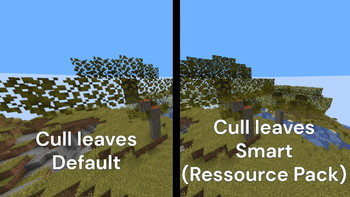
- 👀Entity, faces and leave culling
- 🛜Network optimisation
- 🐞Debug
Future :
Improve the modrinth page.
Add other version
Available Versions
How to Set Up a Eclipse Client Server
Order Server
Choose at least 4 GB RAM (6 GB recommended for Eclipse Client). Based on player count: per 8 players.
Install Modpack in Dashboard
Open the modpack browser in the dashboard, search for "Eclipse Client" and click "Install". The fabric loader and Minecraft 1.21.11 are configured automatically.
Start Server & Play
Start the server – all mods are loaded automatically. Share the server IP with friends and play together!
Frequently Asked Questions
Eclipse Client server crashes or won't start – what to do?
Most common causes: insufficient RAM or wrong fabric loader. Check latest.log for "OutOfMemoryError" → increase RAM to at least 6 GB. For "Mixin" or "ClassNotFoundException" errors: modpack version and loader don't match. With Mado Hosting, loader and Minecraft version are auto-configured on modpack install – preventing most startup issues.
How much RAM does a Eclipse Client server really need?
Minimum 4 GB, recommended 6 GB for stable performance. per 8 players. Important: Minecraft modpacks need more RAM than vanilla – plan extra per additional player. With Mado Hosting, you can scale RAM up live at any time without data loss (from €8/month).
Can I add custom mods to Eclipse Client without conflicts?
Yes, but check compatibility: only use mods for the same loader (fabric) and same Minecraft version (1.21.11). Common issues: ID conflicts with recipe mods and incompatible coremod versions. The Mado dashboard mod browser only shows compatible mods and warns about known conflicts.
Eclipse Client server lagging – performance tips
1) Increase RAM to 6 GB+. 2) Reduce server view-distance to 8 (server.properties). 3) Pre-generate chunks with the "Chunky" plugin. 4) Use /spark profiler to check which mods consume the most tick time. With Mado Hosting, all servers run on NVMe SSDs with dedicated CPU cores – eliminating hardware as a bottleneck.
Similar Modpacks

![Better MC [FABRIC] - BMC2](https://cdn.modrinth.com/data/shFhR8Vx/a19c2bcb51d38f32f138d3607e91cb2b7b8e387f_96.webp)
![Better MC [FORGE] - BMC4](https://cdn.modrinth.com/data/4BV47HRn/7f5ef7cc61b2593609aabef3ed07a866a4f11b73_96.webp)


Rent Eclipse Client Server
Start your own server with automatic modpack installation.
Supported Versions
Start your Eclipse Client Server now
From €8.00/month with 6 GB RAM for the best performance.
Configure Server →