
editon's Modpack
A Modpack that aim to find a balance between optimization mods (Optifine like) + QOL (Quality of Life) with a small Vanilla + (Action and Stuff) feeling.
Screenshots

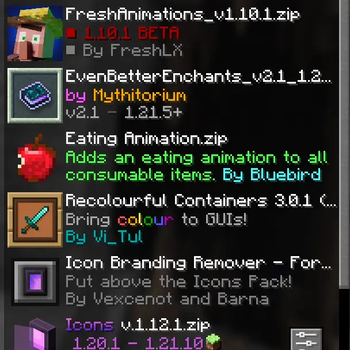
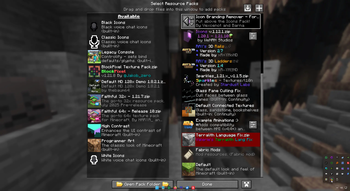
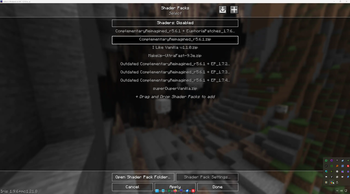

About this Modpack

This Modpack are built on Fabric and should work with Quilt too!
I keep that up to date and add over the time other mods.


The main motivation for creating this Optimization / Vanilla Plus / QOL Modpack is to
enhance the Minecraft experience for me, the community, and for sharing the joy of discovery with others while keeping it true to its roots.
If you want to contact me send a Mail to editon96(at)pm.me
Basic settings explanation
This Modpack is pre-configured for a setup for min. 5 GB of ram on a Mid-PC to get the 60 fps. I test it with my Potato Pc. It works with that too. Worked with:- Nvidea 710m and Intel Core 3230m
- RTX 2070 Super and Ryzen 7 3800x
I have an AMD Radeon RX 9070xt and a AMD Ryzen 9 5950x and test it with that.
I get my Launcher 16 GB of Ram.

Here is a List with Mods and other that are In use and need to be linked.
- Xaero's Minimap - https://modrinth.com/mod/xaeros-minimap
- Xaero's World Map -https://modrinth.com/mod/xaeros-world-map
- Terralith - https://modrinth.com/mod/terralith (1)
- Structory - https://www.curseforge.com/minecraft/mc-mods/structory (1)
- Structory Towers - https://www.curseforge.com/minecraft/mc-mods/structory-towers (1)
- Nullscape - https://modrinth.com/mod/nullscape (1)
- Incendium - https://modrinth.com/mod/incendium (1)
- Continents - https://modrinth.com/datapack/continents (1)
- Essential Mod - https://essential.gg/download (2)
- Fancy Menu - https://modrinth.com/mod/fancymenu
- Better Third Person - https://modrinth.com/mod/better-third-person
- Client Tweaks - https://modrinth.com/mod/client-tweaks
- Hold my Iteams - https://modrinth.com/mod/hold-my-items
- ImmersiveUI - https://modrinth.com/mod/immersive-ui
- Improved Crash Reports - https://modrinth.com/mod/improvedcrashreports
- Just Enought Book - https://modrinth.com/mod/justenoughbook
- Simpel Voice Chat - https://modrinth.com/plugin/simple-voice-chat
- Sounds - https://modrinth.com/mod/sound
- Fresh Animations - https://modrinth.com/resourcepack/fresh-animations
- Third Person (f5) - https://modrinth.com/mod/thirdperson
- Worldedit CUI - https://github.com/EngineHub/WorldEditCUI (used only in the 1.19.x versions)
- Zoomify - https://modrinth.com/mod/zoomify (not in use since 0.2.3)
- Simpel Menu - https://modrinth.com/mod/simple-menu (not in use since 1.0.0)
- FOG - https://modrinth.com/mod/fog (not in use since 1.0.4)
Recommendations
Spoiler
Mods:
- Charm + Strange from https://modrinth.com/user/svenhjol [V+,-M]
- Friends&Foes - https://modrinth.com/mod/friends-and-foes [V+,-M]
- Carry on - https://modrinth.com/mod/carry-on [V+,-M]
- Dungeons and Taverns - https://modrinth.com/mod/dungeons-and-taverns [V+,-M]
- Distant Horizons - https://modrinth.com/mod/distanthorizons [V+]
- Voxy - https://modrinth.com/mod/voxy [V+,-S]
- Iteam Landing Sound - https://modrinth.com/mod/item-landing-sound [V+]
- Reactive Music - https://modrinth.com/mod/reactive-music [V+]
- Custom Tab - https://modrinth.com/mod/custab [V+]
- Lexikon - https://modrinth.com/mod/lexikon [V+,F]
- Hide Item Frame - https://modrinth.com/mod/hide-item-frame [V+]
- Merchant Markers - https://modrinth.com/mod/merchant-markers [V+]
- Clear despawn reworked https://modrinth.com/mod/clear-despawn-reworked [V+]
- Supplementaries - https://modrinth.com/mod/supplementaries [V+]
- Flow - https://modrinth.com/mod/flow [V+]
- Spawm Animation - https://modrinth.com/datapack/spawn-animations [V+]
- geophilic - https://modrinth.com/datapack/geophilic [V+]
- Clear Despawn - https://modrinth.com/mod/clear-despawn-reworked [V+]
- Supplementaries - https://modrinth.com/mod/supplementaries [V+]
- Immersive Winds - https://modrinth.com/mod/immersive-winds [V+]
- Craftify - https://modrinth.com/mod/craftify [F]
- Spoticraft - https://modrinth.com/mod/spoticraft-2 [F]
- Nekomusic Client - https://modrinth.com/mod/nekomusic-client [F]
- FPS Drop when it hurts - https://modrinth.com/mod/fps-drop-when-you-hurt [F]
- Kineticfd - https://modrinth.com/mod/kineticfd [F,O]
- Hide Item Frame - https://modrinth.com/mod/hide-item-frame [O]
- Client Crafting - https://www.curseforge.com/minecraft/mc-mods/client-crafting [O]
- Connectivity - https://www.curseforge.com/minecraft/mc-mods/connectivity [O]
- Recipe Essentials - https://www.curseforge.com/minecraft/mc-mods/recipe-essentials-forge-fabric [O]
- NotsoEssential - https://modrinth.com/mod/notsoessential
- Clothesless - https://modrinth.com/mod/clothesless
Textures:
- Bare Bones - https://www.curseforge.com/minecraft/texture-packs/bb
- Faithful 64x - https://modrinth.com/resourcepack/faithful-64x
- Block Pixel - https://modrinth.com/resourcepack/blockpixel
- BD Craft - https://bdcraft.net/ (love the Vanilla Like BD Craft the moste)
- Villager Variety - https://modrinth.com/resourcepack/villager-variety
- with the Fresh Animations Addon
- Reimagined - https://modrinth.com/resourcepack/reimagined
- Reimagined FA Patch - https://modrinth.com/resourcepack/reimagined-fresh-animations-patch
- Sparkles - https://modrinth.com/resourcepack/sparkles/version/1.0.7
- xali's Enhanced Vanilla - https://modrinth.com/resourcepack/xalis-enhanced-vanilla
- xali's Enchanted Books - https://modrinth.com/resourcepack/xalis-enchanted-books
- xali's Potions - https://modrinth.com/resourcepack/xalis-potions
- sun and moon circular - https://modrinth.com/resourcepack/sun-and-moon-circular
- immersive interfaces - https://modrinth.com/resourcepack/shrimps-immersive-interfaces
- everything animated! - https://modrinth.com/resourcepack/everything-animated!
- flower pots + - https://modrinth.com/resourcepack/flower-pots
- fresh player animations - https://modrinth.com/resourcepack/fresh-player-animations
- Hide Iteam Frames - https://modrinth.com/mod/hide-item-frame
- Torches - https://modrinth.com/resourcepack/weskersons-torches
- Immersive Interfaces - https://modrinth.com/resourcepack/shrimps-immersive-interfaces
- Nautilus3D - https://modrinth.com/resourcepack/nautilus3d
Shaderpacks:
- Complementary Shaders - Reimagined - https://modrinth.com/shader/complementary-reimagined
- Super Duper Vanilla - https://modrinth.com/shader/super-duper-vanilla
- Pastel Shaders - https://www.curseforge.com/minecraft/shaders/pastel-shaders
- Vanilla Plus Shader - https://modrinth.com/shader/vanilla-plus-shader
Hall of FAME
- FreshLX - https://modrinth.com/user/FreshLX
- YUNGS STUFF - https://modrinth.com/organization/refresh-studios
Important words:
- Simple Voice Chat (should be also on the Server to work), if you don't need them deactivate it!
- If you want to use your Texture pack, add them over the default pack in the load order
- WATCH OUT IF YOU UPDATE to newer versions, it can happen that your WORLD BRICKS, so make backups!
- It exists problems with Friends and Foes on some multiplayer Servers, deactivate them if you're on 1.20.x and have problems with connection
Legend:
(1) Stardust Labs: https://www.stardustlabs.net/downloads
(2) BUT DON'T BUY Cosmetics, you can get it in other way by searching ;)
[V+] - Vanilla +;
[-M] - No playing on Multiplayer Server beside the Essentials hosted (you);
[O] - Optimization;
[-S] - Not all shaders are Working;
[F] - FUN
Available Versions
How to Set Up a editon's Modpack Server
Order Server
Choose at least 4 GB RAM (6 GB recommended for editon's Modpack). Based on player count: per 8 players.
Install Modpack in Dashboard
Open the modpack browser in the dashboard, search for "editon's Modpack" and click "Install". The fabric loader and Minecraft 1.21.11 are configured automatically.
Start Server & Play
Start the server – all mods are loaded automatically. Share the server IP with friends and play together!
Frequently Asked Questions
editon's Modpack server crashes or won't start – what to do?
Most common causes: insufficient RAM or wrong fabric loader. Check latest.log for "OutOfMemoryError" → increase RAM to at least 6 GB. For "Mixin" or "ClassNotFoundException" errors: modpack version and loader don't match. With Mado Hosting, loader and Minecraft version are auto-configured on modpack install – preventing most startup issues.
How much RAM does a editon's Modpack server really need?
Minimum 4 GB, recommended 6 GB for stable performance. per 8 players. Important: Minecraft modpacks need more RAM than vanilla – plan extra per additional player. With Mado Hosting, you can scale RAM up live at any time without data loss (from €8/month).
Can I add custom mods to editon's Modpack without conflicts?
Yes, but check compatibility: only use mods for the same loader (fabric) and same Minecraft version (1.21.11). Common issues: ID conflicts with recipe mods and incompatible coremod versions. The Mado dashboard mod browser only shows compatible mods and warns about known conflicts.
editon's Modpack server lagging – performance tips
1) Increase RAM to 6 GB+. 2) Reduce server view-distance to 8 (server.properties). 3) Pre-generate chunks with the "Chunky" plugin. 4) Use /spark profiler to check which mods consume the most tick time. With Mado Hosting, all servers run on NVMe SSDs with dedicated CPU cores – eliminating hardware as a bottleneck.
Similar Modpacks


![Cobblemon Official Modpack [Fabric]](https://cdn.modrinth.com/data/5FFgwNNP/e7f9ee2e9d361623847853fe2ddce42f519ee64f.png)
![COBBLEVERSE - Pokemon Adventure [Cobblemon]](https://cdn.modrinth.com/data/Jkb29YJU/581ecf54530972afb18a04660afd820f2f24f6c7.png)
![Better MC [FABRIC] - BMC2](https://cdn.modrinth.com/data/shFhR8Vx/a19c2bcb51d38f32f138d3607e91cb2b7b8e387f_96.webp)

Rent editon's Modpack Server
Start your own server with automatic modpack installation.
Details
- License
- Creative Commons Attribution Non Commercial 4.0 International
- Server-side
- Optional
- Client-side
- Required
Supported Versions
Start your editon's Modpack Server now
From €8.00/month with 6 GB RAM for the best performance.
Configure Server →