
EE33's Clientside Modpack
Personal modpack made for playing on an SMP server. Contains performance, enhancements and aesthetic improvements!
Screenshots
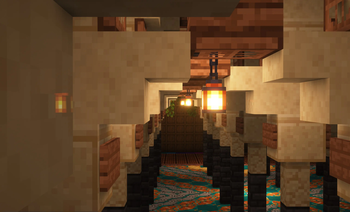

About this Modpack
Awesome features!
- Minimap for adventure
- Advanced written book and sign editor
- Show ping in milliseconds, not bars
- Super cool sounds
- Shaders and dynamic lighting
- Far distance rendering for servers
- Better quality screenshots
- Dark loading screen
- Survival spectator mode
- Not report chat to Microsoft
- Make and use schematics with Litematica
- 3d skins
- More particles, like fireflies and waves
- Customizied GUIs
- Rotate builds in creative
- Speech bubbles for chat
- Join different server versions
Contents
This modpack attempts to combine multiple popular existing performance enhancing modpacks with some personal favorites.
See particular version for modlist. Modpack changes slightly with each update, with new interesting mods being added and dysfunctional ones being removed.
May crash, sometimes.
After trying and failing to add more mods, I upload a version that works! It's usually pretty stable when playing. Crashes happen when mods conflict or too many resources are being used.
Why does this pack exist?
I created this to make it easier to install all the mods I like playing with. Maybe you'll find some mods here that you'd like!
I wanted to use Quilt, but QSL did not update as frequently. Some versions do not use Quilt. I also needed support for the version that vanilla servers usually are on.
For those who are already using a working modpack, this is intended to be used as a reference modlist.
This modpack is created for adventure, building, asethetics. Also for trackpad.
Warnings, read carefully:
On certain strict servers these mods CAN be considered hacks or cheats because they extend vanilla movement, controls, crafting and rendering.
However, on most SMP servers this modpack would be completely fine because
- It does not provide PVP enhancements, faster movement.
- It does not have automate gameplay or duplicate items.
- X-ray is NOT included in the modpack.
Certain mods are edge cases and require your review:
Autoswitch gives a unfair advantage in games where you swap tools. It is intended to be used as a utility when mining only (and save low durability tools).
Stendhal allows copy pasting books and signs.
Minimap can be set to show caves (not ores).
Tweakaroo can be used for fullbright and unlimited freecam, but it is not enabled by default.
Available Versions
How to Set Up a EE33's Clientside Modpack Server
Order Server
Choose at least 4 GB RAM (6 GB recommended for EE33's Clientside Modpack). Based on player count: per 8 players.
Install Modpack in Dashboard
Open the modpack browser in the dashboard, search for "EE33's Clientside Modpack" and click "Install". The quilt loader and Minecraft 1.21.4 are configured automatically.
Start Server & Play
Start the server – all mods are loaded automatically. Share the server IP with friends and play together!
Frequently Asked Questions
EE33's Clientside Modpack server crashes or won't start – what to do?
Most common causes: insufficient RAM or wrong quilt loader. Check latest.log for "OutOfMemoryError" → increase RAM to at least 6 GB. For "Mixin" or "ClassNotFoundException" errors: modpack version and loader don't match. With Mado Hosting, loader and Minecraft version are auto-configured on modpack install – preventing most startup issues.
How much RAM does a EE33's Clientside Modpack server really need?
Minimum 4 GB, recommended 6 GB for stable performance. per 8 players. Important: Minecraft modpacks need more RAM than vanilla – plan extra per additional player. With Mado Hosting, you can scale RAM up live at any time without data loss (from €8/month).
Can I add custom mods to EE33's Clientside Modpack without conflicts?
Yes, but check compatibility: only use mods for the same loader (quilt) and same Minecraft version (1.21.4). Common issues: ID conflicts with recipe mods and incompatible coremod versions. The Mado dashboard mod browser only shows compatible mods and warns about known conflicts.
EE33's Clientside Modpack server lagging – performance tips
1) Increase RAM to 6 GB+. 2) Reduce server view-distance to 8 (server.properties). 3) Pre-generate chunks with the "Chunky" plugin. 4) Use /spark profiler to check which mods consume the most tick time. With Mado Hosting, all servers run on NVMe SSDs with dedicated CPU cores – eliminating hardware as a bottleneck.
Similar Modpacks
![Better MC [FABRIC] - BMC2](https://cdn.modrinth.com/data/shFhR8Vx/a19c2bcb51d38f32f138d3607e91cb2b7b8e387f_96.webp)
![Better MC [FORGE] - BMC4](https://cdn.modrinth.com/data/4BV47HRn/7f5ef7cc61b2593609aabef3ed07a866a4f11b73_96.webp)


![Better MC [FABRIC] - BMC3](https://cdn.modrinth.com/data/NHUidpfR/327e0749bb6d160c41799fd77bf6d3d631569dc8_96.webp)

Rent EE33's Clientside Modpack Server
Start your own server with automatic modpack installation.
Supported Versions
Start your EE33's Clientside Modpack Server now
From €8.00/month with 6 GB RAM for the best performance.
Configure Server →