
EnchantedRealistic
Hello adventurers! Are you ready to meet EnchantedRealistic Mod Pack (ERMP)? This new mod pack completely changes your Minecraft experience by offering you realistic gameplay and new places to explore. Let's discover together during the Test phase of ERMP
Screenshots
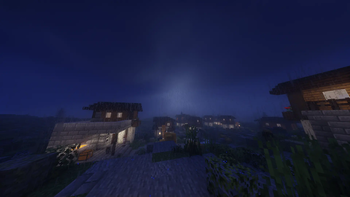
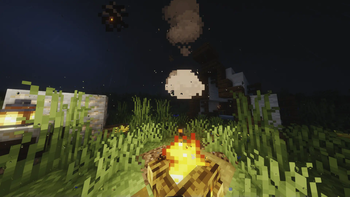
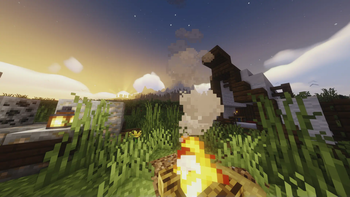
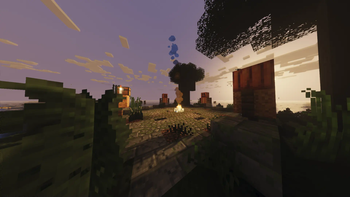

About this Modpack
Embark on an adventure like no other with the EnchantedRealistic Mod Pack (ERMP) for Minecraft. ERMP brings together magic and realism, offering an immersive gameplay experience that will leave you spellbound.
Explore lush forests, ancient ruins, and mystical landscapes teeming with life. With dynamic weather systems and vibrant environments, every moment in ERMP is filled with wonder and excitement.
Craft powerful artifacts, master new spells, and uncover hidden treasures as you journey through the world of ERMP. Whether you're a seasoned explorer or new to modded Minecraft, ERMP offers something for everyone.
Are you ready to unleash the magic? Download ERMP today and embark on an unforgettable adventure!
Greetings, adventurers!, we embark on a journey to explore the performance aspects of the EnchantedRealistic Mod Pack (ERMP), a promising addition to the Minecraft experience. While ERMP introduces exciting features and enhancements, it's essential to evaluate its performance to ensure a smooth and enjoyable gameplay experience. Let's delve into the details of our performance test and address potential concerns:
Additionally, it's important to note the dynamic nature of mod packs like ERMP. While certain mods included in the pack may be subject to removal by the developer in future updates due to various reasons such as compatibility issues, performance concerns, or gameplay adjustments, new mods may also be added to enrich the gameplay experience further.
Remember that shader packs can impact game performance. A more powerful computer may be necessary for higher-quality graphics. Therefore, monitor your performance while using a shader pack and make adjustments as needed.
In conclusion, playing Minecraft with a shader pack can make your game more immersive and visually stunning. I highly recommend trying out shader packs to embark on adventures in a more realistic world!
Available Versions
How to Set Up a EnchantedRealistic Server
Order Server
Choose at least 6 GB RAM (8 GB recommended for EnchantedRealistic). Based on player count: per 5 players.
Install Modpack in Dashboard
Open the modpack browser in the dashboard, search for "EnchantedRealistic" and click "Install". The fabric loader and Minecraft 1.20.1 are configured automatically.
Start Server & Play
Start the server – all mods are loaded automatically. Share the server IP with friends and play together!
Frequently Asked Questions
EnchantedRealistic server crashes or won't start – what to do?
Most common causes: insufficient RAM or wrong fabric loader. Check latest.log for "OutOfMemoryError" → increase RAM to at least 8 GB. For "Mixin" or "ClassNotFoundException" errors: modpack version and loader don't match. With Mado Hosting, loader and Minecraft version are auto-configured on modpack install – preventing most startup issues.
How much RAM does a EnchantedRealistic server really need?
Minimum 6 GB, recommended 8 GB for stable performance. per 5 players. Important: Minecraft modpacks need more RAM than vanilla – plan extra per additional player. With Mado Hosting, you can scale RAM up live at any time without data loss (from €12/month).
Can I add custom mods to EnchantedRealistic without conflicts?
Yes, but check compatibility: only use mods for the same loader (fabric) and same Minecraft version (1.20.1). Common issues: ID conflicts with recipe mods and incompatible coremod versions. The Mado dashboard mod browser only shows compatible mods and warns about known conflicts.
EnchantedRealistic server lagging – performance tips
1) Increase RAM to 8 GB+. 2) Reduce server view-distance to 8 (server.properties). 3) Pre-generate chunks with the "Chunky" plugin. 4) Use /spark profiler to check which mods consume the most tick time. With Mado Hosting, all servers run on NVMe SSDs with dedicated CPU cores – eliminating hardware as a bottleneck.
Similar Modpacks
![Cobblemon Official Modpack [Fabric]](https://cdn.modrinth.com/data/5FFgwNNP/e7f9ee2e9d361623847853fe2ddce42f519ee64f.png)
![COBBLEVERSE - Pokemon Adventure [Cobblemon]](https://cdn.modrinth.com/data/Jkb29YJU/581ecf54530972afb18a04660afd820f2f24f6c7.png)
![Better MC [FABRIC] - BMC2](https://cdn.modrinth.com/data/shFhR8Vx/a19c2bcb51d38f32f138d3607e91cb2b7b8e387f_96.webp)


![Better MC [FORGE] - BMC4](https://cdn.modrinth.com/data/4BV47HRn/7f5ef7cc61b2593609aabef3ed07a866a4f11b73_96.webp)
Rent EnchantedRealistic Server
Start your own server with automatic modpack installation.
Details
- License
- GNU General Public License v3.0 or later
- Server-side
- Required
- Client-side
- Required
Supported Versions
Start your EnchantedRealistic Server now
From €12.00/month with 8 GB RAM for the best performance.
Configure Server →