
Eterna
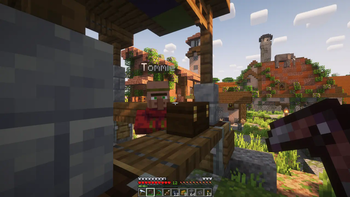
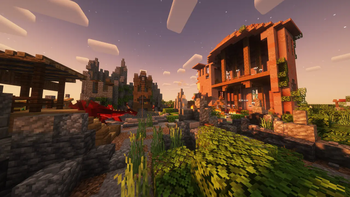
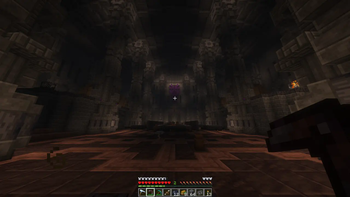
Something new for the old veterans. Fun mods based around adventure, exploration, and immersion, with old favorites and just a few quality of life mods.
Screenshots
About this Modpack
Eterna
is a little project of mine for my friends. It's all about bringing the spark back into playing minecraft with your buddies like the good 'ol days. I've found that this spark comes from cool mods, higher difficulty, more endgame content, and a lot of required exploration to progress, slowing down the classic gameplay loop.
Mods
- Additonal Structures by XxRexRaptorxX (RexRaptor)
- Advanced Netherite by Autovw
- The Aether by AlphaMode, bconlon, Burning Cactus, Drullkus, Hugo Payn, Jaryt, Oscar Payn, quek, Raptor, reetam, RENREN, sunsette
- AI-Improvements by BuiltBrokenModding
- Alex's Mobs by Alexthe668, Carro1001, Paint_Ninja
- AmbientSounds by CreativeMD
- Amendments by MehVahdJukaar
- Amplified Nether by Stardust Labs
- Apotheosis by Shadows_of_Fire
- AppleSkin by squeek
- APTweaks (Bundle) by Markus Bordihn
- Architectury by shedaniel
- Artifacts by ochotonida
- AttributeFix by Darkhax
- AzureLib by AzureDoom, Gecko, Eliot, Chappie, DerToaster, Tslat, Bvanseg
- Bad Packets by deirn
- Balm by BlayTheNinth
- BCLib by Quiqueck, paulevs, Bulldog83
- Better Combatby Daedelus
- Better End by Quiqueck (code), paulevs (code & art), Bulldog83 (code & art), Edos (building), Yuki (art), Seaward (art), Firel (music)
- Better Nether by quiqueck, paulevs (original author)
- Better Ping Display by Quintinity
- Better Totem of Undying by CerbonXD
- Blood Magic by WayofTime
- Blueprint by Team Abnormals
- Blur (Forge) by dima_dencep, tterrag1098, Motschen, Pyrofab, backryun, byquanton
- Bobby Reforged
- Book of Experience by PuckiSilver
- Bookshelf by Darkhax
- Bosses of Mass Destruction by CerbonXD
- Canary by AbdElAziz
- Carry On by Tschipp, Purplicious_Cow, cy4n
- Cat Loaf by Khajiitos
- Cat Jamby shmove
- Cataclysm by L_Ender
- Cerbons API by CerbonXD
- Charm of Undying by Illusive Soulworks
- Chefs Delight by Redstone Games
- Cinderscapes by Vaerian, NeusFear, LudoCrypt, TerraformersMC
- Citadel by Alexthe666
- ClearDespawn by StrikerRocker
- Cloth Config API by shedaniel
- Clumps by Jaredlll08
- [Corpse]https://modrinth.com/mod/corpse by henkelmax
- Collective by Rick South
- Comforts by Illusive Soulworks
- Connector Extras by Su5eD
- Sinytra Connector by Su5eD
- CraftTweaker by Jaredlll08, Kindlich, StanHebben and TheSilkMiner
- Crate Delight by Axperty
- Create by simibubi
- Create Crafts & Additions by MRH0
- Create: Steam 'n' Rails by The Railways Team
- Create Structures by FusionSwarly
- CreativeCore by CreativeMD
- Creeper Overhaul by Artist/Creator - Joosh, Dev - ThatGravyBoat
- Cristel Lib by Cristelknight999
- CTOV - Create: Structures by ChoiceTheorem
- CTOV - Farmer Delight Compat by ChoiceTheorem
- Curios API by C4
- Curse by Jusey1
- Deeper and Darker by Kyanite Team
- Dynamic FPS by juliand665 & LostLuma
- Dynamic Music by LudoCrypt, celeri
- Easy Anvils by Fuzs
- Easy Magic by Fuzs
- Eccentric Tome by EccentricVamp
- Embeddium by embeddedt
- Embeddium Extra by dima_dencep, FlashyReese
- EMI by Emi
- EMI Loot by fzzyhmstrs, lxly9 (art)
- EMI Trades by Prismwork, Flamarine
- EMIffect by Prismwork, Flamarine
- EnchantmentDescriptions by Darkhax
- End Remastered by Team Remastered
- End's Delight by FoggyHillside
- Enderman Tweaks by Natte
- Entity Model Features by Traben
- Entity Texture Features by Traben
- EntityCulling by tr7zw
- Fabric Seasons by D4rkness_King
- Falling Leaves by Cheaterpaul, Fourmisain, BrekiTomasson and RandomMcSomethin
- FancyMenu by Keksuccino
- Farmer's Delight by vectorwing
- Fast Paintings by MehVahdJukaar
- Fast Suite by Shadows_of_Fire
- Fast Workbench by Shadows_of_Fire
- FastFurnace by Shadows_of_Fire
- Fastload-Reforged by AbdElAziz
- Ferrite Core by malte0811
- Forgified Fabric API by FabricMC, Sinytra
- Framework by MrCrayfish
- GeckoLib 4 by Gecko, Eliot, AzureDoom, DerToaster, Tslat, Witixin
- Goblin Traders by MrCrayfish
- The Graveyard by Lion
- Harvest with ease by Crystal Spider
- Heartstone by MehVahdJukaar, Plantkillable
- HorseBuff by CodeF53#0241
- Ice and Fire by Alexthe666, TheBv
- Ice and Fire Delight by Donne431
- Iceberg by Grend
- ImmediatelyFast by RK_01
- Immersive Paintings by Luke100000
- Immersive Weathering by Ordana, MehVahdJukaar, Keybounce
- Integrated API by CraisinLord
- Integrated Dungeons and Structures by CraisinLord
- Integrated Stronghold by CraisinLord
- Integrated Villages by CraisinLord
- Inventory Profiles Next by blackd/mirinimi
- ItemPhysic by CreativeMD
- Just Enough Advancements by MelanX, noeppi_noeppi
- Just Enough Archaeology by LobsterJonn
- Just Enough Beacons by CerbonXD
- Just Enough Breeding by Christofmeg
- Just Enough Items by mezz
- Just Enough Professions (JEP) by Mrbysco, ShyNieke
- KleeSlabs by BlayTheNinth
- Konkrete by Keksuccino
- Kotlin for Forge by thedarkcolour
- Legendary Tooltips by Grend
- Let Me Despawn by frikinjay
- Let Sleeping Dogs Lie by iChun
- libIPN by blackd/mirinimi
- LibX by ModdingX
- Light Overlay by shedaniel
- Lithostitched by Apollo, SmellyModder
- Lootr by Noobanidus
- The Lost Castle by Team Remastered
- Macaw's Doors by Sketch Macaw & Sketch Peachy
- Macaw's Fences and Walls by Sketch Macaw & Peachy Macaw
- Macaw's Furniture by Sketch Macaw
- Macaw's Lights and Lamps by Sketch Macaw & Peachy Macaw
- Macaw's Paintings by Art made by Peachy, coded by Sketch Macaw
- Macaw's Paths and Pavings by Sketch Macaw & Peachy Macaw
- Macaw's Trapdoors by Sketch Macaw & Peachy Macaw
- Make Bubbles Pop by Tschipcraft
- Map Atlases by MehVahdJukaar, Pepperoni__Jabroni__
- Memory Leak Fix by FX - PR0CESS
- Micle's Login Protection by Micle
- MidnightLib by TeamMidnightDust, Motschen
- Mob Captains by PuckiSilver
- Mob Catalog by dayofpi
- Mob Lassos by Fuzs
- Mod Menu by Prospector, haykam821, TerraformersMC
- Model Gap Fix by MehVahdJukaar
- ModernFix by embeddedt
- Modonomicon by Kli Kli
- Moog's End Structures by FinnDog
- Moog's Voyager Structures by FinnDog
- Moonlight Library by MehVahdJukaar
- More Delight by Axperty
- More Geodes Reforged by TheDeathlyCow
- More Mob Variants by nyuppo
- MoreDiscs by Mars
- Mouse Tweaks by Ivan Molodetskikh (YaLTeR)
- Mutant Monsters by shcott21, Chumbanotz, Fuzs, tdstress
- My Nether's Delight by SoyTutta
- MyServerIsCompatible by focamacho
- Mystic Potions by Creep3rCrafter
- Naturalist by Starfish Studios
- Nature's Compass by ChaosTheDude
- Necronomicon by ElocinDev
- NetherPortalFix by BlayTheNinth
- No Chat Reports by Aizistral
- Nox: Renoxed by SciRave, qxeii
- Nyf's Spiders by Nyfaria
- Occultism by Kli Kli
- Oculus by NanoLive, dima_dencep, coderbot, IMS212, Justsnoopy30, FoundationGames
- Onion Onion by DavigJ
- Overflowing Bars by Fuzs
- Patchouli by Vazkii
- Pehkui by Virtuoel
- Placebo by Shadows_of_Fire
- Player Animator by KosmX
- Polymorph by Illusive Soulworks
- Prism by Grend
- Puzzles Lib by Fuzs
- Radiant Gear by Illusive Soulworks
- Rebalanced Loot by Apollo
- Repurposed Structures by TelepathicGrunt
- Resourceful Lib by ThatGravyBoat, Epic_Oreo
- Resourcefulconfig by ThatGravyBoat
- Respawning Animals by Fuzs
- Rubidium Dynamic Lights by TeamDeusVult
- Saturn by AbdElAziz
- SimpleHats by Fonnymunkey, ArtsyDy
- Simple Tombstone by Lothrazar, Corail31
- Sleep Tight by MehVahdJukaar, Plantkillable
- SmartBrainLib by Tslat
- Smooth Boot (Reloaded) by AbdElAziz
- Sound Physics Remastered by Sonic Ether, vlad2305m, Max Henkel
- Spark by Luck
- Spelunker by Leximon, RasmusTV
- Spice of Life: Apple Pie Edition by Vice
- Starter Kit by Rick South
- Storage Drawers by Texelsaur
- Supplementaries by MehVahdJukaar, Plantkillable
- Tectonic by Apollo
- Terralith by Stardust Labs
- Terrestria by coderbot16, NeusFear, TerraformersMC
- TexTrue's Embeddium Options by TexTrue, TexTrueStudio
- Tiny Item Animations by Trivaxy
- Tome of Blood: Rebirth by mystchonky
- Too Fast by Noobanidus
- Too Many Glyphs by DerringersMods
- Towers of the Wild: Additions by Aurelj
- Towns and Towers by Kubek, Biban_Auriu, Cristelknight
- Traveler's Backpack by Tiviacz1337
- Ultris: Boss Expansion by LimeSplatus
- Vanilla Refresh by limesplatus
- Villager Names by Rick South
- Villages&Pillages by Faboslav
- Visual Workbench by Fuzs
- When Dungeons Arise by Aurelj, DiamondTown and Zephyrusj
- XP From Harvest Reworked by RealGecko, Stoutscientist, UplinkPhobia
- YetAnotherConfigLib by isXander
- YUNG's API by YUNGNICKYOUNG
- YUNG's Better Desert Temples by YUNGNICKYOUNG, Tera
- YUNG's Better Dungeons by YUNGNICKYOUNG, Acarii
- YUNG's Better Jungle Temples by YUNGNICKYOUNG, Tera
- YUNG's Better Mineshafts by YUNGNICKYOUNG
- YUNG's Better Nether Fortresses by YUNGNICKYOUNG, Acarii
- YUNG's Better Ocean Monuments by YUNGNICKYOUNG, Tera
- YUNG's Better Strongholds by YUNGNICKYOUNG, Acarii
- YUNG's Better Witch Huts by YUNGNICKYOUNG, Acarii
- YUNG's Bridges by YUNGNICKYOUNG
- YUNG's Extras by YUNGNICKYOUNG, Acarii
- YUNG's Menu Tweaks by YUNGNICKYOUNG
Available Versions
How to Set Up a Eterna Server
Order Server
Choose at least 6 GB RAM (8 GB recommended for Eterna). Based on player count: per 5 players.
Install Modpack in Dashboard
Open the modpack browser in the dashboard, search for "Eterna" and click "Install". The forge loader and Minecraft 1.20.1 are configured automatically.
Start Server & Play
Start the server – all mods are loaded automatically. Share the server IP with friends and play together!
Frequently Asked Questions
Eterna server crashes or won't start – what to do?
Most common causes: insufficient RAM or wrong forge loader. Check latest.log for "OutOfMemoryError" → increase RAM to at least 8 GB. For "Mixin" or "ClassNotFoundException" errors: modpack version and loader don't match. With Mado Hosting, loader and Minecraft version are auto-configured on modpack install – preventing most startup issues.
How much RAM does a Eterna server really need?
Minimum 6 GB, recommended 8 GB for stable performance. per 5 players. Important: Minecraft modpacks need more RAM than vanilla – plan extra per additional player. With Mado Hosting, you can scale RAM up live at any time without data loss (from €12/month).
Can I add custom mods to Eterna without conflicts?
Yes, but check compatibility: only use mods for the same loader (forge) and same Minecraft version (1.20.1). Common issues: ID conflicts with recipe mods and incompatible coremod versions. The Mado dashboard mod browser only shows compatible mods and warns about known conflicts.
Eterna server lagging – performance tips
1) Increase RAM to 8 GB+. 2) Reduce server view-distance to 8 (server.properties). 3) Pre-generate chunks with the "Chunky" plugin. 4) Use /spark profiler to check which mods consume the most tick time. With Mado Hosting, all servers run on NVMe SSDs with dedicated CPU cores – eliminating hardware as a bottleneck.
Similar Modpacks
![Cobblemon Official Modpack [Fabric]](https://cdn.modrinth.com/data/5FFgwNNP/e7f9ee2e9d361623847853fe2ddce42f519ee64f.png)
![COBBLEVERSE - Pokemon Adventure [Cobblemon]](https://cdn.modrinth.com/data/Jkb29YJU/581ecf54530972afb18a04660afd820f2f24f6c7.png)
![Better MC [FABRIC] - BMC2](https://cdn.modrinth.com/data/shFhR8Vx/a19c2bcb51d38f32f138d3607e91cb2b7b8e387f_96.webp)


![Better MC [FORGE] - BMC4](https://cdn.modrinth.com/data/4BV47HRn/7f5ef7cc61b2593609aabef3ed07a866a4f11b73_96.webp)
Rent Eterna Server
Start your own server with automatic modpack installation.
Supported Versions
Start your Eterna Server now
From €12.00/month with 8 GB RAM for the best performance.
Configure Server →