
ExceptionallyOptimized
[1.21.5] [Fabric📜] An open-source modpack that optimizes the overall UX and the performance, while staying true to the vanilla Minecraft experience.
Screenshots


About this Modpack
ExceptionallyOptimized



For Fabric📜 and NeoForge🦊
An open-source modpack that optimizes the overall UX and performance, while staying true to the vanilla Minecraft experience.
While most performance-focused modpacks aim at just higher FPS, this modpack focuses on optimizing the user experience and stability, as well, and yet still manages to outperform many in benchmarks.
The modpack does not provide any QoL or OptiFine-parity mods, but some deliberately selected mods to boost your gaming experience! Besides these optimization mods, the modpack also provides some essentials, like No Chat Reports, and other modpack-centric mods.
You are expected to add any non-optimization mods you want, yourself. If you face any issues, you are free to ask for help on our Discord server.
If you find a bug or want to suggest any feature, you can issue a 🐞Bug Report | 💡Suggestion. Alternatively, you can ask for help or give a suggestion on our Discord server.
📈Further Ways to Increase the Performance
- Recommended JVM arguments.
-XX:+UseZGC -XX:+ZGenerational - Mods that do not go hand-in-hand with the modpack's approach:
- Exordium, Let Me Despawn, Leaves Be Gone, Alternate Current, ServerCore, Fast Item Frames
- and more...
- Lowering down various vanilla options. You don't need the highest settings if you can't play the game.
- Disabling particles and other things using Sodium Extra.
🖥️Benchmarks
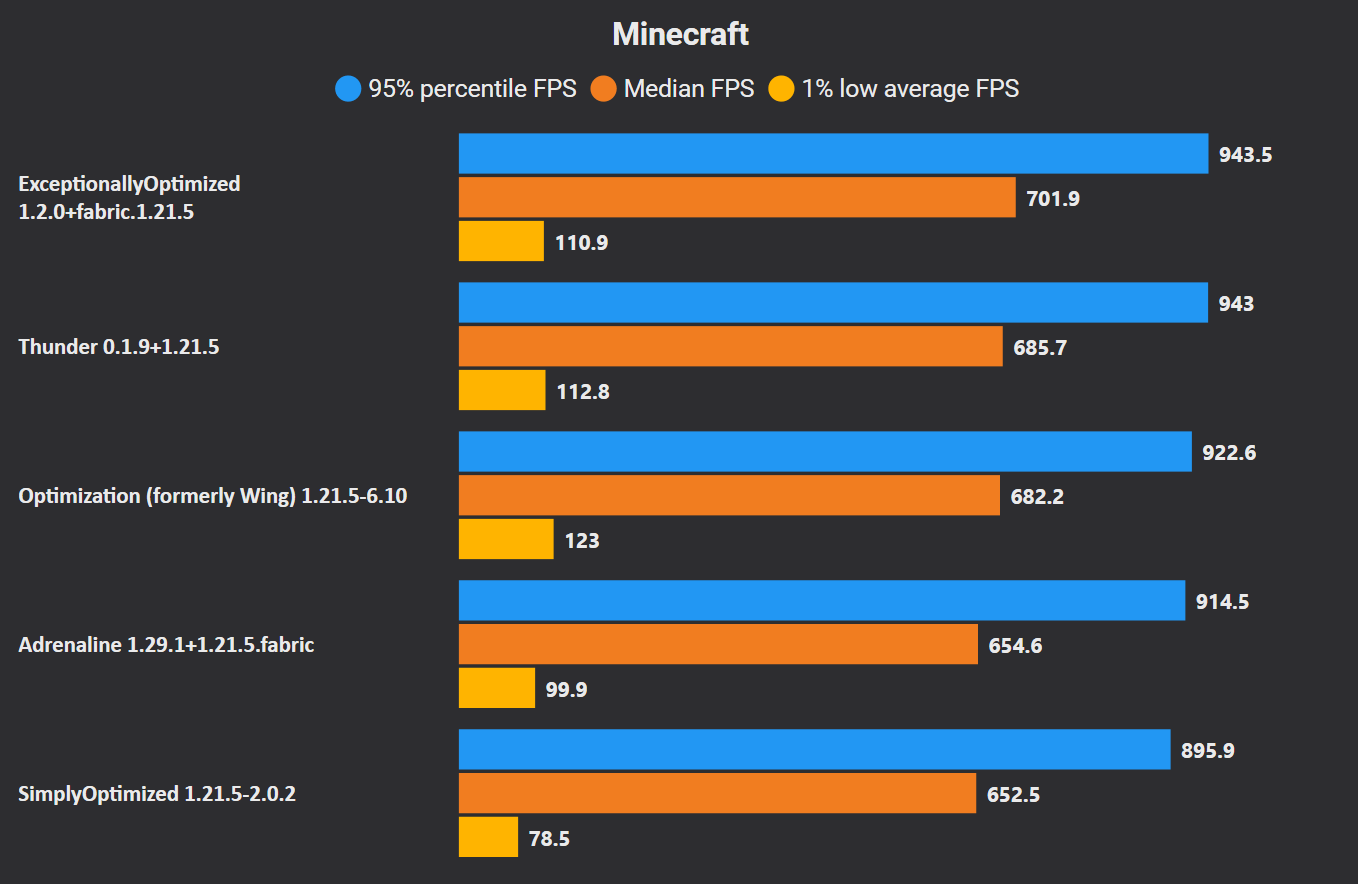
Here is a benchmark with some of the most popular modpacks.
- The following things were taken into account with the benchmark:
- VSync is turned
OFFand the Max FPS is set toUnlimited. - Nvidium is disabled for a fair benchmark for those modpacks that do not include it.
- No other changes were made, so do not take this benchmark AS seriously.
- The same world file is copied to all the packs.
- VSync is turned
Although, ExceptionallyOptimized does manage to outperform these modpacks, you should not just look at the numbers. Here is a summary of the results:
- ExceptionallyOptimized, Thunder and Optimization (silly name ;p) are well-within the error margin and perform almost exactly the same in this scenario. These modpacks might perform differently in different scenarios.
- It should also be noted that ExceptionallyOptimized is not limited to only optimization mods.
- Thunder mostly uses the default vanilla/mod configurations, and thus, also has a slight disadvantage.
- Adrenaline also has a disadvantage as it does not include any unofficial/unpublished mod files.
- SimplyOptimized is clearly the worst one of all. It uses very experimental options and has most vanilla options set to their lower values and still performs the worst. It is not recommended to use this modpack anymore.
❔FAQs
- Why is Fast Better Grass included?
There is a slight performance gain noticed with this resource-pack, while also making the grass look good.
📈Automated Publishing
All releases are published using Kir-Antipov's GitHub Action. The workflow files can be found here.
📜License
You are free to use this modpack as a base for your own modpack and publish it to a mod-hosting platform, provided you comply with all terms of the license.
Here is a summary of the license and important points you need to consider:
Apache License 2.0
Available Versions
How to Set Up a ExceptionallyOptimized Server
Order Server
Choose at least 4 GB RAM (6 GB recommended for ExceptionallyOptimized). Based on player count: per 5 players.
Install Modpack in Dashboard
Open the modpack browser in the dashboard, search for "ExceptionallyOptimized" and click "Install". The fabric loader and Minecraft 1.21.5 are configured automatically.
Start Server & Play
Start the server – all mods are loaded automatically. Share the server IP with friends and play together!
Frequently Asked Questions
ExceptionallyOptimized server crashes or won't start – what to do?
Most common causes: insufficient RAM or wrong fabric loader. Check latest.log for "OutOfMemoryError" → increase RAM to at least 6 GB. For "Mixin" or "ClassNotFoundException" errors: modpack version and loader don't match. With Mado Hosting, loader and Minecraft version are auto-configured on modpack install – preventing most startup issues.
How much RAM does a ExceptionallyOptimized server really need?
Minimum 4 GB, recommended 6 GB for stable performance. per 5 players. Important: Minecraft modpacks need more RAM than vanilla – plan extra per additional player. With Mado Hosting, you can scale RAM up live at any time without data loss (from €8/month).
Can I add custom mods to ExceptionallyOptimized without conflicts?
Yes, but check compatibility: only use mods for the same loader (fabric) and same Minecraft version (1.21.5). Common issues: ID conflicts with recipe mods and incompatible coremod versions. The Mado dashboard mod browser only shows compatible mods and warns about known conflicts.
ExceptionallyOptimized server lagging – performance tips
1) Increase RAM to 6 GB+. 2) Reduce server view-distance to 8 (server.properties). 3) Pre-generate chunks with the "Chunky" plugin. 4) Use /spark profiler to check which mods consume the most tick time. With Mado Hosting, all servers run on NVMe SSDs with dedicated CPU cores – eliminating hardware as a bottleneck.
Similar Modpacks

![Cobblemon Official Modpack [Fabric]](https://cdn.modrinth.com/data/5FFgwNNP/e7f9ee2e9d361623847853fe2ddce42f519ee64f.png)
![COBBLEVERSE - Pokemon Adventure [Cobblemon]](https://cdn.modrinth.com/data/Jkb29YJU/581ecf54530972afb18a04660afd820f2f24f6c7.png)
![Better MC [FABRIC] - BMC2](https://cdn.modrinth.com/data/shFhR8Vx/a19c2bcb51d38f32f138d3607e91cb2b7b8e387f_96.webp)


Rent ExceptionallyOptimized Server
Start your own server with automatic modpack installation.
Supported Versions
Start your ExceptionallyOptimized Server now
From €8.00/month with 6 GB RAM for the best performance.
Configure Server →