
Expanded Horizons
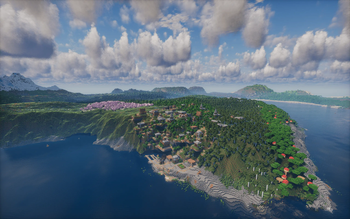
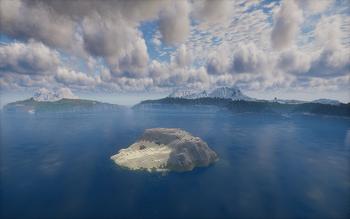
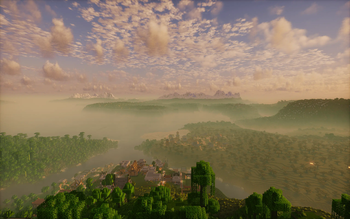
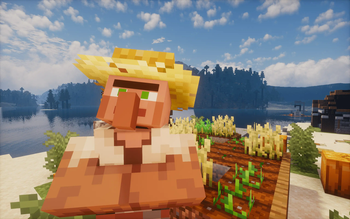
Expanded Horizons enhances Minecraft with stunning visuals, improved world generation, new villages, optimized performance, furniture, transport, and immersive mechanics-offering a richer experience while keeping the vanilla charm!
Screenshots


About this Modpack
🌍 Expanded Horizons 🚀
🛠 Minecraft Version: 1.21.11
🔧 Mod Loader: Fabric
✨ Overview
🔥 Expanded Horizons takes your Minecraft adventure to the next level, bringing stunning visuals, richer world generation, and exciting new mechanics — all while keeping that beloved vanilla charm! 🌿🏡
Explore breathtaking landscapes, discover hidden villages, and enjoy smoother, more immersive gameplay!
🏗 Features
- 🎨 Enhanced Graphics & Visual Effects
- 🌅 Gorgeous lighting, detailed textures, and immersive visuals.
- 🌪️ Dynamic particle effects that make the world feel alive!
- 🏠 New Structures & Villages
- 🏰 Unique, handcrafted villages & mysterious ruins to explore.
- 🏗️ Custom structures scattered across the world, waiting for discovery!
- 🌍 Overhauled World Generation
- 🏞️ More diverse biomes and breathtaking landscapes!
- ⚡ Optimized terrain generation for smoother exploration.
- 🚀 Performance Boost & Optimizations
- 🎯 FPS enhancements and lag reduction for a seamless experience.
- 🔧 Fine-tuned mod integration for top-notch performance.
- 🛋️ Extra Content & Mechanics
- 🪑 Tons of new furniture to decorate your world!
- 🏎️ Innovative transport options to travel in style.
- 🎶 Realistic sound physics for an immersive audio experience.
⚙️ Technical Information
To ensure smooth gameplay and prevent lag spikes caused by world generation, it is strongly recommended to pre-generate chunks around your player using the Chunky mod.
📌 How to pre-generate chunks
- Set the generation radius (in chunks):
/chunky radius {number_of_chunks}c
Example (for 256 chunks):/chunky radius 256c - Start chunk generation:
/chunky start
⚠️ Important:
- Do not explore new territory while Chunky is running.
- Chunk generation may take time depending on the selected radius and system performance.
- To use this modpack on the server, delete the hold my items (HMI) mod, otherwise the server will not start.
🌟 Why Expanded Horizons?
Whether you're a builder crafting the ultimate base 🏗️, an explorer uncovering hidden treasures 🏝️, or just looking for a beautifully optimized Minecraft world, Expanded Horizons delivers a next-level experience without straying too far from vanilla! 🚀✨
🌍 Новые горизонты 🚀 (RU)
🛠 Версия Minecraft: 1.21.11
🔧 Загрузчик модов: Fabric
✨ Обзор
🔥 Expanded Horizons — это модпак, который выводит Minecraft на новый уровень, добавляя потрясающую графику, улучшенную генерацию мира и новые механики, при этом сохраняя дух ванильной игры 🌿🏡
Исследуйте захватывающие пейзажи, находите скрытые деревни и наслаждайтесь более плавным и погружающим геймплеем!
🏗 Особенности
- 🎨 Улучшенная графика и визуальные эффекты
- 🌅 Красивая система освещения, детализированные текстуры и атмосферные эффекты.
- 🌪️ Динамичные частицы, делающие мир более живым.
- 🏠 Новые структуры и деревни
- 🏰 Уникальные, вручную созданные деревни и загадочные руины.
- 🏗️ Пользовательские структуры, разбросанные по всему миру.
- 🌍 Переработанная генерация мира
- 🏞️ Более разнообразные биомы и впечатляющие ландшафты.
- ⚡ Оптимизированная генерация для более плавного исследования.
- 🚀 Оптимизация и производительность
- 🎯 Повышение FPS и снижение лагов.
- 🔧 Тщательно настроенная интеграция модов.
- 🛋️ Дополнительный контент и механики
- 🪑 Большое количество мебели для украшения мира.
- 🏎️ Новые способы передвижения.
- 🎶 Реалистичная звуковая физика для полного погружения.
⚙️ Техническая информация
Для стабильной работы модпака и предотвращения лагов при генерации мира настоятельно рекомендуется заранее прогрузить чанки с помощью мода Chunky.
📌 Как прогрузить чанки
- Установите радиус генерации (в чанках):
/chunky radius {количество_чанков}c
Пример:/chunky radius 256c - Запустите генерацию:
/chunky start
⚠️ Важно:
- Не исследуйте новые территории во время работы Chunky.
- Время генерации зависит от радиуса и производительности компьютера.
- Чтобы использовать этот модпак на сервере, удалите мод hold my items, иначе сервер не запустится.
🌟 Почему Expanded Horizons?
Будь вы строителем 🏗️, исследователем 🏝️ или просто хотите получить красивый и оптимизированный Minecraft, Expanded Horizons предлагает современный и сбалансированный игровой опыт без сильного отхода от ваниллы 🚀✨
Available Versions
How to Set Up a Expanded Horizons Server
Order Server
Choose at least 6 GB RAM (8 GB recommended for Expanded Horizons). Based on player count: per 5 players.
Install Modpack in Dashboard
Open the modpack browser in the dashboard, search for "Expanded Horizons" and click "Install". The fabric loader and Minecraft 1.21.11 are configured automatically.
Start Server & Play
Start the server – all mods are loaded automatically. Share the server IP with friends and play together!
Frequently Asked Questions
Expanded Horizons server crashes or won't start – what to do?
Most common causes: insufficient RAM or wrong fabric loader. Check latest.log for "OutOfMemoryError" → increase RAM to at least 8 GB. For "Mixin" or "ClassNotFoundException" errors: modpack version and loader don't match. With Mado Hosting, loader and Minecraft version are auto-configured on modpack install – preventing most startup issues.
How much RAM does a Expanded Horizons server really need?
Minimum 6 GB, recommended 8 GB for stable performance. per 5 players. Important: Minecraft modpacks need more RAM than vanilla – plan extra per additional player. With Mado Hosting, you can scale RAM up live at any time without data loss (from €12/month).
Can I add custom mods to Expanded Horizons without conflicts?
Yes, but check compatibility: only use mods for the same loader (fabric) and same Minecraft version (1.21.11). Common issues: ID conflicts with recipe mods and incompatible coremod versions. The Mado dashboard mod browser only shows compatible mods and warns about known conflicts.
Expanded Horizons server lagging – performance tips
1) Increase RAM to 8 GB+. 2) Reduce server view-distance to 8 (server.properties). 3) Pre-generate chunks with the "Chunky" plugin. 4) Use /spark profiler to check which mods consume the most tick time. With Mado Hosting, all servers run on NVMe SSDs with dedicated CPU cores – eliminating hardware as a bottleneck.
Similar Modpacks
![Cobblemon Official Modpack [Fabric]](https://cdn.modrinth.com/data/5FFgwNNP/e7f9ee2e9d361623847853fe2ddce42f519ee64f.png)
![COBBLEVERSE - Pokemon Adventure [Cobblemon]](https://cdn.modrinth.com/data/Jkb29YJU/581ecf54530972afb18a04660afd820f2f24f6c7.png)
![Better MC [FABRIC] - BMC2](https://cdn.modrinth.com/data/shFhR8Vx/a19c2bcb51d38f32f138d3607e91cb2b7b8e387f_96.webp)


![Better MC [FORGE] - BMC4](https://cdn.modrinth.com/data/4BV47HRn/7f5ef7cc61b2593609aabef3ed07a866a4f11b73_96.webp)
Rent Expanded Horizons Server
Start your own server with automatic modpack installation.
Supported Versions
Start your Expanded Horizons Server now
From €12.00/month with 8 GB RAM for the best performance.
Configure Server →