
Exploration & More
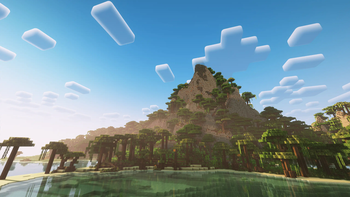
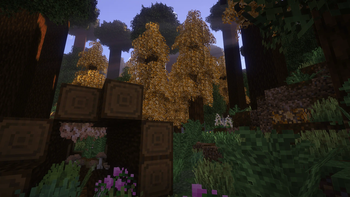
This modpack focuses on exploration and survival. These two aspects are paired with the awesome Create Mod.
Screenshots
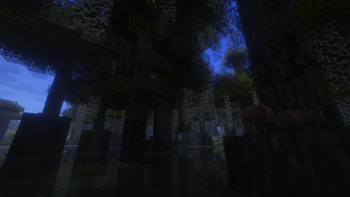
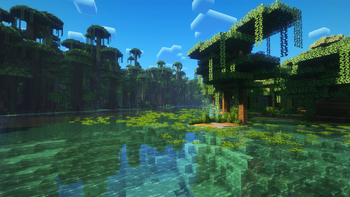
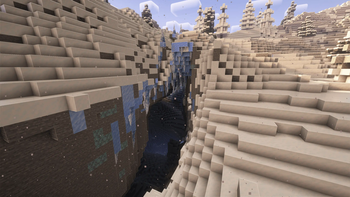
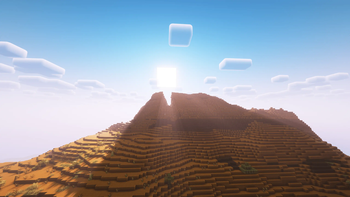
About this Modpack

This modpack focuses on exploration and survival. These two aspects are paired with the awesome Create Mod.
The main features are:
- 🧭 Exploration specific loot
- 🌍 Reworked Overworld
- 🌋 Reworked Nether
- 🌐 Reworked End
- 🍔 Overhauled food and health system
- 🔆 Seasons and climate effects
- 🐉 Some Bosses & special Mobs
- ✨ All the performance mods you know
Important:
- The modpack is tested with 5GB RAM. However, 8 GB is recommended.
- Iris & Flywheel Compat is disabled by default because it can cause crashes. You can enable it but be warned.
Notes:
- Simple Backup is disabled by default. To enable it go to your config folder and open 'simplebackup.json5'. Set 'enableAutomaticBackups' and 'enableServerStoppedBackup' to true. The backups are saved in your games folder in 'simpleBackup'
- The modpack is shader ready. Simply install the shader of your choice.
- The gamerules doPatrolSpawning, mobGriefing, doFireTick and doInsomnia are set to false by default.
Thanks:
- Thanks to everyone from the KubeJS team and the KubeJS extensions teams. Your mods are just awesome.
Download Recommendations
Modlist
- Aquamirae
- Controlling
- CottageCraft Axolotls
- Dehydration
- Drip Sounds (Fabric)
- EnviromentZ
- Explorers Compass
- Extended Drawers
- Extra Alchemy
- Falling Leaves
- Frostiful
- Items Displayed
- More Culling
- Natures Compass
- Scarecrow's Territory
- Alessandrv Enchantments
- Alternate Current
- Appleskin
- Artifacts
- Better Advancements
- Better Animation Collection
- Better Block Sounds
- Better Days
- Better Statistics Screen
- Better End
- Better Nether
- Blur
- Borderless Mining
- Bosses of Mass Destruction
- CIT Resewn
- Charm of Undying
- ChoiceTheorem's Overhauled Village
- Clumps
- Continuity
- Convenient Mobgriefing
- Create Fabric
- Create Jetpack
- Create Slice & Dice
- Create Utilities
- Create: Extended Cogwheels
- Create: Steam 'n' Rails
- DeepslateCutting
- Diagonal Fences
- Diet
- Dynamic Fps
- Easy Anvil
- Easy Magic
- Eating Animation
- Eggstractor Enchantment
- Eldritch Mobs
- Elytra Slot
- Enchant the Rainbow
- Enchantment Disabler
- Enchantments-Plus
- End Remastered
- Enhanced Block Entites
- Entity Culling
- Etcetera
- Euphonium
- Expanded Delight
- Explosive Enhancement
- Extra Enchantments and Curses
- Fabric Seasons
- Fabric Seasons Extras
- Fadeless
- Fancy Dyes
- Fast Items
- FastAnim
- FerriteCore
- Fishing Ruler
- Friends and Foes
- Handcrafted
- Hellions Sniffer+
- idwtialsimmoedm
- Imediately Fast
- Incantationem
- Indium
- Infinity Buttons
- Iris
- KubeJs
- LambDynamicLights
- LazyDFU
- Leaves Be Gone
- Legendary Tooltips
- Let Me Despawn
- Let's Do: Bakery
- Let's Do Vinery
- Lithium
- LootJs
- Lunar
- Memory Leak Fix
- MixinTrace
- Mob Lassos
- Mod Menu
- Modern Fix
- Modification Of Critical Hit
- More Mob Variants
- MoreJs
- Neruina - Tocking entity Fixer
- NERB
- Particle Tweaks
- Patchouli
- Polymorph
- Rare Ice
- Re: Enchantments
- Reacharound
- Reese's Sodium Options
- Seamless Loading Screen
- Shulker+
- Simple Backup
- Snow Real Magic
- Sodium
- Sodium Extra
- Sounds Be Gone
- Sparkle!
- Spelunker
- Spice of Fabric
- Spirit Walker
- Subterrestrial
- SwingThrough
- Tall Flower Pots
- Things
- Tidal Towns
- Tiny Item Animations
- Tom's Simple Storage Mod
- Travelers Titles
- Trinkets
- True Ending
- Vein Mining
- Video Tape
- Visual Workbench
- WITS
- WTHIT
- Wakes
- William Wythers' Expanded Ecosphere
- XXL Packets
- YUNG's Better Desert Temples
- YUNG's Better Dungeons
- YUNG's Better Jungle Temples
- YUNG's Better Mineshafts
- YUNG's Better Nether Fortresses
- YUNG's Better Ocean Monuments
- YUNG's Better Strongholds
- YUNG's Better Witch Huts
- YUNG's Extras
- Chef's Delight
- Hopo Better Underwater Ruins
- Plushie-Mod
- Create: Structures
- Explorify
- FiltPick
- Simple Hats
- Hopo Better Ruined Portals
- Archaeology Banners
- Archeology Plus
- Majruszs Accessories
- Illager Invasion
- Let's Do: Candlelight
- Snow Under Trees (Fabric)
- Mouse Wheelie
- Resource Pack Overrides
- [Let's Do] NetherVinery
- Create: Bells & Whistles
- VerdantVibes
- JEI
- EMI
- EMI Loot
- EMIffects
- Collision Fix
- Lanterns belong on walls
- Let's Do: Herbal Brews
- Gilded Sherds
- Shifting Wares
- Connectible Chains [Fabric]
- Hopper The Hedgehog
- Variant Crafting Tables
- Variant Bookshelves
- Variant Barrels
- Variant Chiseled Bookshelves
- Variant Chests
- Variant Composters
- Variant Beehives
- Better Archeology
- Petal
- Immersive Aircraft
- Lets Do: BloomingNature
- Bainier Bees
- Effortless
- Immersive Weathering
- Better End Citites
- Lets Do: Brewery
- Create: Copycats+
- Create: Deco
- BadOptimazitions
- Shutters
- Bank Storage
- Antique Atlas
- Man Of Many Planes
- Lets Do: Meadow
- Lets Do Addon: Structures
- Village Nullifier
- Farmers Delight Cookbook Reforged
- EMI Addon: Extra Mod Integrations
- EMF
- ETF
- Create: Food
- Forgotten Graves
- lmft
- Custom Block Highlight
- Exline's Copper Equipment
- Ijm's Tweaks
- Farmer's Delight Refabricated
- Medivieal Buildings
- Hexed
- Particle Core
- Dungeon Now Loading
- Create: Dreams & Desires
- The Graveyard
- TearedZ
- Biome Spawn Point
- Sleep to Night
- Create: Molten Metals
- Florum Sporum
- Pountiful Fares
- Iris Flywheel Compat
- Better Biome Reblend
- Lootr
- More Crustacean
- Platforms
- Building But Better
- Switcheroo
- Create: Power Loader
- Nvidium
- Default Options
- Create Cobblestone
- Party Spores
- Create: Crystal Clear
- C2M
- Colorful Hearts
Resource Packs
- CTM Create
- Cubic Sun & Moon
- Enhanced Boss Bars
- Falling Sakura
- Fancy Crops
- Lopy's Creaete's Copper Coating
- Tom's Create Storage
- The Brass Age
- Algard Font
- Steam Golems
- Steam Golem
- Create Style Hopper
- Created & Updated
- Motschens Better Leaves
- Vanilla Experience+
- Flower Pots+
- Foliage+
- Uncontrolled Flowers
- CTM Optifine - Fabric
- Better Lilypads
Available Versions
How to Set Up a Exploration & More Server
Order Server
Choose at least 6 GB RAM (8 GB recommended for Exploration & More). Based on player count: per 5 players.
Install Modpack in Dashboard
Open the modpack browser in the dashboard, search for "Exploration & More" and click "Install". The fabric loader and Minecraft 1.20.1 are configured automatically.
Start Server & Play
Start the server – all mods are loaded automatically. Share the server IP with friends and play together!
Frequently Asked Questions
Exploration & More server crashes or won't start – what to do?
Most common causes: insufficient RAM or wrong fabric loader. Check latest.log for "OutOfMemoryError" → increase RAM to at least 8 GB. For "Mixin" or "ClassNotFoundException" errors: modpack version and loader don't match. With Mado Hosting, loader and Minecraft version are auto-configured on modpack install – preventing most startup issues.
How much RAM does a Exploration & More server really need?
Minimum 6 GB, recommended 8 GB for stable performance. per 5 players. Important: Minecraft modpacks need more RAM than vanilla – plan extra per additional player. With Mado Hosting, you can scale RAM up live at any time without data loss (from €12/month).
Can I add custom mods to Exploration & More without conflicts?
Yes, but check compatibility: only use mods for the same loader (fabric) and same Minecraft version (1.20.1). Common issues: ID conflicts with recipe mods and incompatible coremod versions. The Mado dashboard mod browser only shows compatible mods and warns about known conflicts.
Exploration & More server lagging – performance tips
1) Increase RAM to 8 GB+. 2) Reduce server view-distance to 8 (server.properties). 3) Pre-generate chunks with the "Chunky" plugin. 4) Use /spark profiler to check which mods consume the most tick time. With Mado Hosting, all servers run on NVMe SSDs with dedicated CPU cores – eliminating hardware as a bottleneck.
Similar Modpacks
![Cobblemon Official Modpack [Fabric]](https://cdn.modrinth.com/data/5FFgwNNP/e7f9ee2e9d361623847853fe2ddce42f519ee64f.png)
![COBBLEVERSE - Pokemon Adventure [Cobblemon]](https://cdn.modrinth.com/data/Jkb29YJU/581ecf54530972afb18a04660afd820f2f24f6c7.png)
![Better MC [FABRIC] - BMC2](https://cdn.modrinth.com/data/shFhR8Vx/a19c2bcb51d38f32f138d3607e91cb2b7b8e387f_96.webp)


![Better MC [FORGE] - BMC4](https://cdn.modrinth.com/data/4BV47HRn/7f5ef7cc61b2593609aabef3ed07a866a4f11b73_96.webp)
Rent Exploration & More Server
Start your own server with automatic modpack installation.
Supported Versions
Start your Exploration & More Server now
From €12.00/month with 8 GB RAM for the best performance.
Configure Server →