
Exploration MC
A modpack that makes Minecraft the perfect immersive exploration game!
Screenshots
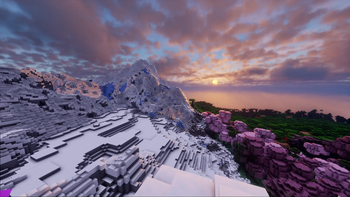
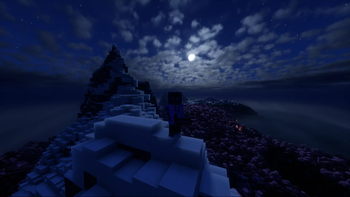
About this Modpack

Ready for a new adventure?!
Hop right in and immerse yourself in this modpack that is designed to create the perfect immersive experience just for exploration. This modpack includes Exposure mod so you can capture the beauty of the world around you!
Main Focus:
This modpack is designed to give you an immersive and fully optimized experience while exploring the Minecraft world
Please note:
This is my first ever public modpack so you can give me suggestions on what to add and improve (or remove) in the future by sending me a message on Discord: creeptonitus
Major content
- Better vanilla structures
- Distant Horizons
- More structures
- More biomes
Mods/Libs/APIs list
AdvancementInfo
AmbientSounds
Animatica
AntiGhost
Architectury API
BCLib
Better Mount HUD
BetterEnd
BetterNether
Bliss-Shader-main.zip
Bliss-Shader-main.zip.txt
Blur+
Boids
Borderless Mining
CICADA
CIT Resewn
Camera Overhaul
Capes
Cloth Config API
Complementary Shaders - Reimagined
Complementary Shaders - Unbound
Continuity
Controlify
CreativeCore
Debugify
DistantHorizons-fabric-2.0.2-a-dev-1.20.1
Do a Barrel Roll
Dynamic FPS
Enhanced Block Entities
Entity Culling
Exposure
Fabric API
Fabric Language Kotlin
Fabric Seasons
FabricSkyBoxes Interop
FabricSkyboxes
Fabrishot
Fadeless
FallingTree
FastQuit
FerriteCore
First-person Model
Forge Config API Port
Hold That Chunk
ImmersiveThunder
Indium
Indium
Inmis
InmisAddon
InvMove
Iris Shaders
Iris Shaders
JamLib
LambDynamicLights
Language Reload
Lithium
Lootr
M.R.U
Main Menu Credits
Memory Leak Fix
MixinTrace
Mod Menu
Model Gap Fix
ModernFix
More Chat History
More Culling
More Mob Variants
No Chat Reports
OptiGUI
Photon Shader
Presence Footsteps
Puzzle
Quality Sounds
Reese's Sodium Options
Reese's Sodium Options
Remove Reloading Screen
Rethinking Voxels
RightClickHarvest
Roughly Enough Items (REI)
Sodium
Sodium
Sodium Extra
Sodium Extra
Sound Physics Remastered
Tectonic
Terralith
YUNG's API
YUNG's Better Desert Temples
YUNG's Better Dungeons
YUNG's Better End Island
YUNG's Better Jungle Temples
YUNG's Better Mineshafts
YUNG's Better Nether Fortresses
YUNG's Better Ocean Monuments
YUNG's Better Strongholds
YUNG's Better Witch Huts
YUNG's Bridges
YUNG's Extras
YUNG's Menu Tweaks
YetAnotherConfigLib
Your Options Shall Be Respected (YOSBR)
Zoomify
[EMF] Entity Model Features
[ETF] Entity Texture Features
e4mc
extrasounds
iris
More info about mods in the Content tab
Available Versions
How to Set Up a Exploration MC Server
Order Server
Choose at least 6 GB RAM (8 GB recommended for Exploration MC). Based on player count: per 5 players.
Install Modpack in Dashboard
Open the modpack browser in the dashboard, search for "Exploration MC" and click "Install". The fabric loader and Minecraft 1.20.1 are configured automatically.
Start Server & Play
Start the server – all mods are loaded automatically. Share the server IP with friends and play together!
Frequently Asked Questions
Exploration MC server crashes or won't start – what to do?
Most common causes: insufficient RAM or wrong fabric loader. Check latest.log for "OutOfMemoryError" → increase RAM to at least 8 GB. For "Mixin" or "ClassNotFoundException" errors: modpack version and loader don't match. With Mado Hosting, loader and Minecraft version are auto-configured on modpack install – preventing most startup issues.
How much RAM does a Exploration MC server really need?
Minimum 6 GB, recommended 8 GB for stable performance. per 5 players. Important: Minecraft modpacks need more RAM than vanilla – plan extra per additional player. With Mado Hosting, you can scale RAM up live at any time without data loss (from €12/month).
Can I add custom mods to Exploration MC without conflicts?
Yes, but check compatibility: only use mods for the same loader (fabric) and same Minecraft version (1.20.1). Common issues: ID conflicts with recipe mods and incompatible coremod versions. The Mado dashboard mod browser only shows compatible mods and warns about known conflicts.
Exploration MC server lagging – performance tips
1) Increase RAM to 8 GB+. 2) Reduce server view-distance to 8 (server.properties). 3) Pre-generate chunks with the "Chunky" plugin. 4) Use /spark profiler to check which mods consume the most tick time. With Mado Hosting, all servers run on NVMe SSDs with dedicated CPU cores – eliminating hardware as a bottleneck.
Similar Modpacks
![Cobblemon Official Modpack [Fabric]](https://cdn.modrinth.com/data/5FFgwNNP/e7f9ee2e9d361623847853fe2ddce42f519ee64f.png)
![COBBLEVERSE - Pokemon Adventure [Cobblemon]](https://cdn.modrinth.com/data/Jkb29YJU/581ecf54530972afb18a04660afd820f2f24f6c7.png)
![Better MC [FABRIC] - BMC2](https://cdn.modrinth.com/data/shFhR8Vx/a19c2bcb51d38f32f138d3607e91cb2b7b8e387f_96.webp)


![Better MC [FORGE] - BMC4](https://cdn.modrinth.com/data/4BV47HRn/7f5ef7cc61b2593609aabef3ed07a866a4f11b73_96.webp)
Rent Exploration MC Server
Start your own server with automatic modpack installation.
Supported Versions
Start your Exploration MC Server now
From €12.00/month with 8 GB RAM for the best performance.
Configure Server →