
Fabulous MC
200+ mods to make the game look great, and to add more content.
Screenshots
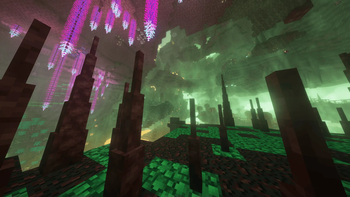




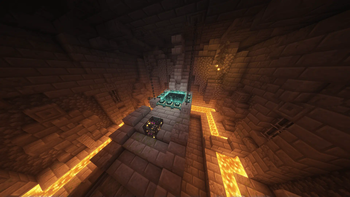
About this Modpack
This is a modpack of 200+ mods that changes the world generation, adds shaders, and adds other content to make the game more fun, and to make it look better.
This modpack adds new ores, new tools, new items, new mobs, more extreme world generation, and many new structures and biomes. It does not overhaul vanilla mechanics or add complicated tech/magic.
Fabulous MC is probably not compatible with any other mods, and I haven't tested it with non-Windows computers.
This modpack can be incredibly intensive, and you seriously have to add a custom amount of RAM to this modpack if you can, because it'll just crash otherwise. I would also keep shaders off or lower shader settings if it's too much.
List of mods: (disregarding library mods/add-ons)
- Additional Structures
- Advanced Netherite
- Advancement Plaques
- Alloy Forgery
- Alternate Current
- AmbientSounds
- Amendments
- Amplified Nether
- Animal Feeding Trough
- AppleSkin
- Archers(RPG Series)
- Artifacts
- Awesome 3D Mace
- Axolotl Buckets
- Better Mount HUD
- BetterNether
- BetterNether Delight
- Biomes O' Plenty
- Blossom Blade
- Bosses of Mass Destruction
- ChoiceTheorem's Overhauled Village
- Comforts
- C2ME
- Creeper Overhaul
- Distant Horizons
- Double Doors
- Dungeons and Taverns
- Dynamic FPS
- EMI
- Eating Animation
- Enchantment Descriptions
- Enhanced Block Entities
- Entity Culling
- Epic Knights: Shields Armor and Weapons
- Essential Mod
- Euphoria Patches
- Explosive Enhancement
- Fabric Seasons
- Fabrishot
- Farmer's Delight Refabricated
- FastQuit
- FerriteCore
- Fish of Thieves
- Formations Nether
- Fowl Play
- Friends and Foes
- Frostiful
- Geophilic
- Guard Villagers
- Handcrafted
- Hearths
- Immediatelyfast
- Immersive Aircraft
- Incantationem
- Iris Shaders
- Jade
- Jade Addons
- Jewelry (RPG Series)
- LambDynamicLights
- Language-Reload
- Lightweight Inventory Sorting
- Lithium
- Lithostitched
- MES - Moog's End Structures
- MNS - Moog's Nether Structures
- Medieval Buildings [End Edition]
- MmmMmmMmmMmm
- Model Gap Fix
- ModernFix
- More Axolotl Variants Mod
- More Chat History
- More Culling
- Mythic Metals
- Nether Depths Upgrade
- No Chat Reports
- Noisium
- Not Enough Animations
- NotHighEnough
- Nyf's Spiders
- Oh The Biomes We've Gone
- Particular
- Polymorph
- Polytone
- Presence Footsteps
- Rechiseled
- Runes
- Scorchful
- Simple Voice Chat
- Smarter Farmers
- Snow! Real Magic! ⛄
- Sodium
- Sodium Extra
- Sound Physics Remastered
- Sounds
- Structory: Towers
- Tectonic
- Terralith
- Towns and Towers
- Traveler's Backpack
- Traveler's Titles
- Tree Harvester
- Trimmable Tools
- Trinkets
- Unwrecked Ships
- Variants and Ventures
- Villages & Pillages
- Visual Workbench
- Wakes
- Waystones
- When Dungeons Arise - Seven Seas
- Wizards (RPG Series)
- Xaero's Minimap
- Xaero's World Map
- Literally all the Yung's mods (im lazy)
- Zoomify
Available Versions
How to Set Up a Fabulous MC Server
Order Server
Choose at least 6 GB RAM (8 GB recommended for Fabulous MC). Based on player count: per 5 players.
Install Modpack in Dashboard
Open the modpack browser in the dashboard, search for "Fabulous MC" and click "Install". The fabric loader and Minecraft 1.21.1 are configured automatically.
Start Server & Play
Start the server – all mods are loaded automatically. Share the server IP with friends and play together!
Frequently Asked Questions
Fabulous MC server crashes or won't start – what to do?
Most common causes: insufficient RAM or wrong fabric loader. Check latest.log for "OutOfMemoryError" → increase RAM to at least 8 GB. For "Mixin" or "ClassNotFoundException" errors: modpack version and loader don't match. With Mado Hosting, loader and Minecraft version are auto-configured on modpack install – preventing most startup issues.
How much RAM does a Fabulous MC server really need?
Minimum 6 GB, recommended 8 GB for stable performance. per 5 players. Important: Minecraft modpacks need more RAM than vanilla – plan extra per additional player. With Mado Hosting, you can scale RAM up live at any time without data loss (from €12/month).
Can I add custom mods to Fabulous MC without conflicts?
Yes, but check compatibility: only use mods for the same loader (fabric) and same Minecraft version (1.21.1). Common issues: ID conflicts with recipe mods and incompatible coremod versions. The Mado dashboard mod browser only shows compatible mods and warns about known conflicts.
Fabulous MC server lagging – performance tips
1) Increase RAM to 8 GB+. 2) Reduce server view-distance to 8 (server.properties). 3) Pre-generate chunks with the "Chunky" plugin. 4) Use /spark profiler to check which mods consume the most tick time. With Mado Hosting, all servers run on NVMe SSDs with dedicated CPU cores – eliminating hardware as a bottleneck.
Similar Modpacks
![Cobblemon Official Modpack [Fabric]](https://cdn.modrinth.com/data/5FFgwNNP/e7f9ee2e9d361623847853fe2ddce42f519ee64f.png)
![COBBLEVERSE - Pokemon Adventure [Cobblemon]](https://cdn.modrinth.com/data/Jkb29YJU/581ecf54530972afb18a04660afd820f2f24f6c7.png)
![Better MC [FABRIC] - BMC2](https://cdn.modrinth.com/data/shFhR8Vx/a19c2bcb51d38f32f138d3607e91cb2b7b8e387f_96.webp)


![Better MC [FORGE] - BMC4](https://cdn.modrinth.com/data/4BV47HRn/7f5ef7cc61b2593609aabef3ed07a866a4f11b73_96.webp)
Rent Fabulous MC Server
Start your own server with automatic modpack installation.
Supported Versions
Start your Fabulous MC Server now
From €12.00/month with 8 GB RAM for the best performance.
Configure Server →