
Fabulously Optimized for PVP
This is a Fork of the Fabulously Optimized Modpack with many additional Features for Minecraft PVP. It offers a big Performance boost and many good Mods for PVP.
Screenshots
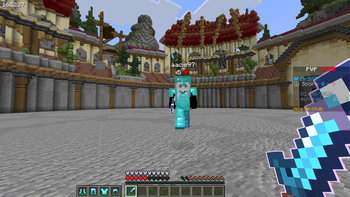
About this Modpack
🛡️ Fabulously PvP-Optimized Modpack (Fork)
Version: 1.0.0
Base Pack: Fabulously Optimized
Modloader: Fabric
Minecraft Version: 1.21.x
🎮 Overview
Fabulously PvP-Optimized is a custom modpack forked from Fabulously Optimized, designed specifically for PvP players, competitive environments, and high FPS gameplay, while maintaining beautiful visuals and resourcepack compatibility.
⚙️ Performance & Optimization
Built on the lightweight Fabulously Optimized foundation, this pack includes:
- Sodium – GPU performance boost
- Lithium – game logic optimizations
- Phosphor – lighting system improvement
- FerriteCore – memory optimization
- Indium – shader compatibility
(These core mods come from the base modpack) :contentReference[oaicite:8]{index=8}
⚔️ PvP Enhancements
Included PvP-specific mods for competitive play:
- Marlows Crystal Otimizer
- Shield Statuses – display if Shields ar broken or not
- Uku`s Armor HUD – shows armor in vanilla like ectra Slots
and many more...
🖼️ Resource Packs & Visual Upgrades
Optional resourcepacks included for PvP aesthetics + clarity
💡 Quality of Life Additions
General QoL mods to improve usability:
- Sodium – boost performance & gives more graphic options
- Zoomify - Lets you zoom in realy far
- Sound Controller - lets you control every sound of the game
and many more...
📌 Features & Benefits
✔️ Massive FPS improvements over vanilla
✔️ Optimized for low-end to high-end systems
✔️ PvP HUD + UI built for competitive matches
✔️ Compatible with most resourcepacks & shaders (via Fabric)
✔️ Easy to extend with other mods
📝 Notes
- This pack does not include client-side cheats or exploits.
- For Hypixel or Ranked servers, ensure no banned mods are active.
- For balanced PvP, disable any mods that could be considered advantage-giving by server rules.
🤝 Credits
Base Pack: Fabulously Optimized
Available Versions
How to Set Up a Fabulously Optimized for PVP Server
Order Server
Choose at least 4 GB RAM (6 GB recommended for Fabulously Optimized for PVP). Based on player count: per 8 players.
Install Modpack in Dashboard
Open the modpack browser in the dashboard, search for "Fabulously Optimized for PVP" and click "Install". The fabric loader and Minecraft 1.21.5 are configured automatically.
Start Server & Play
Start the server – all mods are loaded automatically. Share the server IP with friends and play together!
Frequently Asked Questions
Fabulously Optimized for PVP server crashes or won't start – what to do?
Most common causes: insufficient RAM or wrong fabric loader. Check latest.log for "OutOfMemoryError" → increase RAM to at least 6 GB. For "Mixin" or "ClassNotFoundException" errors: modpack version and loader don't match. With Mado Hosting, loader and Minecraft version are auto-configured on modpack install – preventing most startup issues.
How much RAM does a Fabulously Optimized for PVP server really need?
Minimum 4 GB, recommended 6 GB for stable performance. per 8 players. Important: Minecraft modpacks need more RAM than vanilla – plan extra per additional player. With Mado Hosting, you can scale RAM up live at any time without data loss (from €8/month).
Can I add custom mods to Fabulously Optimized for PVP without conflicts?
Yes, but check compatibility: only use mods for the same loader (fabric) and same Minecraft version (1.21.5). Common issues: ID conflicts with recipe mods and incompatible coremod versions. The Mado dashboard mod browser only shows compatible mods and warns about known conflicts.
Fabulously Optimized for PVP server lagging – performance tips
1) Increase RAM to 6 GB+. 2) Reduce server view-distance to 8 (server.properties). 3) Pre-generate chunks with the "Chunky" plugin. 4) Use /spark profiler to check which mods consume the most tick time. With Mado Hosting, all servers run on NVMe SSDs with dedicated CPU cores – eliminating hardware as a bottleneck.
Similar Modpacks

![Better MC [FABRIC] - BMC2](https://cdn.modrinth.com/data/shFhR8Vx/a19c2bcb51d38f32f138d3607e91cb2b7b8e387f_96.webp)
![Better MC [FORGE] - BMC4](https://cdn.modrinth.com/data/4BV47HRn/7f5ef7cc61b2593609aabef3ed07a866a4f11b73_96.webp)


Rent Fabulously Optimized for PVP Server
Start your own server with automatic modpack installation.
Supported Versions
Start your Fabulously Optimized for PVP Server now
From €8.00/month with 6 GB RAM for the best performance.
Configure Server →