
Fabulously, Minecraft!
Finally, a trailer inspired modpack that runs well!
Screenshots


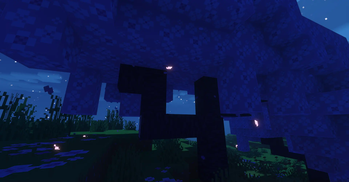
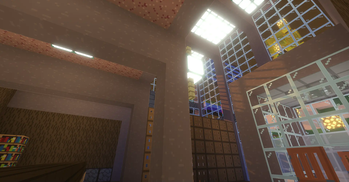
About this Modpack
Finally, a trailer inspired modpack that runs well!
This modpack is designed for midrange to low end PCs and Gaming Laptops but may run well on Potato machines without shaders enabled.
About the lack of updates...
I'm currently working on another modpack, this will get updated with bugfixes at some point.
Updated to 1.20.4!
This modpack features :
- Great sound design and ambient sounds
- Incedibly satisfying camera movements
- Flat syle textures, similar to the trailers
- Well configured shaders for the best performance to quality
- Fullbright by pressing "N" (This doesn't work with shaders on!)
- Insanely fast world generation times
- Great server compatiblilty
- Still Minecraft at it's core (No worldgen changes or new items!)
- It's good enough to daily play! (I actually use it!)
- Server backwards and forwards compatibility! (No need to update to play your favorite servers!)
Credit and thanks to RedPierre for creating Element!
Mods :
- LambDynamicLights
- Held Item Info
- Particle Tweaks
- Sodium
- YDM's Weapon Master
- Highlighter
- Screenshot to Clipboard
- Indium
- ImmediatelyFast
- Camera Overhaul
- Memory Leak Fix
- Very Many Players
- Lithium
- Inventory Control Tweaks
- Starlight
- Reese's Sodium Options
- Krypton
- Fabric API
- Better Ping Display
- Visuality
- Legendary Tooltips
- ChatAnimation
- Xaero's World Map
- Emoji Type
- Sodium Shadowy Path Blocks
- WaveyCapes
- Mod Menu
- Language Reload
- Clumps
- Ksyxis
- Iceberg
- Bobby
- Explosive Enhancement
- Chat Heads
- Load My Resources
- Falling Leaves
- LazyDFU
- Fullbright
- Presence Footsteps
- BetterF3
- Smooth Scrolling Refurbished
- Melody
- FancyMenu
- Fast IP Ping
- CreativeCore
- Xaero's Minimap
- Chunks Fade In
- Chat Patches
- YOSBR
- ViaFabricPlus
- MixinTrace
- Wakes
- Tiny Item Animations
- Zoomify
- ModernFix
- Forge Config API Port
- 3d-Skin-Layers
- Entity Model Features
- Prism
- Smooth Menu
- CraterLib
- Fabric Language Kotlin
- AmbientSounds
- Balm
- freelook
- Dynamic FPS
- FirstPerson
- Concurrent Chunk Management Engine
- Make Bubbles Pop Mod
- Simple RPC
- No Resource Pack Warnings
- No Telemetry
- FerriteCore
- Item Borders
- Particle Rain
- Cloth Config v13
- Sodium Extra
- Sound Physics Remastered
- YetAnotherConfigLib
- Eating Animation
- NotEnoughAnimations
- ThreadTweak
- Seamless Loading Screen
- Entity Texture Features
- Iris
- More Culling
- Show Me Your Skin!
- EntityCulling
- Fabrishot
- StutterFix
- Sneaky!
- Sounds
- Konkrete
- Mineblock's Repeated Utilities
Available Versions
How to Set Up a Fabulously, Minecraft! Server
Order Server
Choose at least 6 GB RAM (8 GB recommended for Fabulously, Minecraft!). Based on player count: per 5 players.
Install Modpack in Dashboard
Open the modpack browser in the dashboard, search for "Fabulously, Minecraft!" and click "Install". The fabric loader and Minecraft 1.20.4 are configured automatically.
Start Server & Play
Start the server – all mods are loaded automatically. Share the server IP with friends and play together!
Frequently Asked Questions
Fabulously, Minecraft! server crashes or won't start – what to do?
Most common causes: insufficient RAM or wrong fabric loader. Check latest.log for "OutOfMemoryError" → increase RAM to at least 8 GB. For "Mixin" or "ClassNotFoundException" errors: modpack version and loader don't match. With Mado Hosting, loader and Minecraft version are auto-configured on modpack install – preventing most startup issues.
How much RAM does a Fabulously, Minecraft! server really need?
Minimum 6 GB, recommended 8 GB for stable performance. per 5 players. Important: Minecraft modpacks need more RAM than vanilla – plan extra per additional player. With Mado Hosting, you can scale RAM up live at any time without data loss (from €12/month).
Can I add custom mods to Fabulously, Minecraft! without conflicts?
Yes, but check compatibility: only use mods for the same loader (fabric) and same Minecraft version (1.20.4). Common issues: ID conflicts with recipe mods and incompatible coremod versions. The Mado dashboard mod browser only shows compatible mods and warns about known conflicts.
Fabulously, Minecraft! server lagging – performance tips
1) Increase RAM to 8 GB+. 2) Reduce server view-distance to 8 (server.properties). 3) Pre-generate chunks with the "Chunky" plugin. 4) Use /spark profiler to check which mods consume the most tick time. With Mado Hosting, all servers run on NVMe SSDs with dedicated CPU cores – eliminating hardware as a bottleneck.
Similar Modpacks
![Cobblemon Official Modpack [Fabric]](https://cdn.modrinth.com/data/5FFgwNNP/e7f9ee2e9d361623847853fe2ddce42f519ee64f.png)
![COBBLEVERSE - Pokemon Adventure [Cobblemon]](https://cdn.modrinth.com/data/Jkb29YJU/581ecf54530972afb18a04660afd820f2f24f6c7.png)
![Better MC [FABRIC] - BMC2](https://cdn.modrinth.com/data/shFhR8Vx/a19c2bcb51d38f32f138d3607e91cb2b7b8e387f_96.webp)


![Better MC [FORGE] - BMC4](https://cdn.modrinth.com/data/4BV47HRn/7f5ef7cc61b2593609aabef3ed07a866a4f11b73_96.webp)
Rent Fabulously, Minecraft! Server
Start your own server with automatic modpack installation.
Supported Versions
Start your Fabulously, Minecraft! Server now
From €12.00/month with 8 GB RAM for the best performance.
Configure Server →