
Factorial: Nvidium
The Nvidium version of the modular Minecraft performance modpack; Factorial, that bundles the best optimization mods for every type of player; whether you prefer Sodium, OptiFine, Nvidium, or anything in between.
About this Modpack
Factorial: Nvidium
Optimization built for those who refuse to compromise.
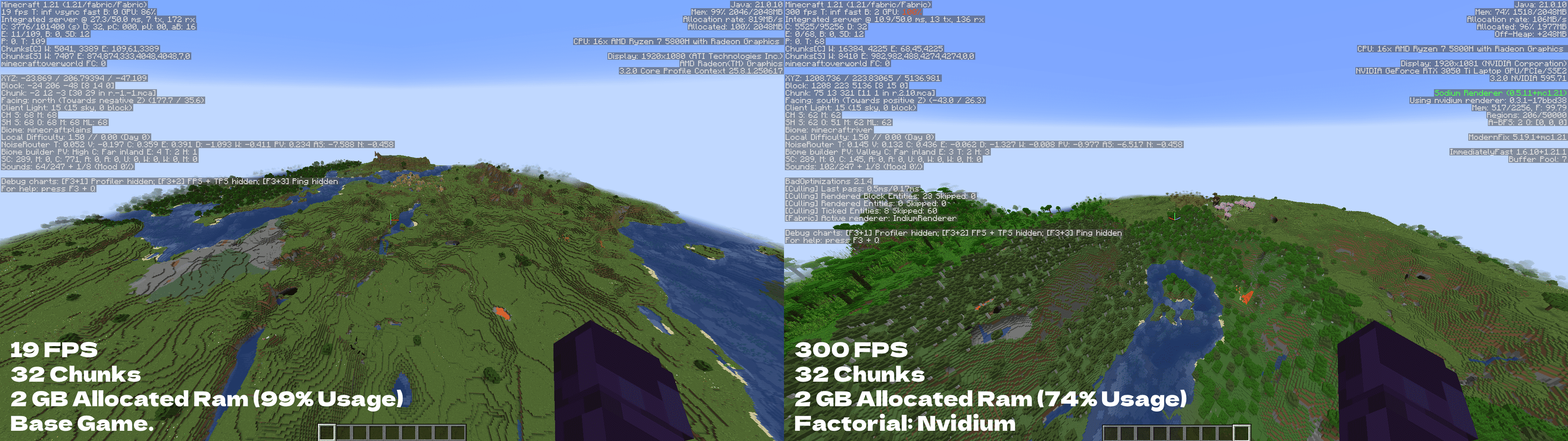
Factorial: Nvidium performed 1,479% (15.79x) Better than the Base Game
Before you begin: The Factorial team HIGHLY recommends users to allocate more RAM to the game, this helps the game to perform better interms of performance.
Factorial: Nvidium is the cutting-edge version of the Factorial modpack, built around Nvidium as its core rendering enhancement. Designed exclusively for NVIDIA GPU users, this version pushes Minecraft's rendering performance further than any other version of Factorial can.
Why Nvidium?
Nvidium leverages NVIDIA's mesh shader technology to completely bypass Minecraft's traditional chunk rendering pipeline. The result is a dramatic reduction in GPU draw calls and a massive FPS uplift, especially at high render distances where other solutions start to struggle. If you have the hardware to run it, nothing else comes close.
Low-End & High-End Friendly
Factorial: Nvidium shines brightest on mid to high-end NVIDIA hardware, but it's not just for enthusiasts. Even on older NVIDIA cards that support mesh shaders, the reduced rendering overhead means more frames and smoother gameplay. High-end setups will see the biggest gains, especially when pushing high render distances or dense environments.
What's Included?
Nvidium sits on top of Sodium, so you get all the benefits of Sodium's rendering engine plus Nvidium's mesh shader acceleration on top. The rest of the pack fills in the gaps: memory, lighting, entity performance, all ready to go out of the box.
Compatibility
- ✅ NVIDIA GTX 16 series and above (mesh shader support required)
- ✅ Includes full Sodium + companion mod suite
- ⚠️ Iris Shaders disable the Nvidium rendered, causing a massive reduction in framerate.
- ⚠️ AMD/Intel GPU users should use a different Factorial version. Nvidium will not activate on non-NVIDIA hardware.
Check out our alternative Factorial versions to suit your needs (most of these versions support shaders):
Exclusive. Extreme. Unmatched. This is Factorial: Nvidium.
Available Versions
How to Set Up a Factorial: Nvidium Server
Order Server
Choose at least 4 GB RAM (6 GB recommended for Factorial: Nvidium). Based on player count: per 8 players.
Install Modpack in Dashboard
Open the modpack browser in the dashboard, search for "Factorial: Nvidium" and click "Install". The fabric loader and Minecraft 1.21 are configured automatically.
Start Server & Play
Start the server – all mods are loaded automatically. Share the server IP with friends and play together!
Frequently Asked Questions
Factorial: Nvidium server crashes or won't start – what to do?
Most common causes: insufficient RAM or wrong fabric loader. Check latest.log for "OutOfMemoryError" → increase RAM to at least 6 GB. For "Mixin" or "ClassNotFoundException" errors: modpack version and loader don't match. With Mado Hosting, loader and Minecraft version are auto-configured on modpack install – preventing most startup issues.
How much RAM does a Factorial: Nvidium server really need?
Minimum 4 GB, recommended 6 GB for stable performance. per 8 players. Important: Minecraft modpacks need more RAM than vanilla – plan extra per additional player. With Mado Hosting, you can scale RAM up live at any time without data loss (from €8/month).
Can I add custom mods to Factorial: Nvidium without conflicts?
Yes, but check compatibility: only use mods for the same loader (fabric) and same Minecraft version (1.21). Common issues: ID conflicts with recipe mods and incompatible coremod versions. The Mado dashboard mod browser only shows compatible mods and warns about known conflicts.
Factorial: Nvidium server lagging – performance tips
1) Increase RAM to 6 GB+. 2) Reduce server view-distance to 8 (server.properties). 3) Pre-generate chunks with the "Chunky" plugin. 4) Use /spark profiler to check which mods consume the most tick time. With Mado Hosting, all servers run on NVMe SSDs with dedicated CPU cores – eliminating hardware as a bottleneck.
Similar Modpacks

![Cobblemon Official Modpack [Fabric]](https://cdn.modrinth.com/data/5FFgwNNP/e7f9ee2e9d361623847853fe2ddce42f519ee64f.png)
![COBBLEVERSE - Pokemon Adventure [Cobblemon]](https://cdn.modrinth.com/data/Jkb29YJU/581ecf54530972afb18a04660afd820f2f24f6c7.png)
![Better MC [FABRIC] - BMC2](https://cdn.modrinth.com/data/shFhR8Vx/a19c2bcb51d38f32f138d3607e91cb2b7b8e387f_96.webp)


Rent Factorial: Nvidium Server
Start your own server with automatic modpack installation.
Supported Versions
Start your Factorial: Nvidium Server now
From €8.00/month with 6 GB RAM for the best performance.
Configure Server →