
Figuratives 2
Balancing gameloop and progression to push players to explore.
Screenshots
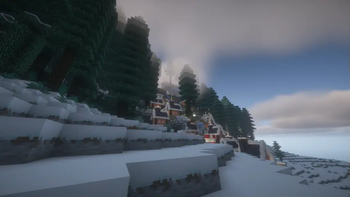
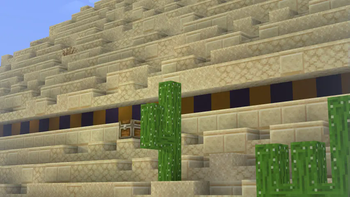
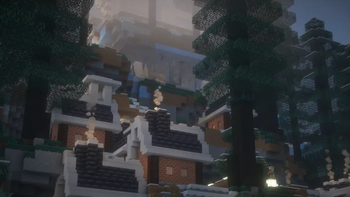
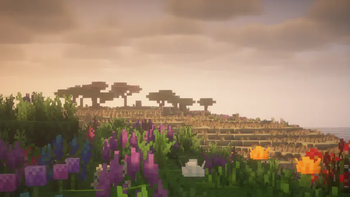
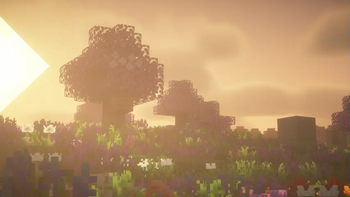
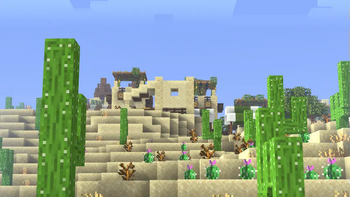
About this Modpack
"Relive that vanilla experience you've had a long time ago."
Foreword
Figuratives 2 is a direct continuation of Figuratives with Minecraft 1.20.1 as base and Modrinth as main platform.
- As Figuratives' purpose is to reimagine the base game and not have a questline, Figuratives 2 mostly plays the same as the original.
Figuratives 2 is still in its very early stages. There will be breaking changes. Do not commit to a world/playthrough right now if you don't like testing and breaking. You should play the first version for a stable gameplay.- Figuratives 2 is now considered stable. You shouldn't have stability issues than any other modpack. The Overworld and The Nether will no longer have breaking updates. The only thing that might change are the enchantments.
- If you want to begin a new playthrough of Figuratives, this
mightshould be your next starting pointin the future.
Summary
Figuratives is a modpack that aims to balance the gameloop instead of the game's difficulty.
The original game currently has a lot of redundancy and it makes the user feel overpowered in just a small amount of time, and doing it in very cheap ways.
This is due to feature creep, which is not easy to mitigate as Minecraft always had backwards compatibility and the developers want to avoid breaking both old ways of playing the game and existing worlds.
This modpack either redesigns a system that is deemed either redundant or overpowered, or just simply removes them.
But this doesn't mean we return to the old days. The game has improved a lot over the years and there's no reason to not take advantage of those. It's just unmanaged.
The pack currently redesigns Enchanting, Trading, Exploration and Bosses.
Enchanting
- New enchantment system added by Enchancement and Enchantment Infusion. Completely adjusted manually for modpack balance.
- Items are now infused on an Enchantment Infusion Table. Every enchanment has its ingredients listed in REI. Order doesn't matter. Simply put the ingredients onto the pedestals, and put the item to be enchanted on the center.
- Enchantments can be gained back in book forms via the Grindstone (see Grind Enchantments).
- Enchantments have no levels. Every enchantment works at its maximum power.
- Some additional features are in enchantment forms, such as Vein Mining).
- Randomness is completely removed. Every enchant takes levels according to their rarity.
- Many enchantments are added, replaced, merged or removed.
Current List of Enchantments
- Fire Aspect
- Efficiency
- Silk Touch
- Luck of the Sea
- Riptide
- Channeling
- Amphibious
- Wardenspine
- Delay
- Phasing
- Scatter
- Torch
- Scooping
- Disarm
- Grapple
- Backstabbing
- Fire Walker
- Barbed
- Pummeling
- Dodge
- Death Wish
- Enlightenment
- Fishing Fanatic
- Fuse Cutter
- Gold-Fuelled
- Frost Rider
- Armored Caravan
- Swiftness
- Hunter
- Leech [Majrusz's Enchantments]
- Magic Protection
- Misantropy
- Telekinesis
- Strider's Grace
- Vein Mining
- Soulbound
- Cloudskipper
- Smokestack
Villagers and Pillagers
- Villager workbenches cannot be cheesed to reset their trades. They are locked in as they acquire their job.
- Pillagers and Raids are completely reworked. Raids are much more challenging and there are many new pillager types to fight against (see Illager Invasion).
Overworld
- The pack includes new vanilla-friendly biomes and mobs for adding variety to your overworld experience.
- There are also a lot of small enhancements, both for visuals and gameplay.
The End
- Ender Eyes are specialised and scattered around the world. You need to find them by exploring before going to the End. Check End Remastered's page for more info.
- End dimension is improved by End Reborn with new blocks and items.
Notes
- Do not try to install OptiFine as it will not work properly.
- At least 3 GB of RAM is recommended to run the modpack smoothly.
- As with any modded game, backup your saves often.
- Feel free to ask about anything at [email protected]. This may include topics like some decisions I made, or simply a bug.
Credits
Every mod developer that this modpack contains their mods.
Special thanks to Serilum, Keksuccino, BlayTheNinth, MehVahdJukaar, shedaniel, Fuzs, FlashyReese, RandomMcSomethin, Buuz135, TerraformersMC for listening to my feedback.
Available Versions
How to Set Up a Figuratives 2 Server
Order Server
Choose at least 6 GB RAM (8 GB recommended for Figuratives 2). Based on player count: per 5 players.
Install Modpack in Dashboard
Open the modpack browser in the dashboard, search for "Figuratives 2" and click "Install". The fabric loader and Minecraft 1.20.1 are configured automatically.
Start Server & Play
Start the server – all mods are loaded automatically. Share the server IP with friends and play together!
Frequently Asked Questions
Figuratives 2 server crashes or won't start – what to do?
Most common causes: insufficient RAM or wrong fabric loader. Check latest.log for "OutOfMemoryError" → increase RAM to at least 8 GB. For "Mixin" or "ClassNotFoundException" errors: modpack version and loader don't match. With Mado Hosting, loader and Minecraft version are auto-configured on modpack install – preventing most startup issues.
How much RAM does a Figuratives 2 server really need?
Minimum 6 GB, recommended 8 GB for stable performance. per 5 players. Important: Minecraft modpacks need more RAM than vanilla – plan extra per additional player. With Mado Hosting, you can scale RAM up live at any time without data loss (from €12/month).
Can I add custom mods to Figuratives 2 without conflicts?
Yes, but check compatibility: only use mods for the same loader (fabric) and same Minecraft version (1.20.1). Common issues: ID conflicts with recipe mods and incompatible coremod versions. The Mado dashboard mod browser only shows compatible mods and warns about known conflicts.
Figuratives 2 server lagging – performance tips
1) Increase RAM to 8 GB+. 2) Reduce server view-distance to 8 (server.properties). 3) Pre-generate chunks with the "Chunky" plugin. 4) Use /spark profiler to check which mods consume the most tick time. With Mado Hosting, all servers run on NVMe SSDs with dedicated CPU cores – eliminating hardware as a bottleneck.
Similar Modpacks
![Cobblemon Official Modpack [Fabric]](https://cdn.modrinth.com/data/5FFgwNNP/e7f9ee2e9d361623847853fe2ddce42f519ee64f.png)
![COBBLEVERSE - Pokemon Adventure [Cobblemon]](https://cdn.modrinth.com/data/Jkb29YJU/581ecf54530972afb18a04660afd820f2f24f6c7.png)
![Better MC [FABRIC] - BMC2](https://cdn.modrinth.com/data/shFhR8Vx/a19c2bcb51d38f32f138d3607e91cb2b7b8e387f_96.webp)


![Better MC [FORGE] - BMC4](https://cdn.modrinth.com/data/4BV47HRn/7f5ef7cc61b2593609aabef3ed07a866a4f11b73_96.webp)
Rent Figuratives 2 Server
Start your own server with automatic modpack installation.
Supported Versions
Start your Figuratives 2 Server now
From €12.00/month with 8 GB RAM for the best performance.
Configure Server →