
Fizzcraft
Fun Vanilla+ Modpack
Screenshots
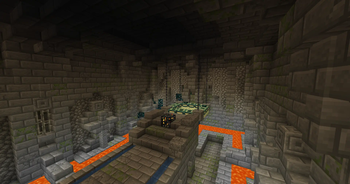
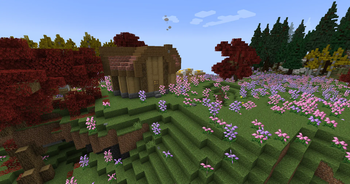
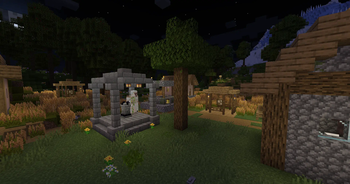

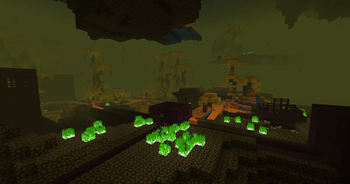
About this Modpack
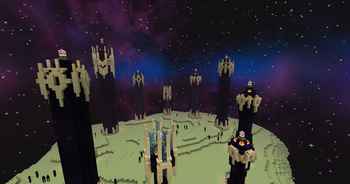
Fun Vanilla+ Modpack with some MAGIC AND SPACE thrown in!
With mods like Ad Astra, Better End, Better Nether, And Amethyst Imbuement(Coming Soon) see Minecraft like never before. Find new and interesting ways to slay your enemy's using magic, or see what is beyond the stars in your own rocket ship.
Mod List
- 3D Skin Layers
- Ad Astra!
- Advanced Netherite
- Amethyst Imbuement
- Another Furniture
- AppleSkin
- Architectury API
- BCLib
- Bag Of Holding
- Better End
- Better F3
- Better Nether
- Biome Makeover
- Book of Experience
- Bookshelf
- Botania
- Botarium
- Bountiful
- CIT Resewn
- Carry On
- Charm of Undying
- Cloth Config API
- Clumps
- Comforts
- Continuity
- Controlling
- Croptopia
- Dark Paintings
- Dawn API
- Deeper and Darker
- Default Dark Mode
- Diagonal Fences
- Drippy Loading Screens
- EMI
- EMI Addon: Extra Mod Integration
- EMI Farmer's Delight
- EMI Loot
- EMI Trades
- EMICompat
- EMIffect
- Easy Anvil
- Easy Magic
- Elytra Slot
- Expanded Delight
- Extra Alchemy
- Fabric Language Kotlin
- Fabric Waystone
- Falling Leaves
- Falling Tree
- Fancy Menu
- Farmer's Delight
- Farmer's Knives
- FerriteCore
- Forge Config API Port
- Geckolib
- Held Item Info
- Immersive Portals
- Immersive Weathering
- Immersive Structures
- Indium
- JamLib
- JourneyMap
- JourneyMap Integration
- Kambrik
- KonKrete
- LambDynamicLights
- LambdaBetterGrass
- Lanterns Belong on Walls
- LazyDFU
- Lithium
- Macaw's Paintings
- MemoryLeakFix
- MidnightLib
- Mod Menu
- Moonlight Lib
- More Axolotl Variants API
- More Axolotl Variants Mod
- More Bows: Restrung!
- More Frogs
- More Geodes
- More Mod Variants
- Mouse Tweaks
- Nature's Compass
- Not Enough Animations
- Oh The Biomes You'll Go
- Patchouli
- Paxi
- Promenade
- Puzzles Lib
- Resourceful Config
- Resourceful Lib
- Right Click Harvest
- Snow Under Tree's
- Sodium
- Supplementaries
- TerraBlender
- The Bumblezone
- Things
- This Rocks
- Tom's Simple Storage
- Trinkets
- Universal Ores
- Visual Workbench
- WTHIT
- Wilder Wild
- Wondrous Wilds
- YUNG's API
- YUNG's Better Desert Temples
- YUNG's Better Dungeons
- YUNG's Better Mineshafts
- YUNG's Better Ocean Monuments
- YUNG's Better Strongholds
- YUNG's Better Witch Huts
- YUNG's Extras
- You're in Grave Danger
- Bad Packets
- OWO Lib
- xali's Enchanted Books
Available Versions
How to Set Up a Fizzcraft Server
Order Server
Choose at least 6 GB RAM (10 GB recommended for Fizzcraft). Based on player count: per 4 players.
Install Modpack in Dashboard
Open the modpack browser in the dashboard, search for "Fizzcraft" and click "Install". The fabric loader and Minecraft 1.19.2 are configured automatically.
Start Server & Play
Start the server – all mods are loaded automatically. Share the server IP with friends and play together!
Frequently Asked Questions
Fizzcraft server crashes or won't start – what to do?
Most common causes: insufficient RAM or wrong fabric loader. Check latest.log for "OutOfMemoryError" → increase RAM to at least 10 GB. For "Mixin" or "ClassNotFoundException" errors: modpack version and loader don't match. With Mado Hosting, loader and Minecraft version are auto-configured on modpack install – preventing most startup issues.
How much RAM does a Fizzcraft server really need?
Minimum 6 GB, recommended 10 GB for stable performance. per 4 players. Important: Minecraft modpacks need more RAM than vanilla – plan extra per additional player. With Mado Hosting, you can scale RAM up live at any time without data loss (from €12/month).
Can I add custom mods to Fizzcraft without conflicts?
Yes, but check compatibility: only use mods for the same loader (fabric) and same Minecraft version (1.19.2). Common issues: ID conflicts with recipe mods and incompatible coremod versions. The Mado dashboard mod browser only shows compatible mods and warns about known conflicts.
Fizzcraft server lagging – performance tips
1) Increase RAM to 10 GB+. 2) Reduce server view-distance to 8 (server.properties). 3) Pre-generate chunks with the "Chunky" plugin. 4) Use /spark profiler to check which mods consume the most tick time. With Mado Hosting, all servers run on NVMe SSDs with dedicated CPU cores – eliminating hardware as a bottleneck.
Similar Modpacks
![Cobblemon Official Modpack [Fabric]](https://cdn.modrinth.com/data/5FFgwNNP/e7f9ee2e9d361623847853fe2ddce42f519ee64f.png)
![COBBLEVERSE - Pokemon Adventure [Cobblemon]](https://cdn.modrinth.com/data/Jkb29YJU/581ecf54530972afb18a04660afd820f2f24f6c7.png)
![Better MC [FABRIC] - BMC2](https://cdn.modrinth.com/data/shFhR8Vx/a19c2bcb51d38f32f138d3607e91cb2b7b8e387f_96.webp)


![Better MC [FORGE] - BMC4](https://cdn.modrinth.com/data/4BV47HRn/7f5ef7cc61b2593609aabef3ed07a866a4f11b73_96.webp)
Rent Fizzcraft Server
Start your own server with automatic modpack installation.
Supported Versions
Start your Fizzcraft Server now
From €12.00/month with 10 GB RAM for the best performance.
Configure Server →