
FLSHKPack
It will be comfortable to play with the modpack
Screenshots
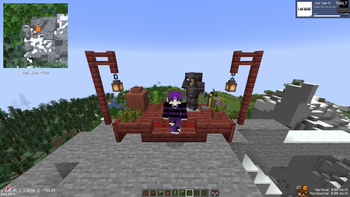
About this Modpack
RU
🌄 Графика и визуальные эффекты
✅ AmbientSounds – добавляет реалистичные звуки окружающей среды.
✅ BetterF3 – улучшает экран отладки (F3) для удобства использования.
✅ Dynamic FPS – улучшает производительность за счёт снижения FPS в фоновом режиме.
✅ Iris Shaders – позволяет использовать шейдеры, делая игру более красивой.
✅ Shaders – похоже, что сборка поддерживает шейдеры через Iris (возможно, используются BSL или Complementary).
✅ Visible Barriers – отображает невидимые барьеры, что полезно для строительства.
🏡 Улучшения интерфейса
✅ Xaero's Minimap & Xaero's World Map – миникарта и карта мира для лучшей навигации.
✅ Inventory Profiles Next – автоматическое упорядочивание предметов в инвентаре.
✅ Better Ping Display – показывает пинг на сервере в удобном виде.
✅ Craftify – помогает с крафтом и отображает доступные рецепты.
✅ NotEnoughAnimations – добавляет анимации для более реалистичных движений персонажа.
🌍 Улучшения окружающей среды
✅ Falling Leaves – добавляет эффект падения листьев с деревьев.
✅ Wavey Capes – делает движение плащей более естественным.
✅ RyoamicLights – позволяет свету от факелов и ламп распространяться в реальном времени.
✅ Smooth Boot – улучшает загрузку игры, снижая лаги при запуске.
✅ Enhanced Block Entities – улучшает внешний вид блоков, таких как сундуки и другие объекты.
⚔️ Улучшения геймплея и выживания
✅ AppleSkin – показывает подробную информацию о еде и насыщении.
✅ Entity Model Features – добавляет больше деталей к моделям мобов.
✅ Server Ping Fixer – улучшает соединение с сервером.
✅ Shulker Box Tooltip – показывает содержимое шалкер-боксов при наведении на них.
✅ Mod Menu – удобный интерфейс для управления модами в игре.
✅ Lithium, Sodium, Phosphor – улучшают производительность и снижают лаги.
💡 Общее впечатление:
Сборка хорошо сбалансирована между улучшением производительности, реалистичными визуальными эффектами и удобством интерфейса. Она сохраняет атмосферу ванильного выживания, но делает мир Minecraft более живым и детализированным. Если ты добавишь шейдеры, графика станет ещё лучше! 🔥
EN
🌄 Graphics and Visual Effects
✅ AmbientSounds – adds realistic ambient sounds.
✅ BetterF3 – improves the debug screen (F3) for better usability.
✅ Dynamic FPS – boosts performance by lowering FPS in the background.
✅ Iris Shaders – allows the use of shaders, making the game look more beautiful.
✅ Shaders – it seems the modpack supports shaders via Iris (likely using BSL or Complementary).
✅ Visible Barriers – shows invisible barriers, useful for building.
🏡 Interface Improvements
✅ Xaero's Minimap & Xaero's World Map – adds a minimap and world map for better navigation.
✅ Inventory Profiles Next – automatically sorts items in the inventory.
✅ Better Ping Display – shows the server ping in a clear format.
✅ Craftify – helps with crafting and shows available recipes.
✅ NotEnoughAnimations – adds more realistic player animations.
🌍 Environmental Enhancements
✅ Falling Leaves – adds falling leaf effects from trees.
✅ Wavey Capes – makes cape movement more natural.
✅ RyoamicLights – enables real-time lighting from torches and lamps.
✅ Smooth Boot – improves game loading and reduces startup lag.
✅ Enhanced Block Entities – improves the visual quality of blocks like chests and other objects.
⚔️ Gameplay and Survival Enhancements
✅ AppleSkin – shows detailed information about food and saturation.
✅ Entity Model Features – adds more details to mob models.
✅ Server Ping Fixer – improves server connection stability.
✅ Shulker Box Tooltip – shows the contents of shulker boxes when hovering over them.
✅ Mod Menu – provides a user-friendly interface for managing mods.
✅ Lithium, Sodium, Phosphor – improve performance and reduce lag.
💡 Overall Impression:
The modpack is well-balanced between performance improvements, realistic visual effects, and interface convenience. It retains the vanilla survival feel but makes the Minecraft world more vibrant and detailed. If you add shaders, the graphics will reach a whole new level! 🔥
Available Versions
How to Set Up a FLSHKPack Server
Order Server
Choose at least 6 GB RAM (8 GB recommended for FLSHKPack). Based on player count: per 5 players.
Install Modpack in Dashboard
Open the modpack browser in the dashboard, search for "FLSHKPack" and click "Install". The fabric loader and Minecraft 1.21 are configured automatically.
Start Server & Play
Start the server – all mods are loaded automatically. Share the server IP with friends and play together!
Frequently Asked Questions
FLSHKPack server crashes or won't start – what to do?
Most common causes: insufficient RAM or wrong fabric loader. Check latest.log for "OutOfMemoryError" → increase RAM to at least 8 GB. For "Mixin" or "ClassNotFoundException" errors: modpack version and loader don't match. With Mado Hosting, loader and Minecraft version are auto-configured on modpack install – preventing most startup issues.
How much RAM does a FLSHKPack server really need?
Minimum 6 GB, recommended 8 GB for stable performance. per 5 players. Important: Minecraft modpacks need more RAM than vanilla – plan extra per additional player. With Mado Hosting, you can scale RAM up live at any time without data loss (from €12/month).
Can I add custom mods to FLSHKPack without conflicts?
Yes, but check compatibility: only use mods for the same loader (fabric) and same Minecraft version (1.21). Common issues: ID conflicts with recipe mods and incompatible coremod versions. The Mado dashboard mod browser only shows compatible mods and warns about known conflicts.
FLSHKPack server lagging – performance tips
1) Increase RAM to 8 GB+. 2) Reduce server view-distance to 8 (server.properties). 3) Pre-generate chunks with the "Chunky" plugin. 4) Use /spark profiler to check which mods consume the most tick time. With Mado Hosting, all servers run on NVMe SSDs with dedicated CPU cores – eliminating hardware as a bottleneck.
Similar Modpacks
![Cobblemon Official Modpack [Fabric]](https://cdn.modrinth.com/data/5FFgwNNP/e7f9ee2e9d361623847853fe2ddce42f519ee64f.png)
![COBBLEVERSE - Pokemon Adventure [Cobblemon]](https://cdn.modrinth.com/data/Jkb29YJU/581ecf54530972afb18a04660afd820f2f24f6c7.png)
![Better MC [FABRIC] - BMC2](https://cdn.modrinth.com/data/shFhR8Vx/a19c2bcb51d38f32f138d3607e91cb2b7b8e387f_96.webp)


![Better MC [FORGE] - BMC4](https://cdn.modrinth.com/data/4BV47HRn/7f5ef7cc61b2593609aabef3ed07a866a4f11b73_96.webp)
Rent FLSHKPack Server
Start your own server with automatic modpack installation.
Supported Versions
Start your FLSHKPack Server now
From €12.00/month with 8 GB RAM for the best performance.
Configure Server →