
Froster's QOL
Various Client-Sided QOL changes and Technical Additions in a single, easy to use bundle.
Screenshots

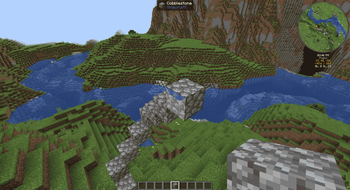
About this Modpack
Tweakeroo
- Adds Optifine-style zoom with adjustable FOV.
- Adds the ability to offset a block placement by 1 block in any direction from the face.
- Adds the ability to specify a block's rotation reguardless of player position.
- Adds precise angle snapping. Useful for placing ice boats or other straight-line AFK travel.
- Adds a right-click spam button useful for certain farms where an AFK player is needed.
- Adds free-cam useful for just about everything.
MiniHUD
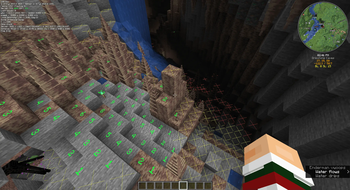
- Adds a light-level overlay on relevant blocks. Red X means mobs can spawn reguardless of skylight. Yellow X means mobs can spawn at night. No X means mobs cannot regularly spawn.
- Adds a structure bounding-box visualizer to allow you to properly place and size farms.
- Adds the ability to render shapes through the config menu. Useful for spawning spheres.
BetterF3
- Improves the F3 menu to be less terrible.
Item Scroller
- Allows vastly better inventory/container management by utilizing the scroll wheel.
Replay Mod
- Allows the user to record gameplay. Most keybinds are deactivated since pause menu operation exists. Feel free to override this if you use this mod often.
Vanilla Tweaks Resource Pack
- Adds a variety of toggle-able resource packs to enhance UI, visibility, accessibility, etc.
- Vanilla Tweaks Official Website
- Credits: Vanilla Tweaks: https://vanillatweaks.net/
Other
- Xaero's Minimap/Worldmap
- EMF/ETF
- 3D Skins
- AppleSkin
- Better Mount Hud
- Boat Item View
- Capes
- Chat Heads
- Do a Barrel Roll (disabled by default)
- Shulker and Durability Tooltips
- Held Item Tooltips
- Status Effect Bars
- Iris Shaders
- Jade
- Dynamic Lights
- Mod Menu
- No Chat Reports
- Many Additional Animations (including Not Enough Animations)
- ReplayMod
- Many performance/fix mods
Keybinds
Many keybinds are unbound to reduce complexity. To open a mod's config, first pause, then go to mods, then click the mod's icon.
Description              : Bind           : Mod
----------------------------------------------------------
Zoom                     : C              : Tweakeroo
Adjust Zoom Amount       : C+SCRL         : Tweakeroo
Offset Block Placement   : LALT           : Tweakeroo
Specific Block Rotation  : R              : Tweakeroo
Angle Snap               : V              : Tweakeroo
Fast Right Click         : B              : Tweakeroo
Free Cam                 : N              : Tweakeroo
Light/Structure Render   : H              : MiniHUD
Structure Render         : G              : MiniHUD
View Container Contents  : LSHFT          : MiniHUD
MiniHUD Config           : H+C            : MiniHUD
Drag to Transfer         : SHFT+LMB+Drag  : Item Scroller
Transfer Item To/From    : SCRLUP/DN      : Item Scroller
Transfer Stack To/From   : SHFT+SCRLUP/DN : Item Scroller
Minimap Enlarge          : Z              : Xaero's Minimap
Open Worldmap            : M              : Xaero's Worldmap
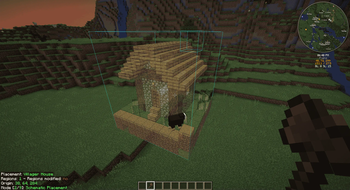
Litematica Render        : L              : Litematica
Litematica Operation     : CTRL+SCRL      : Litematica
Litematica Menu          : END            : Litematica
Litematica Execute Op.   : `(GRAVEACCENT) : Litematica
Next/Prev. Struct. Layer : PGUP/PGDN      : Litematica
Shader Enable/Disable    : K              : Iris
Pause/Play Replay        : P              : ReplayMod

Tip: From the MiniHUD Config, use the dropdown in the top-right to access other configs.
Available Versions
How to Set Up a Froster's QOL Server
Order Server
Choose at least 6 GB RAM (8 GB recommended for Froster's QOL). Based on player count: per 5 players.
Install Modpack in Dashboard
Open the modpack browser in the dashboard, search for "Froster's QOL" and click "Install". The fabric loader and Minecraft 1.21.4 are configured automatically.
Start Server & Play
Start the server – all mods are loaded automatically. Share the server IP with friends and play together!
Frequently Asked Questions
Froster's QOL server crashes or won't start – what to do?
Most common causes: insufficient RAM or wrong fabric loader. Check latest.log for "OutOfMemoryError" → increase RAM to at least 8 GB. For "Mixin" or "ClassNotFoundException" errors: modpack version and loader don't match. With Mado Hosting, loader and Minecraft version are auto-configured on modpack install – preventing most startup issues.
How much RAM does a Froster's QOL server really need?
Minimum 6 GB, recommended 8 GB for stable performance. per 5 players. Important: Minecraft modpacks need more RAM than vanilla – plan extra per additional player. With Mado Hosting, you can scale RAM up live at any time without data loss (from €12/month).
Can I add custom mods to Froster's QOL without conflicts?
Yes, but check compatibility: only use mods for the same loader (fabric) and same Minecraft version (1.21.4). Common issues: ID conflicts with recipe mods and incompatible coremod versions. The Mado dashboard mod browser only shows compatible mods and warns about known conflicts.
Froster's QOL server lagging – performance tips
1) Increase RAM to 8 GB+. 2) Reduce server view-distance to 8 (server.properties). 3) Pre-generate chunks with the "Chunky" plugin. 4) Use /spark profiler to check which mods consume the most tick time. With Mado Hosting, all servers run on NVMe SSDs with dedicated CPU cores – eliminating hardware as a bottleneck.
Rent Froster's QOL Server
Start your own server with automatic modpack installation.
Supported Versions
Start your Froster's QOL Server now
From €12.00/month with 8 GB RAM for the best performance.
Configure Server →