
Frozen Horrors
Frozen Horrors is a horror survival modpack set in a fully frozen world. Explore icy landscapes, discover new structures, and survive against terrifying mobs that make every night dangerous. With overhauled terrain generation and a dark atmosphere, this mo
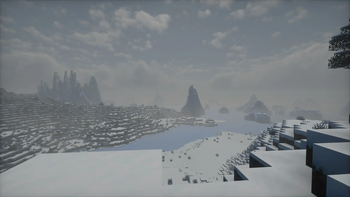
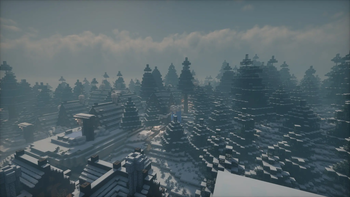
Screenshots
About this Modpack
Frozen Horrors is a challenging horror-themed Minecraft modpack that drops you into a completely frozen world, where survival is never guaranteed.
The entire overworld is covered in endless snow and ice, featuring overhauled terrain generation, new structures, and Ambient Effects. While exploring the frozen worlds, you will encounter terrifying horror mobs like Herobrine that turn the night into a constant threat staying alone after sunset is dangerous.
This modpack expands the game with new items, structures, and world mechanics, focusing on tension, exploration, and survival.
Frozen Horrors is made for players who enjoy:
❄️ A fully frozen, winter-themed world
👁️ Intense horror elements and scary mobs
🏚️ New structures and terrain generation
🧊 A harsh survival experience with an creepy atmosphere
Can you survive the cold… and the horrors hiding within it?
Good luck, you’ll need it
⚠️ Warning
This modpack contains flashing lights, sudden sounds, and scary effects.
Players with epilepsy, photosensitivity, or sensitivity to horror content should avoid this Modpack.
Recommendaton
If loaded in the newely created world use the command: /chunky radius 600 600 or /chunky radius 1000 1000 and then /chunky start for better performance
More Detail
Frozen Horrors is a horror-survival modpack that transforms Minecraft into a fully frozen nightmare filled with danger, mystery, and atmospheric exploration.
The world features overhauled terrain and structure generation, powered by mods like Terralith for world generation and Better Villages for improved settlements. You will also discover many additional structures, including those from Farmer’s Delight and other exploration-focused mods, making exploration both rewarding and dangerous.
The modpack adds new items, food, and farming content, such as [Let’s Do] Vinery, Meadow, and similar mods that expand survival and progression in a harsh winter environment.
To enhance immersion, ambient and visual improvements are included, featuring mods like Ambient Sounds, Coastal Waves, and Continuity, creating a cold, eerie atmosphere where you are never truly alone.
Of course, horror is a core focus. The world is inhabited by terrifying entities, including The Man From The Fog, Herobrine, Cave Dweller, and other scary mobs that turn the night into a constant threat.
As an extra challenge, the entire overworld is locked in an endless winter using the Eternal Winter mod, resources are limited, visibility is reduced, and survival requires careful planning.
Available Versions
How to Set Up a Frozen Horrors Server
Order Server
Choose at least 6 GB RAM (8 GB recommended for Frozen Horrors). Based on player count: per 5 players.
Install Modpack in Dashboard
Open the modpack browser in the dashboard, search for "Frozen Horrors" and click "Install". The forge loader and Minecraft 1.20.1 are configured automatically.
Start Server & Play
Start the server – all mods are loaded automatically. Share the server IP with friends and play together!
Frequently Asked Questions
Frozen Horrors server crashes or won't start – what to do?
Most common causes: insufficient RAM or wrong forge loader. Check latest.log for "OutOfMemoryError" → increase RAM to at least 8 GB. For "Mixin" or "ClassNotFoundException" errors: modpack version and loader don't match. With Mado Hosting, loader and Minecraft version are auto-configured on modpack install – preventing most startup issues.
How much RAM does a Frozen Horrors server really need?
Minimum 6 GB, recommended 8 GB for stable performance. per 5 players. Important: Minecraft modpacks need more RAM than vanilla – plan extra per additional player. With Mado Hosting, you can scale RAM up live at any time without data loss (from €12/month).
Can I add custom mods to Frozen Horrors without conflicts?
Yes, but check compatibility: only use mods for the same loader (forge) and same Minecraft version (1.20.1). Common issues: ID conflicts with recipe mods and incompatible coremod versions. The Mado dashboard mod browser only shows compatible mods and warns about known conflicts.
Frozen Horrors server lagging – performance tips
1) Increase RAM to 8 GB+. 2) Reduce server view-distance to 8 (server.properties). 3) Pre-generate chunks with the "Chunky" plugin. 4) Use /spark profiler to check which mods consume the most tick time. With Mado Hosting, all servers run on NVMe SSDs with dedicated CPU cores – eliminating hardware as a bottleneck.
Similar Modpacks
![Cobblemon Official Modpack [Fabric]](https://cdn.modrinth.com/data/5FFgwNNP/e7f9ee2e9d361623847853fe2ddce42f519ee64f.png)
![COBBLEVERSE - Pokemon Adventure [Cobblemon]](https://cdn.modrinth.com/data/Jkb29YJU/581ecf54530972afb18a04660afd820f2f24f6c7.png)
![Better MC [FABRIC] - BMC2](https://cdn.modrinth.com/data/shFhR8Vx/a19c2bcb51d38f32f138d3607e91cb2b7b8e387f_96.webp)


![Better MC [FORGE] - BMC4](https://cdn.modrinth.com/data/4BV47HRn/7f5ef7cc61b2593609aabef3ed07a866a4f11b73_96.webp)
Rent Frozen Horrors Server
Start your own server with automatic modpack installation.
Supported Versions
Start your Frozen Horrors Server now
From €12.00/month with 8 GB RAM for the best performance.
Configure Server →