
FruitFam
Explore unique biomes, epic dungeons, and enhanced gameplay! Join by subscribing to Peachuri on Twitch and connecting through the FruitFam Discord to access the Minecraft server.
Screenshots
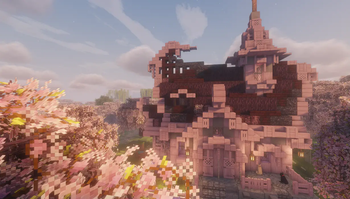
About this Modpack
FruitFam Modpack
Experience Minecraft like never before with the FruitFam Modpack, designed for both the FruitFam Minecraft server and single-player adventures. This modpack brings a perfect balance of exploration, adventure, and quality-of-life improvements to elevate your gameplay.
Features at a Glance
- Overhauled World Generation:
- Biomes O' Plenty
- Incendium
- Nullscape
- Yung's Better X
- Optimized Performance: Shader support for stunning visuals.
- Enhanced Strongholds & Fortresses: Redesigned for more engaging exploration.
- New Bosses and Mobs: Includes Bosses of Mass Destruction and Adventurez.
- Hundreds of New Structures: Featuring Yung's Better Dungeons and AdoraBuild: Structures.
- Quality-of-Life Enhancements: Waystones, Tom's Storage, and Xaero's Minimap with added features.
- Massive Mod Collection: Over 160 curated mods for an unforgettable experience.
Why Choose the FruitFam Modpack?
This modpack caters to adventurers, builders, and explorers alike. Whether you're diving into uncharted biomes, conquering fierce bosses, or unraveling the secrets of newly added dungeons, the FruitFam Modpack ensures endless hours of immersive gameplay. Quality-of-life features like fast travel and improved storage streamline your experience, letting you focus on what matters most—adventure!
Compatibility and Requirements
Optimized for Minecraft 1.21.1, this modpack delivers enhanced visuals and smooth performance with shader support. A modern system is recommended for the best experience.
Join the FruitFam Community (18+ Only)
Originally created for the FruitFam server, this modpack is now open to all adventurers. Take your Minecraft experience to the next level and join a vibrant community!
How to Join:
- Subscribe to Peachuri on Twitch.
- Join the FruitFam Discord Server to get the role required to access the server.
Dive into a world of endless possibilities with the FruitFam Modpack!
Modpack contains:
- 🛠️ 3D Skin Layers
- 🧩 Advanced Netherite
- 🍃 Alacrity
- 🎲 Almanac
- 🍥 Alternate Current
- 🍀 Better Advancements
- 🌱 Better Grassify
- 🐾 Better Compatibility Checker
- 🌿 Better Mount HUD
- 🌟 Better Statistics Screen
- 🌻 Better Witch Huts
- 🍉 Biomes O' Plenty
- 🍯 Blossom Blade
- 🧩 Bosses of Mass Destruction
- 🎮 Boat Break Fix
- 💎 BSL Shaders
- 📦 Balm
- 🌳 Cardinal Components API
- 🛠️ Chat Plus
- 🍪 Chipped
- 🎮 Cloth Config API
- 🍃 Control Saver Mod
- 🎵 Collective
- 💠 Complementary Shaders - Reimagined
- 🎮 Continuity
- 🌱 CraterLib
- 🐱 Crawl
- 💎 Cubes Without Borders
- 💡 Cut Through
- 🧭 DragonLoot
- ⚙️ Debugify
- 🐾 Double Doors
- 🧰 Entity Culling
- ✨ Entity Model Features
- 📦 ExtraSounds Next
- 🔧 FerriteCore
- 🍃 Fabric API
- 🌠 FabricSkyboxes
- 📐 Fabric Language Kotlin
- 🔨 Fast IP Ping
- 🧡 Fusion (Connected Textures)
- 🍃 Geckolib
- 🧱 Geophilic
- 🧪 GlitchCore
- 🎵 Hearths
- 🎵 Iris Shaders
- 🔥 Indium
- 💫 Inventory Profiles Next
- 🛠️ Just Enough Breeding (JEBr)
- 🧩 Just Enough Items
- 🛠️ Just Enough Professions (JEP)
- 🍯 JamLib
- 🌸 Kiwi
- 🍀 Let Me Despawn
- 💠 Lithium
- ⚒️ Load My F***ing Tags
- 🏞️ Mod Menu
- 🍃 ModernFix
- 🧱 MES - Moog's End Structures
- 📦 Melody
- 🎮 MidnightLib
- 📸 MVS - Moog's Voyager Structures
- 🔮 Necronomicon API
- 🌎 Nature's Compass
- ✨ No Chat Reports
- 🛠️ Nicer Skies
- 🔋 Nvidium
- 🎲 Noisium
- 🎮 ObsidianUI
- 🔨 Open Parties and Claims
- 🛠️ Packet Fixer
- 🎮 Polymorph
- 🧩 Polythemis
- 🔮 Puzzles Lib
- 🧩 Repurposed Structures - Quilt/Fabric
- 🧩 Resourcify
- 🍯 RightClickHarvest
- 🎮 Round Trees
- 🏞️ Searchables
- 🔧 Sodium
- ⚙️ Sodium Extra
- 🍎 Spark
- 🧰 Structory
- ⚒️ Stony Cliffs Are Cool
- 🏞️ TCDCommons API
- 🎮 The Bumblezone - Fabric
- 🌸 Tidal Towns
- 🌱 TerraBlender
- 🧩 Text Placeholder API
- 🎮 Waystones
- 🍃 YUNG's Better Jungle Temples
- 🌳 YUNG's Better Nether Fortresses
- 🔮 YUNG's Better Mineshafts
- 🛠️ YUNG's Better Ocean Monuments
- 🧩 YUNG's Better Strongholds
- 🍀 YUNG's Better Witch Huts
Available Versions
How to Set Up a FruitFam Server
Order Server
Choose at least 4 GB RAM (6 GB recommended for FruitFam). Based on player count: per 8 players.
Install Modpack in Dashboard
Open the modpack browser in the dashboard, search for "FruitFam" and click "Install". The fabric loader and Minecraft 1.21.1 are configured automatically.
Start Server & Play
Start the server – all mods are loaded automatically. Share the server IP with friends and play together!
Frequently Asked Questions
FruitFam server crashes or won't start – what to do?
Most common causes: insufficient RAM or wrong fabric loader. Check latest.log for "OutOfMemoryError" → increase RAM to at least 6 GB. For "Mixin" or "ClassNotFoundException" errors: modpack version and loader don't match. With Mado Hosting, loader and Minecraft version are auto-configured on modpack install – preventing most startup issues.
How much RAM does a FruitFam server really need?
Minimum 4 GB, recommended 6 GB for stable performance. per 8 players. Important: Minecraft modpacks need more RAM than vanilla – plan extra per additional player. With Mado Hosting, you can scale RAM up live at any time without data loss (from €8/month).
Can I add custom mods to FruitFam without conflicts?
Yes, but check compatibility: only use mods for the same loader (fabric) and same Minecraft version (1.21.1). Common issues: ID conflicts with recipe mods and incompatible coremod versions. The Mado dashboard mod browser only shows compatible mods and warns about known conflicts.
FruitFam server lagging – performance tips
1) Increase RAM to 6 GB+. 2) Reduce server view-distance to 8 (server.properties). 3) Pre-generate chunks with the "Chunky" plugin. 4) Use /spark profiler to check which mods consume the most tick time. With Mado Hosting, all servers run on NVMe SSDs with dedicated CPU cores – eliminating hardware as a bottleneck.
Similar Modpacks

![Cobblemon Official Modpack [Fabric]](https://cdn.modrinth.com/data/5FFgwNNP/e7f9ee2e9d361623847853fe2ddce42f519ee64f.png)
![COBBLEVERSE - Pokemon Adventure [Cobblemon]](https://cdn.modrinth.com/data/Jkb29YJU/581ecf54530972afb18a04660afd820f2f24f6c7.png)
![Better MC [FABRIC] - BMC2](https://cdn.modrinth.com/data/shFhR8Vx/a19c2bcb51d38f32f138d3607e91cb2b7b8e387f_96.webp)


Rent FruitFam Server
Start your own server with automatic modpack installation.
Supported Versions
Start your FruitFam Server now
From €8.00/month with 6 GB RAM for the best performance.
Configure Server →