
FugCraft
Vanilla++; Optimized for multiplayer; powered by Vulkan. Experience silky-smooth performance, perfectly curated mods, and a hassle-free server setup.
About this Modpack
FugCraft - Vanilla++ Multiplayer
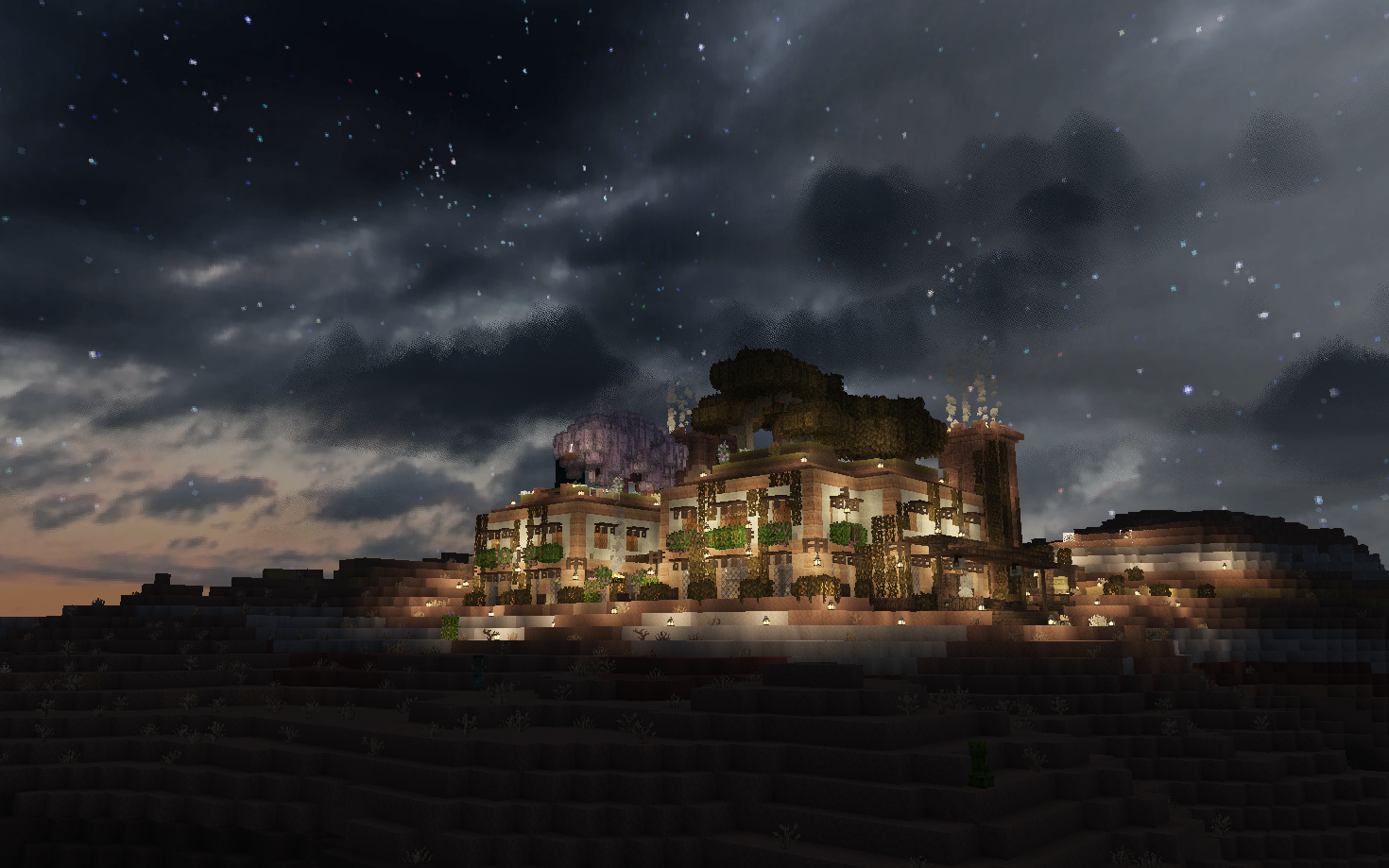
What is FugCraft?
FugCraft is a curated Vanilla++ modpack for multiplayer — still Minecraft at heart, just faster, farther, and richer.
| 🌍 See forever | VulkanMod + Distant Horizons — render way beyond normal distances while staying performant |
| 🗺️ Explore more | Biomes O' Plenty, overhauled vanilla structures, Moogs structure packs, Towns and Towers, Underground Worlds, and real-world synced seasons |
| 🤝 Play together | Proximity voice chat, parties, map-based land claims, player shops, and death graves |
| 🍳 Live off the land | Farmer's Delight cooking and farming with addon content |
| ✨ Feel the world | Sound physics, footsteps, dynamic lighting, and bundled resource packs (Ashen 16x, Hyper Realistic Sky) |
🖥️ Want to host your own server? The complete open-source server setup is on GitHub — pre-configured and ready to deploy!
✨ Key Features
🚀 Performance Optimized
- VulkanMod + Distant Horizons as the core rendering direction
- Additional client and server-side optimization mods for smooth gameplay
- Optimized default settings for most systems
- Compatible with low-end to high-end hardware
- + More! Additional performance tweaks and optimizations
🎨 Beautiful Visuals
- Distant Horizons - Render way beyond normal distances (thousands of chunks on beefy systems!)
- Ashen 16x resource pack for clean, vanilla+ textures
- Hyper Realistic Sky resource pack for improved clouds, sun, moon, and atmosphere
- Enhanced particles, weather effects, and atmospheric ambience from additional mods and resource packs
- Dynamic lighting, visual effects, and immersive improvements
🔊 Immersive Audio
- Atmosfera - Dynamic ambient sounds that enhance atmosphere
- Presence Footsteps - Realistic footstep sounds that vary by block
- Sound Physics Remastered - Realistic sound propagation and reverb
🗺️ Navigation & Information
- JourneyMap - Full-screen map, minimap, and waypoints
- Jade for detailed block and entity information
- Roughly Enough Items for quick recipe and item lookups
- Zoomify for smooth zooming when planning megabuilds
- Integrated waypoint system
🎮 Gameplay Enhancements
- Expanded World Generation - Biomes O' Plenty, Dungeons and Taverns structure overhauls, Moogs structure packs, Towns and Towers, and Underground Worlds
- Real-World Synced Seasons - Dynamic seasons powered by Serene Seasons, BetterDays, and Real Serene Seasons
- Farmer's Delight - Expanded cooking, farming, and food storage with addon content
- Friends&Foes - More vanilla-friendly mobs and structure variety
- Open Parties and Claims - Protect your builds and team up
- Universal Shops - Create and run player-to-player shops (Wiki)
- Universal Graves - Never lose your items on death
- Traveler's Backpack - Portable storage solution with customizable backpacks for extended adventures (Wiki)
- Veinminer - Mine connected ores quickly (with enchantment support)
- Anvil Restoration - Repair anvils with iron ingots
- Inventory Sorter - Keep your chests organized
- Pet Protection - Your pets are safe from harm
- Mine Spawners - Pick up and relocate mob spawners using silk touch
🎤 Voice Chat Built-In
- Simple Voice Chat - Proximity-based voice communication
- Talk to nearby players naturally in-game
- Customizable settings and push-to-talk
🎯 Quality of Life
- Essential Commands - Teleportation, homes, warps, and essential server utilities
- LambDynamicLights - Hold torches to light your way
- Controller Support via Controlify
- Mod Menu for easy configuration
- HTM Chest Protection - Lock down chests with Hey That's Mine! commands
- All keybinds customizable
📦 What's Included?
Mods
A carefully selected mod stack including:
- Core performance mods centered around VulkanMod + Distant Horizons
- Visual enhancements (Distant Horizons, dynamic lighting, particle effects)
- Audio improvements (Ambient sounds, realistic footsteps, sound physics)
- Expanded world gen (Biomes O' Plenty, Dungeons and Taverns, Moogs structure packs, Towns and Towers, Underground Worlds, synced seasons)
- Food and farming (Farmer's Delight and addons)
- Gameplay features (Claims, Shops, Voice Chat, Friends&Foes, Veinminer)
- Quality of life improvements (Inventory Sorter, Backpacks, Dynamic Lights, JourneyMap)
- Full mod list available in the client resources README
💡 Customization Tip: You can disable any mod you don't want by removing it from your mods folder or renaming it with a
.disabledextension!
Resource Packs (Pre-configured!)
- Ashen 16x - Clean, vanilla+ texture pack that enhances the look while maintaining the original feel
- Hyper Realistic Sky - Improved clouds, sun, moon, and atmosphere
- Enhanced animations - Smoother mob and player movements from additional resource packs
- Improved particles - Custom weather effects, better fire/smoke, splash particles from particle packs
- Atmospheric ambience - Immersive environmental sounds and audio enhancements
- All pre-configured and optimized for performance
⚙️ Optimization Guide
Default Settings
The modpack uses performance-first defaults tuned around VulkanMod + Distant Horizons:
- Distant Horizons render distance:
256 - Normal render distance:
12 - Simulation distance: conservative by default for stability
🎨 Want Better Visuals?
- Increase Distant Horizons render distance (default is 256)
- Options → Click the Distant Horizons button (small button to the left of FOV slider with DH logo)
- Increase further if your system can handle it
- Increase Distant Horizons quality preset
- Higher quality gives cleaner distant terrain (with higher GPU cost)
- If you have a beast PC, increase simulation distance
- Raise in steps and test for stability
On shaders: FugCraft does not include shader mods. We think shaders are often overrated — they can hurt FPS and fight with Distant Horizons. Beauty here comes from render distance, resource packs, and polish mods. A Vulkan-based shader option might be worth revisiting in the future, but it's not part of the plan today.
⚡ Need Better Performance?
- Turn down Distant Horizons quality preset first
- Decrease Distant Horizons render distance (default is 256)
- Options → Click the Distant Horizons button (small button to the left of FOV slider with DH logo)
- Turn Distant Horizons off entirely if needed
- Lower normal render distance
- Lower simulation distance
⌨️ Essential Keybinds
Note: All keybinds can be rebound in settings
J- Open full mapM- Toggle minimapB- Add waypointN- Manage waypointsG- Toggle fullbright'(apostrophe) - Open claims settings- On full map (
J): holdU+ drag - Claim an area - On full map (
J): holdI+ drag - Unclaim an area V- Voice chat settingsR- Push to talk (voice chat)
🎮 Server Commands
Essential commands for the FugCraft server:
| Command | Description |
|---|---|
/home set <name> |
Set a personal home location |
/home tp <name> |
Teleport to your home |
/tpa <player> |
Request to teleport to a player |
/tpaccept |
Accept teleport request |
/warp tp <name> |
Teleport to server warps |
/spawn |
Teleport to spawn |
/rtp |
Random teleport far from spawn |
/openpac-claims |
Manage your claims |
/openpac-parties |
Manage parties |
/htm <command> |
Access Hey That's Mine! features for chest protection |
📚 Full command list: Essential Commands Wiki
🔗 Links & Resources
- 🌐 GitHub Repository: FugCraft-Server
- 🖥️ Host Your Own Server: Complete open-source server setup available in the repository - ready to host locally or remotely!
- 📥 Manual Downloads: Available in the GitHub repo if you prefer manual installation
- 📋 Full Mod List: Check the repository for detailed mod information
💡 Pro Tips
- Right-click an anvil while holding iron ingots to repair it automatically
- Open the pause menu Server Links... button for the repo, client guide, modpack, and wiki links
- Voice chat has proximity - walk closer to hear players better
- Use the claims system to protect your builds — open the map (
J), holdU+ drag to claim,I+ drag to unclaim - Notice the enhanced particles and ambience - look for improved rain, fire, and environmental effects!
- Distant Horizons generates LOD chunks gradually - be patient for best results!
- Check out the Traveler's Backpack Wiki to learn how to use all the backpack features!
🎯 Target Version
Fabric 26.1.2
📝 Credits
Created and maintained for the FugCraft community. Special thanks to all the mod developers whose incredible work makes this modpack possible!
Found a bug? Have suggestions? Visit the GitHub repository!
Available Versions
How to Set Up a FugCraft Server
Order Server
Choose at least 4 GB RAM (6 GB recommended for FugCraft). Based on player count: per 8 players.
Install Modpack in Dashboard
Open the modpack browser in the dashboard, search for "FugCraft" and click "Install". The fabric loader and Minecraft 26.1.2 are configured automatically.
Start Server & Play
Start the server – all mods are loaded automatically. Share the server IP with friends and play together!
Frequently Asked Questions
FugCraft server crashes or won't start – what to do?
Most common causes: insufficient RAM or wrong fabric loader. Check latest.log for "OutOfMemoryError" → increase RAM to at least 6 GB. For "Mixin" or "ClassNotFoundException" errors: modpack version and loader don't match. With Mado Hosting, loader and Minecraft version are auto-configured on modpack install – preventing most startup issues.
How much RAM does a FugCraft server really need?
Minimum 4 GB, recommended 6 GB for stable performance. per 8 players. Important: Minecraft modpacks need more RAM than vanilla – plan extra per additional player. With Mado Hosting, you can scale RAM up live at any time without data loss (from €8/month).
Can I add custom mods to FugCraft without conflicts?
Yes, but check compatibility: only use mods for the same loader (fabric) and same Minecraft version (26.1.2). Common issues: ID conflicts with recipe mods and incompatible coremod versions. The Mado dashboard mod browser only shows compatible mods and warns about known conflicts.
FugCraft server lagging – performance tips
1) Increase RAM to 6 GB+. 2) Reduce server view-distance to 8 (server.properties). 3) Pre-generate chunks with the "Chunky" plugin. 4) Use /spark profiler to check which mods consume the most tick time. With Mado Hosting, all servers run on NVMe SSDs with dedicated CPU cores – eliminating hardware as a bottleneck.
Similar Modpacks

![Cobblemon Official Modpack [Fabric]](https://cdn.modrinth.com/data/5FFgwNNP/e7f9ee2e9d361623847853fe2ddce42f519ee64f.png)
![COBBLEVERSE - Pokemon Adventure [Cobblemon]](https://cdn.modrinth.com/data/Jkb29YJU/581ecf54530972afb18a04660afd820f2f24f6c7.png)
![Better MC [FABRIC] - BMC2](https://cdn.modrinth.com/data/shFhR8Vx/a19c2bcb51d38f32f138d3607e91cb2b7b8e387f_96.webp)


Rent FugCraft Server
Start your own server with automatic modpack installation.
Supported Versions
Start your FugCraft Server now
From €8.00/month with 6 GB RAM for the best performance.
Configure Server →