
FunkyClient
A clean, client-side modpack made to enhance Minecraft’s visuals, performance, and quality of life — without changing vanilla gameplay. Perfect for chill singleplayer or playing with friends on servers. Includes all the mods, resource packs, and shaders I
Screenshots



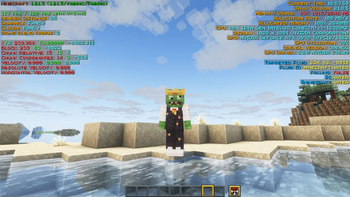


About this Modpack

👑 FunkyClient
😍 This modpack is perfect for enjoying Minecraft with friends on servers or just chilling in singleplayer. The purpose of this pack is to enhance Minecraft while keeping it true to vanilla — it doesn’t add new gameplay content, only client-side improvements for visuals, performance, and quality of life.
👨🏫 It includes all the mods, resource packs, and the shader I use every time I play Minecraft. Anytime I make changes, I’ll update this modpack so it always reflects exactly what I use.
✨ What’s Inside?
🖼️ Visual & Vibe Enhancers
Complementary Shaders + Iris ☀️
Visuality, Falling Leaves, Cave Dust, Armor Chroma, Enchantment Outlines
Drippy Loading Screen, Better Clouds, 3D Skin Layers, Chat Animation, Fresh Animations
🎧 Immersive Audio
AmbientSounds, Melody, Sound Physics Remastered, Sparkle!, Sounds 🎶
Make the world feel alive
🛠️ Performance Boosters
Sodium, Lithium, FerriteCore, Entity Culling, More Culling, ImmediatelyFast ⚙️
FPS Display to keep it real
🧰 Quality of Life Tweaks
AppleSkin, Durability Tooltip, Shulker Box Tooltip, InvMove, Mouse Tweaks
RightClickHarvest, Hold My Items, Pick Up Notifier, Cherished Worlds
Fullbright with Gamma Utils 🌕
BetterF3 and Mod Menu for clean control
⚔️ Combat & Gear Overhaul
YDM’s Weapon Master 🔪
Viper’s Enchantment Overhaul for better looking books
blob’s Enchant Icons, Not Enough Animations, Better Third Person for smooth fighting
🗺️ Exploration Tools
Xaero’s Minimap + World Map 🧭
Visible Traders, Villager Trading Plus
Glowing Ores! to make mining easyier
Available Versions
How to Set Up a FunkyClient Server
Order Server
Choose at least 4 GB RAM (6 GB recommended for FunkyClient). Based on player count: per 8 players.
Install Modpack in Dashboard
Open the modpack browser in the dashboard, search for "FunkyClient" and click "Install". The fabric loader and Minecraft 1.21.11 are configured automatically.
Start Server & Play
Start the server – all mods are loaded automatically. Share the server IP with friends and play together!
Frequently Asked Questions
FunkyClient server crashes or won't start – what to do?
Most common causes: insufficient RAM or wrong fabric loader. Check latest.log for "OutOfMemoryError" → increase RAM to at least 6 GB. For "Mixin" or "ClassNotFoundException" errors: modpack version and loader don't match. With Mado Hosting, loader and Minecraft version are auto-configured on modpack install – preventing most startup issues.
How much RAM does a FunkyClient server really need?
Minimum 4 GB, recommended 6 GB for stable performance. per 8 players. Important: Minecraft modpacks need more RAM than vanilla – plan extra per additional player. With Mado Hosting, you can scale RAM up live at any time without data loss (from €8/month).
Can I add custom mods to FunkyClient without conflicts?
Yes, but check compatibility: only use mods for the same loader (fabric) and same Minecraft version (1.21.11). Common issues: ID conflicts with recipe mods and incompatible coremod versions. The Mado dashboard mod browser only shows compatible mods and warns about known conflicts.
FunkyClient server lagging – performance tips
1) Increase RAM to 6 GB+. 2) Reduce server view-distance to 8 (server.properties). 3) Pre-generate chunks with the "Chunky" plugin. 4) Use /spark profiler to check which mods consume the most tick time. With Mado Hosting, all servers run on NVMe SSDs with dedicated CPU cores – eliminating hardware as a bottleneck.
Rent FunkyClient Server
Start your own server with automatic modpack installation.
Supported Versions
Start your FunkyClient Server now
From €8.00/month with 6 GB RAM for the best performance.
Configure Server →