
Funky Vanilla
Feels like the base-game, but is it really?
Screenshots
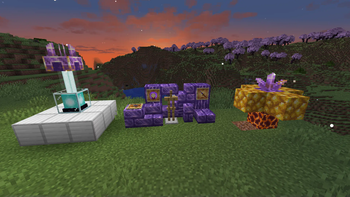
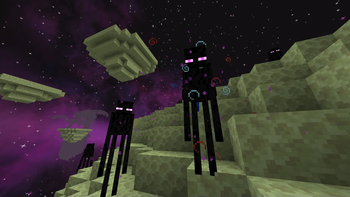

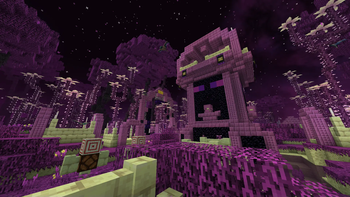
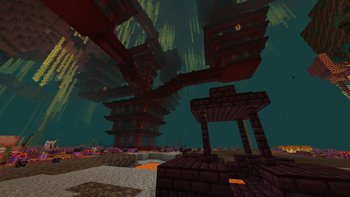

About this Modpack

What is this modpack?
Funky Vanilla aims to enhance the vanilla experience by not adding too much bloat. All mods added in this modpack don't strive too far from the vanilla vibe and either add some cool use, alter exsisting mechanics, or are just straight up goofy.
Any specific features you want to mention?
There are a few features I'd like to brush over:
- New advancements 📈
- HUD changes and fixes 📱
- New decorative blocks ✨
- Changes to the Nether and End dimensions 🌌
- Two new dimensions (Deeper and Darker, The Bumble Zone) 🐝
- New technology to mess around with 🔧
- New tools, weapons, and materials ⛏️
- ...and more!
Is it Optimized?
Optimization is a big topic when it comes to running the game, especially with mods. There are many optimization mods in this modpack. Bellow is a list of all the optimization mods and what they do for the game to run smoothly:
Optimizations
Enhanced Block Entities - Reduces block entity FPS lag
Ferrite Core - Optimizes memory usage
ImmediatelyFast - Speeds up rendering
Krypton - Network optimizations
Lithium - Server optimizations
ModernFix - offers general optimizations and fixes bugs
QDResLoader - reuses the QSL resource loading system
Sodium - a modern renderer for Minecraft
ThreadTweak - makes booting up the game easier on your hardware
Spark - performance profiler for Minecraft
Async Locator - optimizes the loading of structures
C2ME (Fabric) - improves chunk performance
Dynamic FPS - alters the FPS when tabbed out
Fastload - speeds up world loading
Noisium - optimises worldgen performance
Are the mods compatable?
In my time of playing, I have found no issues with mod compatability other than some wood types not being able to be crafted into big doors and end rituals not being compatable with the enchant overhaul. Other than those things, nothing too big stands out.
Any last words?
This modpack was originally meant for some of my friends to play, and it still is, but I kinda got side-tracked and made this behemoth of a modrinth page. I really hope you enjoy this modpack as much as I do. This is one of the most high effort modpacks I have ever made, and I personaly am proud of it.
Will you update this modpack to newer versions?
Most likely not. Sorry.
Available Versions
How to Set Up a Funky Vanilla Server
Order Server
Choose at least 6 GB RAM (8 GB recommended for Funky Vanilla). Based on player count: per 5 players.
Install Modpack in Dashboard
Open the modpack browser in the dashboard, search for "Funky Vanilla" and click "Install". The quilt loader and Minecraft 1.20.1 are configured automatically.
Start Server & Play
Start the server – all mods are loaded automatically. Share the server IP with friends and play together!
Frequently Asked Questions
Funky Vanilla server crashes or won't start – what to do?
Most common causes: insufficient RAM or wrong quilt loader. Check latest.log for "OutOfMemoryError" → increase RAM to at least 8 GB. For "Mixin" or "ClassNotFoundException" errors: modpack version and loader don't match. With Mado Hosting, loader and Minecraft version are auto-configured on modpack install – preventing most startup issues.
How much RAM does a Funky Vanilla server really need?
Minimum 6 GB, recommended 8 GB for stable performance. per 5 players. Important: Minecraft modpacks need more RAM than vanilla – plan extra per additional player. With Mado Hosting, you can scale RAM up live at any time without data loss (from €12/month).
Can I add custom mods to Funky Vanilla without conflicts?
Yes, but check compatibility: only use mods for the same loader (quilt) and same Minecraft version (1.20.1). Common issues: ID conflicts with recipe mods and incompatible coremod versions. The Mado dashboard mod browser only shows compatible mods and warns about known conflicts.
Funky Vanilla server lagging – performance tips
1) Increase RAM to 8 GB+. 2) Reduce server view-distance to 8 (server.properties). 3) Pre-generate chunks with the "Chunky" plugin. 4) Use /spark profiler to check which mods consume the most tick time. With Mado Hosting, all servers run on NVMe SSDs with dedicated CPU cores – eliminating hardware as a bottleneck.
Similar Modpacks
![Cobblemon Official Modpack [Fabric]](https://cdn.modrinth.com/data/5FFgwNNP/e7f9ee2e9d361623847853fe2ddce42f519ee64f.png)
![COBBLEVERSE - Pokemon Adventure [Cobblemon]](https://cdn.modrinth.com/data/Jkb29YJU/581ecf54530972afb18a04660afd820f2f24f6c7.png)
![Better MC [FABRIC] - BMC2](https://cdn.modrinth.com/data/shFhR8Vx/a19c2bcb51d38f32f138d3607e91cb2b7b8e387f_96.webp)


![Better MC [FORGE] - BMC4](https://cdn.modrinth.com/data/4BV47HRn/7f5ef7cc61b2593609aabef3ed07a866a4f11b73_96.webp)
Rent Funky Vanilla Server
Start your own server with automatic modpack installation.
Supported Versions
Start your Funky Vanilla Server now
From €12.00/month with 8 GB RAM for the best performance.
Configure Server →