
GABG's XVanilla
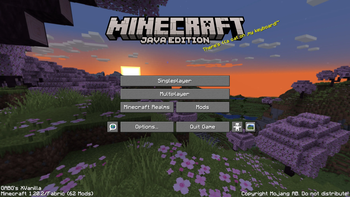
Derived from Fabulously Optimized, GABG's XVanilla adds many QoL improvements to the game. Faithful 32x and Shaders included!
Screenshots
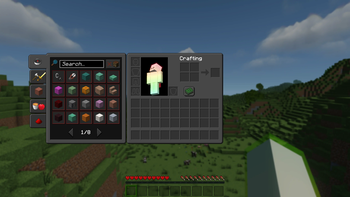
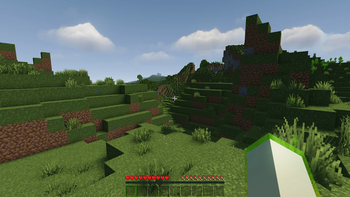
About this Modpack
GABG's XVanilla



GABG's XVanilla (GABG's XV or GXV if it's too long for you) is an opinionated modpack derived from Fabulously Optimized (FO for short) with the goal of adding even more QoL (Quality of Live) improvements
Differences from FO
Items with their names formatted with strikethough are present in FO, but are removed from GABG's XVanilla
Mods
- 3D Skin Layers - Render the player skin layer in 3D
- Advancement Plaques - Replace the advancement popups with something flashier.
- AmbientSounds - Adds a rich ambience to the minecraft world
- Better Animations Collection - Adds a bunch of animations to the game
Better Beds- Changes the renderer of the bed to use json models instead of a block entity renderer- Better Enchanted Books - Colorized lace in the Enchanted Books and shows the max possible level
- Better Mount HUD - Improves the ingame HUD while riding a mount
- Better Command Block UI - Enhances the Command Block UI
- Blur - Adds a blur effect to all GUI backgrounds
- Better Recipe Book - Adds a 'few' quality of life changes to the recipe book
- Cake Chomps - Adds sound and crumb particles when you eat a piece of cake
- Chat Heads - Adds player heads next to player-specific chat messages
- Dark Loading Screen - Makes the loading screen darker
FastQuit- Lets you return to the Title Screen early while your world is still saving in the background- Fluid Void Fading - Renders fluids flowing into the void
- Mouse Tweaks - Enhances inventory management by adding various functions to the mouse buttons
- Not Enough Animations - Bringing first-person animations to the third-person
- Repeater Sound - Add click sound to some redstone components
- Screenshot Viewer - View your screenshots in game
- Sound Physics Remastered - Provides realistic sound attenuation, reverberation, and absorption through blocks
- Stendhal - New and enhanced visual utilities for books, signs, anvil and the in-game chat
- Timeless - Brings back old features
- Visuality - Little visual improvements
Some mods were omited from this list since they have very little or no user-facing functions.
Resource Packs
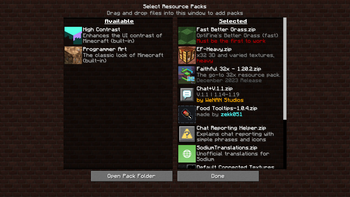
- Faithful 32x - The iconic Faithful 32x resource pack
- Enhanced Faithcraft - Faithful 32x addon that adds a few improvements
- Chat + - Adding tiny icons to vanilla chat messages
- Food Tooltips - Display food value on tooltips
Vanilla settings
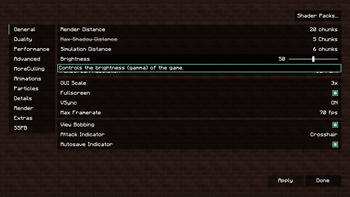
- Render distance: 20
- Max FPS: 70
Available Versions
How to Set Up a GABG's XVanilla Server
Order Server
Choose at least 4 GB RAM (6 GB recommended for GABG's XVanilla). Based on player count: per 8 players.
Install Modpack in Dashboard
Open the modpack browser in the dashboard, search for "GABG's XVanilla" and click "Install". The fabric loader and Minecraft 1.21.11 are configured automatically.
Start Server & Play
Start the server – all mods are loaded automatically. Share the server IP with friends and play together!
Frequently Asked Questions
GABG's XVanilla server crashes or won't start – what to do?
Most common causes: insufficient RAM or wrong fabric loader. Check latest.log for "OutOfMemoryError" → increase RAM to at least 6 GB. For "Mixin" or "ClassNotFoundException" errors: modpack version and loader don't match. With Mado Hosting, loader and Minecraft version are auto-configured on modpack install – preventing most startup issues.
How much RAM does a GABG's XVanilla server really need?
Minimum 4 GB, recommended 6 GB for stable performance. per 8 players. Important: Minecraft modpacks need more RAM than vanilla – plan extra per additional player. With Mado Hosting, you can scale RAM up live at any time without data loss (from €8/month).
Can I add custom mods to GABG's XVanilla without conflicts?
Yes, but check compatibility: only use mods for the same loader (fabric) and same Minecraft version (1.21.11). Common issues: ID conflicts with recipe mods and incompatible coremod versions. The Mado dashboard mod browser only shows compatible mods and warns about known conflicts.
GABG's XVanilla server lagging – performance tips
1) Increase RAM to 6 GB+. 2) Reduce server view-distance to 8 (server.properties). 3) Pre-generate chunks with the "Chunky" plugin. 4) Use /spark profiler to check which mods consume the most tick time. With Mado Hosting, all servers run on NVMe SSDs with dedicated CPU cores – eliminating hardware as a bottleneck.
Similar Modpacks

![Cobblemon Official Modpack [Fabric]](https://cdn.modrinth.com/data/5FFgwNNP/e7f9ee2e9d361623847853fe2ddce42f519ee64f.png)
![COBBLEVERSE - Pokemon Adventure [Cobblemon]](https://cdn.modrinth.com/data/Jkb29YJU/581ecf54530972afb18a04660afd820f2f24f6c7.png)
![Better MC [FABRIC] - BMC2](https://cdn.modrinth.com/data/shFhR8Vx/a19c2bcb51d38f32f138d3607e91cb2b7b8e387f_96.webp)


Rent GABG's XVanilla Server
Start your own server with automatic modpack installation.
Details
- License
- GNU General Public License v3.0 or later
- Server-side
- Unsupported
- Client-side
- Required
Supported Versions
Start your GABG's XVanilla Server now
From €8.00/month with 6 GB RAM for the best performance.
Configure Server →