
GoodM
Make your minecraft more fun!
Screenshots
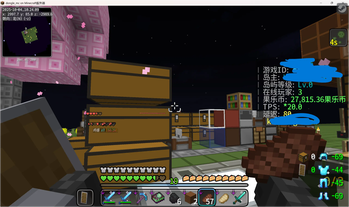
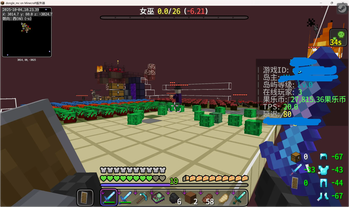
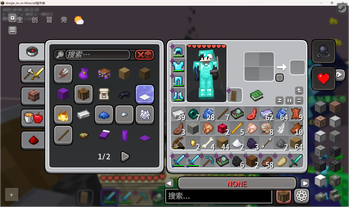
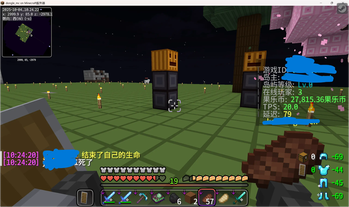
About this Modpack
🎮 GoodM 我的世界整合包
✨ 一个集性能优化、视觉增强、实用工具于一体的超强整合包! ✨
著作权 © JetCPP Studio
项目主页: https://jetcpp.dpdns.org/project/goodminecraft.html
🚀 整合包特色
🎯 核心亮点
- ⚡ 性能爆表 - 帧率提升200%+,告别卡顿
- 🎨 视觉盛宴 - 光影加持,画面美到哭
- 🛠️ 功能齐全 - 生存、建筑、红石全支持
- 🎮 操作丝滑 - 各种便捷功能爽到飞起
🛠️ 核心模组阵容
🚀 性能优化组 (帧率起飞!)
| 模组 | 功能说明 | 体验提升 |
|---|---|---|
| 钠 (Sodium) | 🚀 渲染引擎优化 | 帧率暴涨,流畅如丝 |
| 铁氧体磁芯 (FerriteCore) | 💾 内存占用优化 | 内存占用减少30% |
| 实体渲染机制优化 | 👥 智能实体管理 | 多人服务器不卡顿 |
| 树叶渲染优化 | 🌿 树叶剔除技术 | 丛林探险更流畅 |
| 动态 FPS | 🔄 后台自动降频 | 省电又护眼 |
🎨 视觉增强组 (眼睛怀孕!)
| 模组 | 功能说明 | 视觉效果 |
|---|---|---|
| Iris Shaders | 🌈 光影支持 | 电影级画质 |
| 钠扩展 | ⚙️ 更多视觉选项 | 细节拉满 |
| 飘扬披风 | 🦸 动态披风效果 | 走路带风 |
| 3D 皮肤层 | 👤 立体皮肤渲染 | 角色更有层次 |
| 界面背景模糊 | 🎭 炫酷界面效果 | 科技感爆棚 |
🎮 生存必备组 (生存玩家狂喜!)
| 模组 | 功能说明 | 实用程度 |
|---|---|---|
| 投影 (Litematica) | 🏗️ 建筑蓝图 | 建筑神器 |
| 一键背包整理 | 🎒 自动整理 | 告别强迫症 |
| 连锁采矿 | ⛏️ 连锁挖掘 | 挖矿效率翻倍 |
| 简易附魔台 | ✨ 智能附魔 | 告别随机附魔 |
| 通用附魔 | 🔮 更多附魔 | 装备更强大 |
🔧 实用工具组 (爽到飞起!)
| 模组 | 功能说明 | 便利程度 |
|---|---|---|
| Xaero的小地图 | 🗺️ 实时地图 | 再也不迷路 |
| 游戏内账号切换 | 🔄 快速换号 | 多账号福音 |
| 拾取提示 | 📦 物品拾取提醒 | 重要物品不错过 |
| 更好的F3 | 🔍 信息显示优化 | 调试更直观 |
| 快速退出 | ⏩ 秒退游戏 | 告别等待 |
🎨 材质包推荐
🌟 视觉优化类
- CozyUI - 超美界面材质,温馨又舒适 🏠
- Fresh Animations - 生动动画效果,生物更可爱 🦊
- Dramatic Skys - 史诗级天空材质,云彩美如画 ☁️
- Angel's Weather - 天气效果增强,真实感爆表 🌧️
🎯 实用功能性
- NewGlowingOres - 发光矿石,挖矿更轻松 💎
- 红石必备材质 - 红石电路一目了然 🔴
- Fullbright - 永久夜视效果,洞穴探险无压力 🌙
🎭 趣味性材质
- Better Expressions - 更丰富的生物表情 😊
- Blue's Better Monsters - 怪物美化,恐怖又可爱 👻
- Smooth Bow Animation - 平滑拉弓动画 🏹
⚙️ 配置要求
💻 最低配置
- 处理器: Intel i3 或同等性能
- 内存: 4GB 分配内存
- 显卡: GTX 750 Ti 或同等
- 存储: 至少 2GB 可用空间
🚀 推荐配置
- 处理器: Intel i5 或同等性能
- 内存: 8GB 分配内存
- 显卡: GTX 1060 或同等
- 存储: 4GB 可用空间
📥 安装指南
🛠️ 快速安装
下载整合包 📦
- 确保你有最新的 Fabric 加载器
- 下载 GoodM 整合包文件
安装步骤 🔧
1. 备份你的 .minecraft 文件夹
2. 将整合包文件解压到 .minecraft 文件夹
3. 启动游戏,选择 Fabric 配置档
4. Enjoy! 🎉
首次启动 ✨
- 等待模组加载完成
- 根据需要调整光影设置
- 配置小地图快捷键
- 设置投影快捷键
🎯 使用技巧
🎮 快捷键设置
| 功能 | 推荐按键 | 说明 |
|---|---|---|
| 小地图 | M | 打开地图设置 |
| 投影菜单 | M+C | 建筑投影功能 |
| 连锁采矿 | ` (波浪键) | 快速连锁挖掘 |
| 背包整理 | R | 一键整理物品 |
| 快速退出 | F4 | 秒退游戏 |
⚡ 性能优化技巧
- 🔧 渲染距离: 8-12 区块 (平衡性能与视野)
- 🌈 光影: 推荐 Complementary 或 BSL
- 💾 内存: 分配 6-8GB 获得最佳体验
- 🎮 实体渲染: 根据电脑性能调整
🎉 特色功能展示
🏗️ 建筑神器 - 投影
- 📐 精准复制 - 完美复刻任何建筑
- 🎯 实时预览 - 建造过程一目了然
- 🛠️ 一键粘贴 - 快速放置方块
🗺️ 导航专家 - 小地图
- 📍 实时定位 - 永远知道自己在哪
- 🏠 标记点 - 重要地点一键标记
- 👥 实体显示 - 怪物、动物、玩家位置
⛏️ 挖矿大师 - 连锁功能
- 🔗 连锁挖掘 - 一键挖掉整片矿物
- 🎯 精准选择 - 只连锁同类方块
- ⚡ 效率翻倍 - 挖矿速度提升300%
🚨 注意事项
⚠️ 重要提醒
- 🔒 服务器兼容性: 部分服务器可能限制某些模组
- 💾 内存管理: 建议分配 6-8GB 内存
- 🔄 版本更新: 定期检查模组更新
- 📁 备份存档: 重要存档记得备份
🎮 游戏体验建议
- 首次游玩建议从生存模式开始
- 熟悉各模组功能后再进行大型建筑
- 根据电脑性能调整光影设置
- 合理使用投影功能,避免过度依赖
🤝 社区支持
📢 反馈与建议
如果你在使用过程中遇到问题或有改进建议:
- 📧 提交问题反馈
- 💡 分享你的使用体验
- 🎮 交流游戏心得
🔄 更新计划
- 📅 每周更新: 模组版本更新
- 🎯 功能优化: 持续改进用户体验
- 🐛 BUG修复: 及时修复问题
🎊 开始你的冒险吧!
准备好体验最丝滑、最美观、最实用的我的世界了吗?🎮
GoodM 整合包 - 让你的我的世界焕然一新!✨
著作权 © JetCPP Studio
项目主页: https://jetcpp.dpdns.org/project/goodminecraft.html
💖 感谢所有模组开发者的辛勤付出!
🚀 祝您游戏愉快!
Available Versions
How to Set Up a GoodM Server
Order Server
Choose at least 4 GB RAM (6 GB recommended for GoodM). Based on player count: per 8 players.
Install Modpack in Dashboard
Open the modpack browser in the dashboard, search for "GoodM" and click "Install". The fabric loader and Minecraft 1.21.11 are configured automatically.
Start Server & Play
Start the server – all mods are loaded automatically. Share the server IP with friends and play together!
Frequently Asked Questions
GoodM server crashes or won't start – what to do?
Most common causes: insufficient RAM or wrong fabric loader. Check latest.log for "OutOfMemoryError" → increase RAM to at least 6 GB. For "Mixin" or "ClassNotFoundException" errors: modpack version and loader don't match. With Mado Hosting, loader and Minecraft version are auto-configured on modpack install – preventing most startup issues.
How much RAM does a GoodM server really need?
Minimum 4 GB, recommended 6 GB for stable performance. per 8 players. Important: Minecraft modpacks need more RAM than vanilla – plan extra per additional player. With Mado Hosting, you can scale RAM up live at any time without data loss (from €8/month).
Can I add custom mods to GoodM without conflicts?
Yes, but check compatibility: only use mods for the same loader (fabric) and same Minecraft version (1.21.11). Common issues: ID conflicts with recipe mods and incompatible coremod versions. The Mado dashboard mod browser only shows compatible mods and warns about known conflicts.
GoodM server lagging – performance tips
1) Increase RAM to 6 GB+. 2) Reduce server view-distance to 8 (server.properties). 3) Pre-generate chunks with the "Chunky" plugin. 4) Use /spark profiler to check which mods consume the most tick time. With Mado Hosting, all servers run on NVMe SSDs with dedicated CPU cores – eliminating hardware as a bottleneck.
Similar Modpacks

![Cobblemon Official Modpack [Fabric]](https://cdn.modrinth.com/data/5FFgwNNP/e7f9ee2e9d361623847853fe2ddce42f519ee64f.png)
![COBBLEVERSE - Pokemon Adventure [Cobblemon]](https://cdn.modrinth.com/data/Jkb29YJU/581ecf54530972afb18a04660afd820f2f24f6c7.png)
![Better MC [FABRIC] - BMC2](https://cdn.modrinth.com/data/shFhR8Vx/a19c2bcb51d38f32f138d3607e91cb2b7b8e387f_96.webp)


Rent GoodM Server
Start your own server with automatic modpack installation.
Supported Versions
Start your GoodM Server now
From €8.00/month with 6 GB RAM for the best performance.
Configure Server →