
Gurby's Christmas Pack
A tiny, festive modpack made for Gurby’s community—featuring constant snowfall, glowing holiday decorations, and a calm, cozy singleplayer experience.
Screenshots

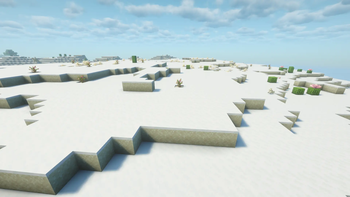

About this Modpack
🎄Gurby's Christmas Pack🎄
A cozy, holiday adventure for Gurby's community!
Step into a world wrapped in twinkling lights, gentle snowfall and the warm charm of the holidays! Gurby's Christmas Pack was put together for Gurby's community, giving everyone an easy way to enjoy the festive season alongside GurbyGrey.
✨FEATURES✨
- Endless Winter Atmosphere! Snowy Weather blankets every biome in snow, and freezes all exposed water for a fully immersed winter wonderland.
- Enhanced Snowfall Effects! Biome Particle Weather adds pretty snowfall to your Minecraft world for a more magical, winter feel.
- Festive Lights & Classic Decorations! Gren's Christmas Chests + Leaves brings glowing lights to leaf blocks and the iconic Christmas chests from vanilla's holiday event.
- Simple, Cozy and Lightweight! Minimal mods, maximum holiday mood. Perfect for anyone with a difficult PC.
- Perfect for Seasonal Play! Designed for relaxed, personal holiday experiences! Build a snowy cabin, decorate a festive village, or just enjoy the peaceful ambience.
🎁Made by Gurby, Shared With You🎁
Cozy up, stay warm, and enjoy the season!
Merry Christmas from Gurby's community! 🎅✨
This modpack is released under All Rights Reserved.
You may not redistribute this pack or upload it elsewhere.
All included mods and resource packs remain the property of their respective creators and follow their original licenses. This pack only bundles them for convenience for GurbyGrey’s community.
Available Versions
How to Set Up a Gurby's Christmas Pack Server
Order Server
Choose at least 4 GB RAM (6 GB recommended for Gurby's Christmas Pack). Based on player count: per 8 players.
Install Modpack in Dashboard
Open the modpack browser in the dashboard, search for "Gurby's Christmas Pack" and click "Install". The fabric loader and Minecraft 1.21.8 are configured automatically.
Start Server & Play
Start the server – all mods are loaded automatically. Share the server IP with friends and play together!
Frequently Asked Questions
Gurby's Christmas Pack server crashes or won't start – what to do?
Most common causes: insufficient RAM or wrong fabric loader. Check latest.log for "OutOfMemoryError" → increase RAM to at least 6 GB. For "Mixin" or "ClassNotFoundException" errors: modpack version and loader don't match. With Mado Hosting, loader and Minecraft version are auto-configured on modpack install – preventing most startup issues.
How much RAM does a Gurby's Christmas Pack server really need?
Minimum 4 GB, recommended 6 GB for stable performance. per 8 players. Important: Minecraft modpacks need more RAM than vanilla – plan extra per additional player. With Mado Hosting, you can scale RAM up live at any time without data loss (from €8/month).
Can I add custom mods to Gurby's Christmas Pack without conflicts?
Yes, but check compatibility: only use mods for the same loader (fabric) and same Minecraft version (1.21.8). Common issues: ID conflicts with recipe mods and incompatible coremod versions. The Mado dashboard mod browser only shows compatible mods and warns about known conflicts.
Gurby's Christmas Pack server lagging – performance tips
1) Increase RAM to 6 GB+. 2) Reduce server view-distance to 8 (server.properties). 3) Pre-generate chunks with the "Chunky" plugin. 4) Use /spark profiler to check which mods consume the most tick time. With Mado Hosting, all servers run on NVMe SSDs with dedicated CPU cores – eliminating hardware as a bottleneck.
Similar Modpacks

![Cobblemon Official Modpack [Fabric]](https://cdn.modrinth.com/data/5FFgwNNP/e7f9ee2e9d361623847853fe2ddce42f519ee64f.png)
![COBBLEVERSE - Pokemon Adventure [Cobblemon]](https://cdn.modrinth.com/data/Jkb29YJU/581ecf54530972afb18a04660afd820f2f24f6c7.png)
![Better MC [FABRIC] - BMC2](https://cdn.modrinth.com/data/shFhR8Vx/a19c2bcb51d38f32f138d3607e91cb2b7b8e387f_96.webp)


Rent Gurby's Christmas Pack Server
Start your own server with automatic modpack installation.
Supported Versions
Start your Gurby's Christmas Pack Server now
From €8.00/month with 6 GB RAM for the best performance.
Configure Server →