
Hardcore Frozen Apocalypse
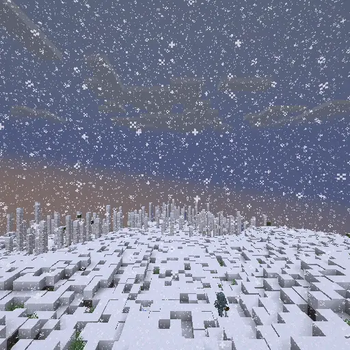
Survive an endless winter. Food is scarce, caves are cruel, and the surface is stalked by the frozen dead. This pack blends chilly survival with exploration and light automation—perfect for hardcore worlds and co-op runs.
Screenshots
About this Modpack
What’s inside
Frozen survival theme: New frozen threats and frigid ambience to keep every venture risky and rewarding.
Exploration & structures: YUNG’s Better Strongholds, Mineshafts, and Cave Biomes overhaul the underground; discover Underground Bunkers, Underground Villages, and the ominous Frozen Zombie Castle while you scavenge for supplies.
Light automation & utilities: Create (Fabric) lets you bootstrap contraptions to process resources and stabilize your base. Waystones streamline travel, and Sophisticated Backpacks keeps your kit organized.
Combat & clarity: Better Combat upgrades melee feel; JEI and Jade keep recipes and block info at your fingertips; AppleSkin, Inventory Profiles Next, Controlling, and Searchables polish the moment-to-moment experience.
Atmosphere: Sound Physics Remastered and Visuality add crunchy, wintry immersion. Iris is included with curated shaderpacks (Snowimagined, Rethinking Voxels) and two bundled resource packs (Mandala Utopia + GUI Darkmode) for a crisp, icy look out of the box.
Multiplayer-ready: Simple Voice Chat for proximity chat, Hardcore Revival for downed-ally rescues, and No Chat Reports for private servers.
Performance by default: Sodium, Indium, Sodium Extra, FerriteCore, ModernFix, and Spark are pre-tuned so you can play smoothly without tweaking.
Recommended playstyle
Hardcore or semi-hardcore. Scout carefully, settle near underground networks, and push outward once you’re geared.
Explore to progress. Bunkers, villages, and reworked dungeons are your lifelines to better loot and safer routes.
Automate smartly. Use Create for resource processing and survival QoL as you carve out a thawed refuge below the ice.
Sponsor
Available Versions
How to Set Up a Hardcore Frozen Apocalypse Server
Order Server
Choose at least 6 GB RAM (8 GB recommended for Hardcore Frozen Apocalypse). Based on player count: per 5 players.
Install Modpack in Dashboard
Open the modpack browser in the dashboard, search for "Hardcore Frozen Apocalypse" and click "Install". The fabric loader and Minecraft 1.20.1 are configured automatically.
Start Server & Play
Start the server – all mods are loaded automatically. Share the server IP with friends and play together!
Frequently Asked Questions
Hardcore Frozen Apocalypse server crashes or won't start – what to do?
Most common causes: insufficient RAM or wrong fabric loader. Check latest.log for "OutOfMemoryError" → increase RAM to at least 8 GB. For "Mixin" or "ClassNotFoundException" errors: modpack version and loader don't match. With Mado Hosting, loader and Minecraft version are auto-configured on modpack install – preventing most startup issues.
How much RAM does a Hardcore Frozen Apocalypse server really need?
Minimum 6 GB, recommended 8 GB for stable performance. per 5 players. Important: Minecraft modpacks need more RAM than vanilla – plan extra per additional player. With Mado Hosting, you can scale RAM up live at any time without data loss (from €12/month).
Can I add custom mods to Hardcore Frozen Apocalypse without conflicts?
Yes, but check compatibility: only use mods for the same loader (fabric) and same Minecraft version (1.20.1). Common issues: ID conflicts with recipe mods and incompatible coremod versions. The Mado dashboard mod browser only shows compatible mods and warns about known conflicts.
Hardcore Frozen Apocalypse server lagging – performance tips
1) Increase RAM to 8 GB+. 2) Reduce server view-distance to 8 (server.properties). 3) Pre-generate chunks with the "Chunky" plugin. 4) Use /spark profiler to check which mods consume the most tick time. With Mado Hosting, all servers run on NVMe SSDs with dedicated CPU cores – eliminating hardware as a bottleneck.
Similar Modpacks
![Cobblemon Official Modpack [Fabric]](https://cdn.modrinth.com/data/5FFgwNNP/e7f9ee2e9d361623847853fe2ddce42f519ee64f.png)
![COBBLEVERSE - Pokemon Adventure [Cobblemon]](https://cdn.modrinth.com/data/Jkb29YJU/581ecf54530972afb18a04660afd820f2f24f6c7.png)
![Better MC [FABRIC] - BMC2](https://cdn.modrinth.com/data/shFhR8Vx/a19c2bcb51d38f32f138d3607e91cb2b7b8e387f_96.webp)


![Better MC [FORGE] - BMC4](https://cdn.modrinth.com/data/4BV47HRn/7f5ef7cc61b2593609aabef3ed07a866a4f11b73_96.webp)
Rent Hardcore Frozen Apocalypse Server
Start your own server with automatic modpack installation.
Supported Versions
Start your Hardcore Frozen Apocalypse Server now
From €12.00/month with 8 GB RAM for the best performance.
Configure Server →