
Harvista
「Harvista」is a leisure, development-oriented sweet modpack.
Screenshots
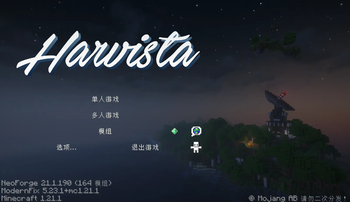
About this Modpack

Round lotus pads float on the stream,
Tiny leaves adrift like a dream;
Slender wheat lets blossoms fly,
Light as breeze in summer’s sky.
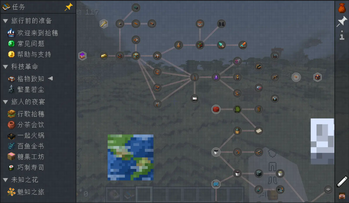
「Harvista」 is a leisure, development-oriented sweet modpack. Within 「Harvista」, you'll embark on a long journey from steam engines to the vast expanse of the stars: start with simple machinery, develop industry, and build automation networks; ultimately soar through the skies to see the myriad stars like dust. 「Harvista」 also features a rich and engaging culinary system. Experiment with cooking diverse delicacies, delve into a wealth of gourmet recipes, earn milestones on your agricultural path, and pursue the legendary 「CatBurger」. Immerse yourself in tranquility while strolling through exquisite settlements, or embrace the challenge of the unknown and conquer formidable foes... The story of 「Harvista」 is yours to unfold.
Overview
Technology:「Harvista」 aims to craft a fresh technological journey. We’ve selected cutting-edge mods like Oritech and stellaris, boldly stepping away from traditional mods like IC2 and Create. The new mods feature stunning animation effects, turning mechanical operations into visual delights. They preserve classic elements while introducing unique mechanisms and content through thoughtful design. We’ve also implemented specialized compatibility optimizations for tech mods, building a self-consistent technological ecosystem.
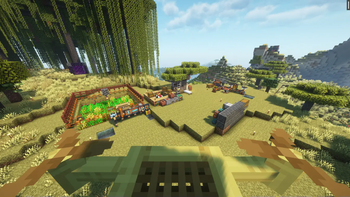
Agriculture:「Harvista」 fully removes beyond homogenized farming mods like Farmer’s Delight and the "Let's Do" series, opting instead for niche gems like Caupona and EveryXHotpot. Through thoughtful mod pairing, 「Harvista」 offers rich gameplay and a compatible cooking system, delivering a layered culinary experience.
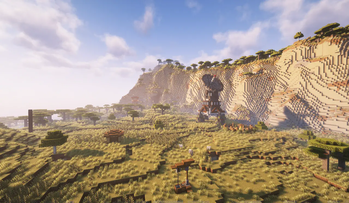
World Generation: 「Harvista」 introduces diverse new biomes and structures, bringing fresh allies and foes. We’ve optimized world generation for harmony, ensuring modded structures generate correctly within modded biomes to enhance exploration immersion.
Less is More: More mods aren’t always better—only through careful curation can a modpack achieve magic. As a lightweight pack, 「Harvista」 meticulously selects 141 mods to build a comprehensive yet streamlined gameplay system, rejecting bloat and redundancy.
Smooth Experience: 「Harvista」 is deeply optimized for performance-quality balance. It retains stunning visuals while ensuring stable frame rates and smooth gameplay. Even in late-game factory hubs, TPS remains stable.
- Recommended Specs: Intel® Core™ i5-10400, NVIDIA GeForce RTX 3050, 6GB RAM allocation
- Minimum Specs: Intel® Core™ i5-7400, NVIDIA GeForce GTX 1050, 4GB RAM allocation
- Tested Performance: Intel® Core™ Ultra 9 285H + NVIDIA GeForce RTX 5060 | 1080p + Complementary Shaders (High Preset) | Average 121 FPS
Tip: If experiencing lag, try disabling heavy client-side mods like Particular. A performance-focused Lite version is planned for future release.
FAQ
Q: My game is stuttering/lagging!
A: Harvista is a modern modpack built for the latest Minecraft version and has certain system requirements. Try disabling shaders, lowering graphics settings, or removing high-impact visual mods (e.g., Particular).
Q: There are two suns in my sky!
A: Some shaders (e.g., Complementary Shaders) conflict with the modified skybox from stellaris mods. Load the resource pack HarvistaCompat to resolve this. Do not enable this pack if no issue exists!
Q: Structures aren’t generating properly!
A: Harvista has dedicated world-generation compatibility fixes, making this issue highly unlikely. Verify that the HarvistaCompat datapack is loaded at the top of your datapack list.
Q: I found a bug / My game crashed!
A: Sorry you encountered this! Please report it via our Feedback Page or inquire on our social media channels. We’ll assist as soon as possible.
Q: The new modpack version breaks my old save!
A: Saves from pre-1.20.1 (Harvista v2.x.x or earlier) are unrecoverable due to extensive mod changes—start a new world. For v3.x saves, check compatibility notes in the Changelog before updating.
Available Versions
How to Set Up a Harvista Server
Order Server
Choose at least 6 GB RAM (8 GB recommended for Harvista). Based on player count: per 5 players.
Install Modpack in Dashboard
Open the modpack browser in the dashboard, search for "Harvista" and click "Install". The forge loader and Minecraft 1.21.1 are configured automatically.
Start Server & Play
Start the server – all mods are loaded automatically. Share the server IP with friends and play together!
Frequently Asked Questions
Harvista server crashes or won't start – what to do?
Most common causes: insufficient RAM or wrong forge loader. Check latest.log for "OutOfMemoryError" → increase RAM to at least 8 GB. For "Mixin" or "ClassNotFoundException" errors: modpack version and loader don't match. With Mado Hosting, loader and Minecraft version are auto-configured on modpack install – preventing most startup issues.
How much RAM does a Harvista server really need?
Minimum 6 GB, recommended 8 GB for stable performance. per 5 players. Important: Minecraft modpacks need more RAM than vanilla – plan extra per additional player. With Mado Hosting, you can scale RAM up live at any time without data loss (from €12/month).
Can I add custom mods to Harvista without conflicts?
Yes, but check compatibility: only use mods for the same loader (forge) and same Minecraft version (1.21.1). Common issues: ID conflicts with recipe mods and incompatible coremod versions. The Mado dashboard mod browser only shows compatible mods and warns about known conflicts.
Harvista server lagging – performance tips
1) Increase RAM to 8 GB+. 2) Reduce server view-distance to 8 (server.properties). 3) Pre-generate chunks with the "Chunky" plugin. 4) Use /spark profiler to check which mods consume the most tick time. With Mado Hosting, all servers run on NVMe SSDs with dedicated CPU cores – eliminating hardware as a bottleneck.
Similar Modpacks

![Cobblemon Official Modpack [Fabric]](https://cdn.modrinth.com/data/5FFgwNNP/e7f9ee2e9d361623847853fe2ddce42f519ee64f.png)
![COBBLEVERSE - Pokemon Adventure [Cobblemon]](https://cdn.modrinth.com/data/Jkb29YJU/581ecf54530972afb18a04660afd820f2f24f6c7.png)
![Better MC [FABRIC] - BMC2](https://cdn.modrinth.com/data/shFhR8Vx/a19c2bcb51d38f32f138d3607e91cb2b7b8e387f_96.webp)


Rent Harvista Server
Start your own server with automatic modpack installation.
Supported Versions
Start your Harvista Server now
From €12.00/month with 8 GB RAM for the best performance.
Configure Server →