
hawgleNET
An amateur modpack that seeks to improve Adventuring, World Generation and add fun multiplayer features for small groups of players.
Screenshots
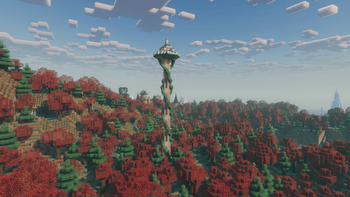
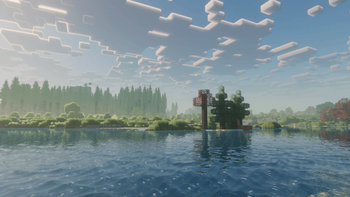
About this Modpack
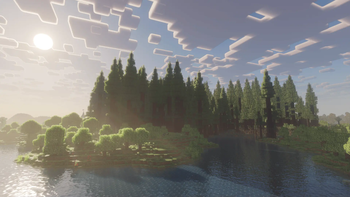
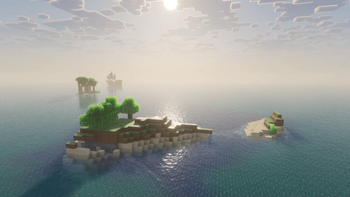
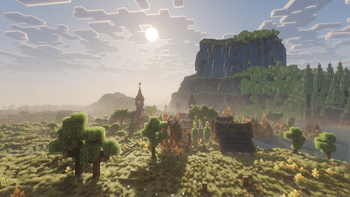
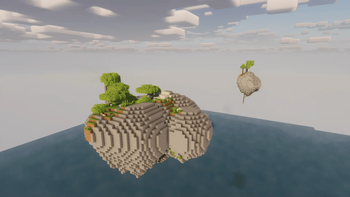
hawgleNET is an amateur modpack that I made for a small multiplayer server between me and my friends. I've selected mods that go along with the broad themes of improving adventuring by adding a lot of structures, making the world generation more interesting and adding fun multiplayer features such as the TVs and projectors of WaterFrames. A bit of client and server optimization is also included.
Please note that I'm not experienced with Minecraft modding. Expect the Modpack to be unoptimized and mods to be outdated. I've cobbled together something that works, and thats pretty much it.
List of included mods in Version 502 (133 Mods in total)
- Accessories [1.1.0-beta.6+1.21.1] by Blodhgarm, chyzman, Dr.Zeal
- Advanced Backups [3.6.4] by Mommy Heather
- Alternate Current [1.9.0] by Space Walker
- AmbientSounds [6.0.5] by CreativeMD
- Amendments [1.21-1.2.23] by MehVahdJukaar, Plantkillable
- AppleSkin [3.0.5+mc1.21] by squeek502
- Architectury [13.0.8] by shedaniel
- Armor Hud [2.1-1.21] by SaolGhra
- Armor Trim Item Fix [1.1.0] by MincraftEinstein
- Athena [4.0.1] by ThatGravyBoat
- BCLib [21.0.13] by Quiqueck, paulevs, Bulldog83
- Bad Packets [0.8.1] by deirn
- Balm [21.0.19] by BlayTheNinth
- Banner Flags [2.6] by Gurkis
- BedrockIfy [1.10.1+mc1.21] by juancarloscp52, lonefelidae16
- Better End [21.0.11] by Quiqueck (code), paulevs (code & art), Bulldog83 (code & art), Edos (building), Yuki (art), Seaward (art), Firel (music)
- Better Impaling [3.1] by boyonk
- Better Nether [21.0.11] by quiqueck, paulevs (original author)
- Better Ping Display [1.1.1] by Quintinity
- BetterF3 [11.0.1] by cominixo, TreyRuffy
- BiomesOPlenty [21.0.0.18] by Adubbz, Forstride
- Blossom Blade [1.3] by joshieman
- CICADA [0.8.3+1.21-and-above] by enjarai
- Capes [1.5.4+1.21] by Cael
- Cardinal Components API [6.1.1] by UpcraftLP, Pyrofab
- Chat Heads [0.13.0] by dzwdz, Fourmisain
- Chisel Refabricated [1.8.2] by Slaincow, KnowYourKnot, Original Creator: AUTOMATIC_MAIDEN
- ClientSort [0.9.0] by NotRyken
- Cloth Config v15 [15.0.130] by shedaniel
- Collective [7.87] by Rick South
- Compact Chat [2.1.1] by Caoimhe Byrne
- CreativeCore [2.12.9] by CreativeMD, AriaFreeze
- Cubes Without Borders [3.0.0+mc1.21] by Kir_Antipov
- Debugify [1.21+1.0] by isXander
- Detail Armor Bar [2.6.3+1.21-fabric] by RedLime
- Distant Horizons [2.2.1-a]
- Do a Barrel Roll [3.6.2+1.21] by enjarai
- Dungeons and Taverns [1-v4.4.4] by NovaWostra, Konci, Walls
- Dungeons+ [1.9.0b] by technodono
- Dynamic Crosshair [8.1+1.21] by Crendgrim
- Dynamic Crosshair Compat [4.2] by Crendgrim
- Dynamic FPS [3.7.7] by juliand665, LostLuma
- EMI [1.1.12+1.21+fabric] by Emi
- Eating Animation [1.21+1.9.72] by theone_ss, spusik_, PinkGoosik, DoctorNight1
- Elytra Pitch [1.3.1] by FatalFlare
- Entity Model Features [2.2.6] by Traben
- Entity Texture Features [6.2.8] by Traben
- EntityCulling [1.7.0] by tr7zw
- Fabric API [0.102.0+1.21] by FabricMC
- Fabric Language Kotlin [1.12.1+kotlin.2.0.20] by FabricMC
- Falling Leaves [1.16.2] by Fourmisain, BrekiTomasson, RandomMcSomethin
- Fast IP Ping [1.0.5] by Fallen_Breath
- Fast Paintings [1.21-1.2.15] by MehVahdJukaar
- Fast Scrolling [3.0.0] by Snownee
- FastQuit [3.0.0+1.20.6] by KingContaria
- FerriteCore [7.0.0] by malte0811
- Forge Config API Port [21.0.8] by Fuzs
- Freecam (Modrinth Edition) [1.3.0+mc1.21] by hashalite, Matt Sturgeon
- Friends&Foes [2.0.16] by Faboslav
- Friends&Foes - Beekeeper Hut [2.0.1] by Faboslav
- Friends&Foes - Flowery Mooblooms [2.0.2] by Faboslav
- FurniCraft [4.4] by efeketket
- GlitchCore [2.0.0.3] by Adubbz
- Global XP [1.12] by bl4ckscor3
- ImmediatelyFast [1.3.3+1.21.1] by RK_01
- Indium [1.0.35+mc1.21] by comp500
- InvMove [0.8.8] by PieKing1215
- Iris [1.8.0+mc1.21.1] by coderbot, IMS212, Justsnoopy30, FoundationGames
- Item Obliterator [3.1.1] by ElocinDev
- Jade [15.1.5+fabric] by Snownee
- Kiwi Library [15.1.4+fabric] by Snownee
- Lavender [0.1.15+1.21] by glisco
- Lithium [0.13.0] by JellySquid, 2No2Name
- Luki's Grand Capitals [1.1.1] by lukidonu
- MaLiLib [0.21.6] by masa
- MasterCutter [1.3.1+1.21] by Nico4play
- MidnightLib [1.6.3] by Motschen, TeamMidnightDust
- MixinTrace [1.1.1+1.17] by comp500
- Mod Menu [11.0.2] by Prospector, haykam821, TerraformersMC
- Model Gap Fix [1.21-1.6] by MehVahdJukaar
- ModernFix [5.19.1+mc1.21] by embeddedt
- Moonlight Lib [1.21-2.17.22] by MehVahdJukaar
- More Chat History [1.3.1] by JackFred
- More Culling [1.0.0] by FX - PR0CESS, 1Foxy2
- Necronomicon [1.6.0] by ElocinDev
- Open Parties and Claims [0.23.4] by Xaero96, other contributors
- OptiGUI [2.3.0-beta.6+1.21] by opekope2
- Placeholder API [2.4.1+1.21] by Patbox
- PneumonoCore [1.1.6] by Pneumono_
- Polymer [0.9.9+1.21] by Patbox
- Reese's Sodium Options [1.8.0-beta.4+mc1.21.1] by FlashyReese
- Reinforced Chests [3.0.1+1.21] by Aton-Kish
- Saturated [0.19] by Bro-Omg56977
- ScalableLux [0.1.0+fabric.26c6e72] by Spottedleaf, ishland
- SereneSeasons [10.0.0.6] by Adubbz, Forstride
- Server Sleep [1-datapack2] by aninuscsalas
- ServerCore [1.5.4+1.21] by Wesley1808
- Ships [3.0.3] by EMD123
- Show Me Your Skin! [1.11.3+1.21] by enjarai
- Shulker Box Tooltip [5.0.4+1.21] by MisterPeModder
- Silk (All modules) [1.10.7] by jakobkmar, _F0X
- Smelting Plus [1.0.7] by redstonegamesb
- Sodium [0.6.0+mc1.21.1] by JellySquid (jellysquid3)
- Sodium Extra [0.6.0-beta.3+mc1.21.1] by FlashyReese
- Status Effect Bars [1.0.6] by Neecko5b84
- Supplementaries [1.21-3.0.33-beta] by MehVahdJukaar, Plantkillable
- Supplementaries Squared [1.21-1.2.3] by MehVahdJukaar, Plantkillable
- TerraBlender [4.0.0.2] by Adubbz
- Terralith [2.5.6] by Stardust Labs
- Things [0.4.2+1.21] by glisco
- TimeStacker [1.2.0] by TonimatasDEV
- Towers of the Wild Modded [fabric-1.21-1.0.5] by Me!
- Traveler's Backpack [fabric-1.21-10.0.6] by Tiviacz1337
- Tree Harvester [9.1] by Rick South
- Trimmable Tools [2.0.4] by Apollo, DawnKiro
- Veinminer [2.1.5] by Miraculixx, Max Bossing
- Veinminer Enchantment [2.2.1] by Miraculixx
- Very Many Players [0.2.0+beta.7.165+1.21] by ishland
- Villager Names [8.1] by Rick South
- VinURL [1.1.3] by Plompii, Hoofer
- Visuality [0.7.7+1.21] by PinkGoosik
- WaterFrames [2.0.14a] by SrRapero720
- WaterMedia [2.0.72] by SrRapero720, Goedix
- Waystones [21.1.3] by BlayTheNinth
- WorldEdit [7.3.8+6939-7d32b45] by EngineHub
- WorldWeaver [21.0.13] by Quiqueck
- Xaero's Minimap [24.2.1] by xaero96
- Xaero's World Map [1.39.0] by xaero96
- YetAnotherConfigLib [3.5.0+1.21-fabric] by isXander
- Zoomify [2.14.0+1.21] by isXander
- idwtialsimmoedm [0.3.2+1.21] by glisco
- oωo [0.12.12+1.21] by glisco
- wthit [12.4.3] by deirn, Nicholas "TehNut" Ignoffo, ProfMobius
Available Versions
How to Set Up a hawgleNET Server
Order Server
Choose at least 6 GB RAM (8 GB recommended for hawgleNET). Based on player count: per 5 players.
Install Modpack in Dashboard
Open the modpack browser in the dashboard, search for "hawgleNET" and click "Install". The fabric loader and Minecraft 1.21 are configured automatically.
Start Server & Play
Start the server – all mods are loaded automatically. Share the server IP with friends and play together!
Frequently Asked Questions
hawgleNET server crashes or won't start – what to do?
Most common causes: insufficient RAM or wrong fabric loader. Check latest.log for "OutOfMemoryError" → increase RAM to at least 8 GB. For "Mixin" or "ClassNotFoundException" errors: modpack version and loader don't match. With Mado Hosting, loader and Minecraft version are auto-configured on modpack install – preventing most startup issues.
How much RAM does a hawgleNET server really need?
Minimum 6 GB, recommended 8 GB for stable performance. per 5 players. Important: Minecraft modpacks need more RAM than vanilla – plan extra per additional player. With Mado Hosting, you can scale RAM up live at any time without data loss (from €12/month).
Can I add custom mods to hawgleNET without conflicts?
Yes, but check compatibility: only use mods for the same loader (fabric) and same Minecraft version (1.21). Common issues: ID conflicts with recipe mods and incompatible coremod versions. The Mado dashboard mod browser only shows compatible mods and warns about known conflicts.
hawgleNET server lagging – performance tips
1) Increase RAM to 8 GB+. 2) Reduce server view-distance to 8 (server.properties). 3) Pre-generate chunks with the "Chunky" plugin. 4) Use /spark profiler to check which mods consume the most tick time. With Mado Hosting, all servers run on NVMe SSDs with dedicated CPU cores – eliminating hardware as a bottleneck.
Similar Modpacks
![Cobblemon Official Modpack [Fabric]](https://cdn.modrinth.com/data/5FFgwNNP/e7f9ee2e9d361623847853fe2ddce42f519ee64f.png)
![COBBLEVERSE - Pokemon Adventure [Cobblemon]](https://cdn.modrinth.com/data/Jkb29YJU/581ecf54530972afb18a04660afd820f2f24f6c7.png)
![Better MC [FABRIC] - BMC2](https://cdn.modrinth.com/data/shFhR8Vx/a19c2bcb51d38f32f138d3607e91cb2b7b8e387f_96.webp)


![Better MC [FORGE] - BMC4](https://cdn.modrinth.com/data/4BV47HRn/7f5ef7cc61b2593609aabef3ed07a866a4f11b73_96.webp)
Rent hawgleNET Server
Start your own server with automatic modpack installation.
Supported Versions
Start your hawgleNET Server now
From €12.00/month with 8 GB RAM for the best performance.
Configure Server →