
Herbstlande
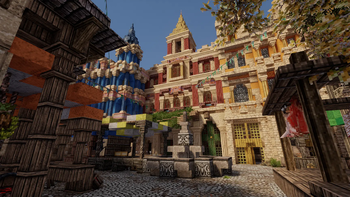
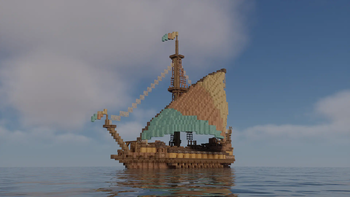
This is the Modpack for a german build-team called "Herbstlande", building a medieval fantasy map.
Screenshots
About this Modpack
What is "Herbstlande"
"Herbstlande" is a German Minecraft server that creates a semi-realistic medieval world.
The term medieval is stretched somewhat here and includes buildings from ancient times as well as - from the perspective of the Middle Ages - more recent eras.
“Herbstlande” is German and translated means autumn lands. The name is quite old and has nothing to do with the world we are currently working on. The name has remained with us to this day out of tradition.
This modpack is designed for players joining Herbstlande as well as ArdaCraft.
Since ArdaCraft updates mods independently, we cannot always guarantee compatibility between the servers. However, our goal is to make it easy to jump between the two servers.
The modpack contains a different overlay than the ArdaCraft Modpack. We adapted tha AC-Overlay for us, same with the shader. There are a few blocks there - mostly glass panes - that we changed/deledet. We also use Xaeros Worldmap instead of Journeymap.
The two main content mods are Conquest Reforged and Create, alongside a suite of visual and performance-optimisation mods aimed to make players' experience as smooth as possible.
ArdaCraft also have a plot world where anyone can join and try their hand at building using the Conquest Reforged mod. You can also add your friends to your plot to build together!
We would be happy if you join our Discord. Here you will find regular updates and the opportunity to easily get in touch with us. If you are interested in applying for our team, please contact us there too.
Our team leader Aventus presents some of our buildings on his Youtube channel, feel free to stop by!
Permissions and Credits
First of all, we would like to say a big "thank you!" to the Ardacraft team, especially Fornad, for allowing us to use the Ardacraft modpack as the basis for our modpack!
A corresponding proof can be found here.
Resource Packs
The ArdaCraft Overlay is made by the ArdaCraft team. The version in the Modpack is edited by us.
The textures from the ConquestReforged mod and the CR-Create overlay are Made by Monsterfish. He allowed us to use it in our Modpack. See here. The CR-Create overlay is made by TheUnknownDad. He also gave us his permission.
YAWP is made by Zordak. See proof of permission here.
Shader Packs
Chocapic13_V9_Ultra_-_For_ArdaCraft is a edit from ArdaCraft of Chocapic13' Shaders which changes saturation and shading, as well as providing full compatibility with Conquest Reforged blocks. The dev is no longer active, but a copy of his licencing rules can be found here (scroll down to 'License'). Both YoFPS and RedHat on Modrinth refer to this licence. These rules are followed.
Bliss-Shader-ArdaCraft Edit-Screenshots only is an edit from ArdaCraft of the Bliss shader which changes saturation and shading, as well as providing full compatibility with Conquest Reforged blocks. The developer X0nk has given ArdaCraft and general permission to redistribute this. Look at the Description for the ArdaCraft Modpack.
Mods
Effective is made by doctor4t. It is included as an override as the Fabric Version is not available on Modrinth.
Available Versions
How to Set Up a Herbstlande Server
Order Server
Choose at least 6 GB RAM (8 GB recommended for Herbstlande). Based on player count: per 5 players.
Install Modpack in Dashboard
Open the modpack browser in the dashboard, search for "Herbstlande" and click "Install". The fabric loader and Minecraft 1.20.1 are configured automatically.
Start Server & Play
Start the server – all mods are loaded automatically. Share the server IP with friends and play together!
Frequently Asked Questions
Herbstlande server crashes or won't start – what to do?
Most common causes: insufficient RAM or wrong fabric loader. Check latest.log for "OutOfMemoryError" → increase RAM to at least 8 GB. For "Mixin" or "ClassNotFoundException" errors: modpack version and loader don't match. With Mado Hosting, loader and Minecraft version are auto-configured on modpack install – preventing most startup issues.
How much RAM does a Herbstlande server really need?
Minimum 6 GB, recommended 8 GB for stable performance. per 5 players. Important: Minecraft modpacks need more RAM than vanilla – plan extra per additional player. With Mado Hosting, you can scale RAM up live at any time without data loss (from €12/month).
Can I add custom mods to Herbstlande without conflicts?
Yes, but check compatibility: only use mods for the same loader (fabric) and same Minecraft version (1.20.1). Common issues: ID conflicts with recipe mods and incompatible coremod versions. The Mado dashboard mod browser only shows compatible mods and warns about known conflicts.
Herbstlande server lagging – performance tips
1) Increase RAM to 8 GB+. 2) Reduce server view-distance to 8 (server.properties). 3) Pre-generate chunks with the "Chunky" plugin. 4) Use /spark profiler to check which mods consume the most tick time. With Mado Hosting, all servers run on NVMe SSDs with dedicated CPU cores – eliminating hardware as a bottleneck.
Similar Modpacks
![Cobblemon Official Modpack [Fabric]](https://cdn.modrinth.com/data/5FFgwNNP/e7f9ee2e9d361623847853fe2ddce42f519ee64f.png)
![COBBLEVERSE - Pokemon Adventure [Cobblemon]](https://cdn.modrinth.com/data/Jkb29YJU/581ecf54530972afb18a04660afd820f2f24f6c7.png)
![Better MC [FABRIC] - BMC2](https://cdn.modrinth.com/data/shFhR8Vx/a19c2bcb51d38f32f138d3607e91cb2b7b8e387f_96.webp)


![Better MC [FORGE] - BMC4](https://cdn.modrinth.com/data/4BV47HRn/7f5ef7cc61b2593609aabef3ed07a866a4f11b73_96.webp)
Rent Herbstlande Server
Start your own server with automatic modpack installation.
Supported Versions
Start your Herbstlande Server now
From €12.00/month with 8 GB RAM for the best performance.
Configure Server →