
b8ches SMP 2 - Hexes and Hoodoo
A fantasy adventure modpack with RPG elements!
Screenshots

About this Modpack
Hexes and Hoodoo
A fantasy adventure modpack originally produced for Twitch streamer B8stal to run her 2nd community SMP. This pack, however, is envisioned as a fully-fledged modpack playable solo or on a server!
Installation
Simply install this pack via the Modrinth launcher to get started.
Helpful Hints
- If you are on lower-end hardware, I would highly recommend disabling Distant Horizons, the distant LOD generating mod that gives you a greater render distance than Minecraft would be default, as it will likely cause you performance issues due to the increased load it will put your hardware under. I'd recommend disabling the mod outright, but if your server is enforcing a specific mod list, then the following guide may be useful to you.
A Short Guide to disabling Distant Horizons In-Game
Open the Distant Horizons Menu in Options.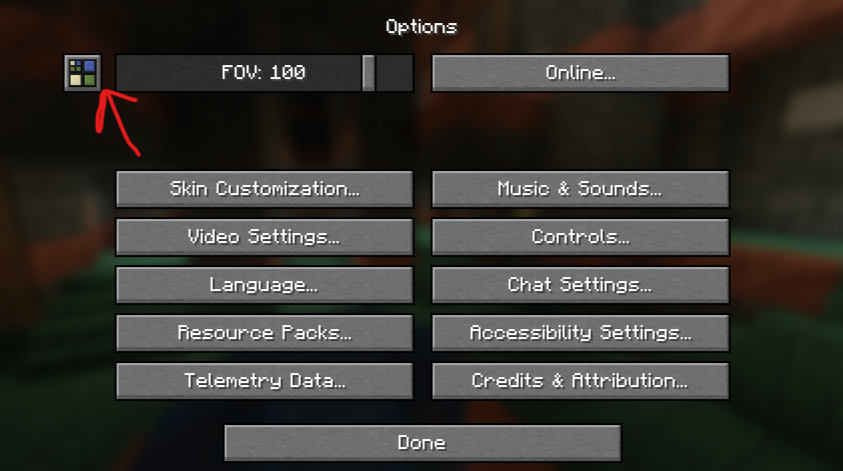
Disable "Enable Rendering" and hit "Done".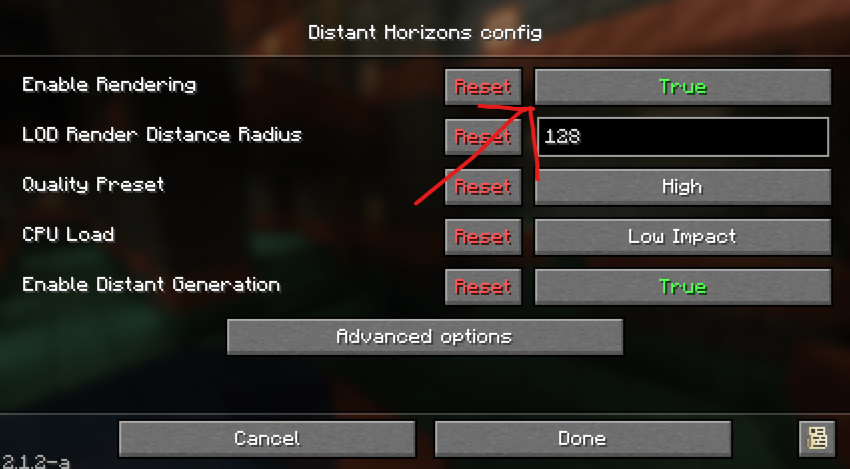
Thank you Joschino for the screenshots!
I would recommend allocating at least 6GB (6144MB) of RAM to this modpack profile without Distant Horizons, and at least 8GB (8192MB) if you are running Distant Horizons. For a guide on how to change your RAM allocation on the Modrinth launcher, see .
As we have many new blocks added by mods to enhance your designs and builds, we have EMI installed to allow you to explore the full range of blocks on offer! Click on a block to see its crafting recipe, as well as any other functions the block may have! EMI's documentation largely revolves around mod integration for developers, but you can see examples of the EMI UI in action here.
The modpack features proximity voice chat via Simple Voice Chat! You will be prompted to set up your audio devices when you join, but you can press V to set it up at any time! It also integrates with Sound Physics Remastered, so you'll be able to hear other people's voices (and your own, if enabled in the SPR config) echo in caves!
The world will be affected by Seasons, which will impact the weather, flora, and crop growth! If you want more info on Serene Seasons, the mod the pack uses to achieve this, you can read about it here.
When you die, your items and 75% of your XP will be stored in a soul that will persist at the place of your death for 3 hours (real-world time) after you died! Once this period expires, the soul will break and your items and XP will be at the mercy of others, and will start their despawn countdown!
Attributions
All content in this pack was sourced from Modrinth. However, as Paxi moves data and resource packs out of their default directories, and Colorwheel patches some shader packs to create custom ZIPs, these may not automatically be accredited in the modpack dependency list.
Datapacks
Resource Packs
- 3D Mace!
- Better Leaves
- Fancy Crops
- Fresh Moves
- GUI Revision
- GUI Revision Compats
- Icons
- Icons Compat
- LowOnFire
- Round Trees
- Stellarity Music
- Stellarity RP
- Sun and Moon Circular
Shader Packs
- Bliss Shaders
- Colorwheel Patcher (used to patch Bliss and Complementary for Flywheel compatibility)
- Complementary Unbound
- MakeUp UltraFast
Special Thanks
Thank you to Goldmaker_10 for creating the custom assets resource pack included in the modpack, as well as playtesting the multiplayer server alongside iamcovenant, Joschino, Mr_Majedd, scarlettyeah, TheZelfie, and Zubit!
Available Versions
How to Set Up a b8ches SMP 2 - Hexes and Hoodoo Server
Order Server
Choose at least 6 GB RAM (8 GB recommended for b8ches SMP 2 - Hexes and Hoodoo). Based on player count: per 5 players.
Install Modpack in Dashboard
Open the modpack browser in the dashboard, search for "b8ches SMP 2 - Hexes and Hoodoo" and click "Install". The neoforge loader and Minecraft 1.21.1 are configured automatically.
Start Server & Play
Start the server – all mods are loaded automatically. Share the server IP with friends and play together!
Frequently Asked Questions
b8ches SMP 2 - Hexes and Hoodoo server crashes or won't start – what to do?
Most common causes: insufficient RAM or wrong neoforge loader. Check latest.log for "OutOfMemoryError" → increase RAM to at least 8 GB. For "Mixin" or "ClassNotFoundException" errors: modpack version and loader don't match. With Mado Hosting, loader and Minecraft version are auto-configured on modpack install – preventing most startup issues.
How much RAM does a b8ches SMP 2 - Hexes and Hoodoo server really need?
Minimum 6 GB, recommended 8 GB for stable performance. per 5 players. Important: Minecraft modpacks need more RAM than vanilla – plan extra per additional player. With Mado Hosting, you can scale RAM up live at any time without data loss (from €12/month).
Can I add custom mods to b8ches SMP 2 - Hexes and Hoodoo without conflicts?
Yes, but check compatibility: only use mods for the same loader (neoforge) and same Minecraft version (1.21.1). Common issues: ID conflicts with recipe mods and incompatible coremod versions. The Mado dashboard mod browser only shows compatible mods and warns about known conflicts.
b8ches SMP 2 - Hexes and Hoodoo server lagging – performance tips
1) Increase RAM to 8 GB+. 2) Reduce server view-distance to 8 (server.properties). 3) Pre-generate chunks with the "Chunky" plugin. 4) Use /spark profiler to check which mods consume the most tick time. With Mado Hosting, all servers run on NVMe SSDs with dedicated CPU cores – eliminating hardware as a bottleneck.
Similar Modpacks
![Cobblemon Official Modpack [Fabric]](https://cdn.modrinth.com/data/5FFgwNNP/e7f9ee2e9d361623847853fe2ddce42f519ee64f.png)
![COBBLEVERSE - Pokemon Adventure [Cobblemon]](https://cdn.modrinth.com/data/Jkb29YJU/581ecf54530972afb18a04660afd820f2f24f6c7.png)
![Better MC [FABRIC] - BMC2](https://cdn.modrinth.com/data/shFhR8Vx/a19c2bcb51d38f32f138d3607e91cb2b7b8e387f_96.webp)


![Better MC [FORGE] - BMC4](https://cdn.modrinth.com/data/4BV47HRn/7f5ef7cc61b2593609aabef3ed07a866a4f11b73_96.webp)
Rent b8ches SMP 2 - Hexes and Hoodoo Server
Start your own server with automatic modpack installation.
Supported Versions
Start your b8ches SMP 2 - Hexes and Hoodoo Server now
From €12.00/month with 8 GB RAM for the best performance.
Configure Server →