
Hobbycraft
Minecraft should be a hobby, not a chore.
Screenshots
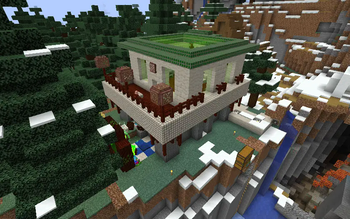
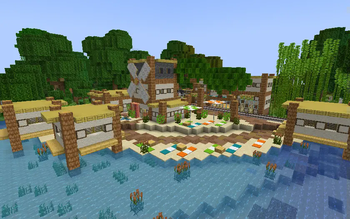
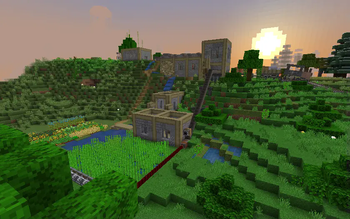
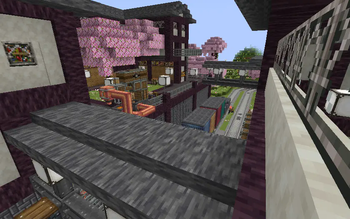
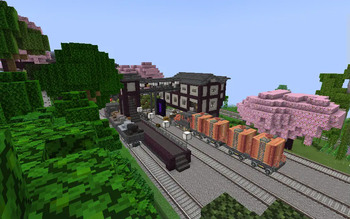
About this Modpack
Has Minecraft lost some of its charm? Does the endless grind discourage you from reaching for the stars? Hobbycraft hopes to bring new life to Minecraft through mods and other tweaks that keep gameplay exciting, including:
- Create to add new automation mechanics (and some nice building blocks)
- Botania to add magical items and processes
- Wilder Wild, Cinderscapes, and Profundis to add new biomes and world generation features
- Supplementaries to add a bunch of decorative and functional blocks and item
- Farmer's Delight to add new interest to farming and the food system
- Critters and Companions to bring more life to the world
- Forgotten Graves and Enchanting Infuser to tweak vanilla mechanics to make them less annoying
- Xaero's Minimap and World Map to aid in navigation and exploration throughout modded terrain
- Tons of recipe tweaks to reduce the grind of resource gathering without being overpowered (and villager trading is disabled)
Ender Decrees
This modpack has a sort of questing system known as ender decrees (the lore being that these are tasks given by the enderman in order to access the end dimension). The first player to complete each ender decree will be rewarded with an eye of ender to open the end portal (the normal recipe for eyes of ender has been disabled). You can view the ender decrees in game in the advancement menu. Most of them revolve around collecting a large amount of certain resources, so building farms is advised.
Optimization
Just as Minecraft shouldn't take up gameplay time on meaningless tasks, it shouldn't take up loading time either. Optimization was an important part on this pack's design; each mod was carefully chosen to serve a purpose and contribute positively to gameplay. Hobbycraft also includes several optimization mods including:
- Sodium, Indium , and ImmediatelyFast for rendering improvements
- Lithium for server-side improvements
- FerriteCore to drastically reduce memory usage
- Ksyxis to disable the spawn chunks, greatly increasing loading speed
- Dynamic FPS to avoid hogging computing power when running in the background
Multiplayer
Minecraft is best enjoyed with friends, and Hobbycraft keeps this in mind in its design. The ender decrees are designed to be completed collaboratively – each one can only be completed once in a world. Additionally the Simple Voice Chat mod is included to enable better interactions between players.
Available Versions
How to Set Up a Hobbycraft Server
Order Server
Choose at least 4 GB RAM (6 GB recommended for Hobbycraft). Based on player count: per 8 players.
Install Modpack in Dashboard
Open the modpack browser in the dashboard, search for "Hobbycraft" and click "Install". The fabric loader and Minecraft 1.20.1 are configured automatically.
Start Server & Play
Start the server – all mods are loaded automatically. Share the server IP with friends and play together!
Frequently Asked Questions
Hobbycraft server crashes or won't start – what to do?
Most common causes: insufficient RAM or wrong fabric loader. Check latest.log for "OutOfMemoryError" → increase RAM to at least 6 GB. For "Mixin" or "ClassNotFoundException" errors: modpack version and loader don't match. With Mado Hosting, loader and Minecraft version are auto-configured on modpack install – preventing most startup issues.
How much RAM does a Hobbycraft server really need?
Minimum 4 GB, recommended 6 GB for stable performance. per 8 players. Important: Minecraft modpacks need more RAM than vanilla – plan extra per additional player. With Mado Hosting, you can scale RAM up live at any time without data loss (from €8/month).
Can I add custom mods to Hobbycraft without conflicts?
Yes, but check compatibility: only use mods for the same loader (fabric) and same Minecraft version (1.20.1). Common issues: ID conflicts with recipe mods and incompatible coremod versions. The Mado dashboard mod browser only shows compatible mods and warns about known conflicts.
Hobbycraft server lagging – performance tips
1) Increase RAM to 6 GB+. 2) Reduce server view-distance to 8 (server.properties). 3) Pre-generate chunks with the "Chunky" plugin. 4) Use /spark profiler to check which mods consume the most tick time. With Mado Hosting, all servers run on NVMe SSDs with dedicated CPU cores – eliminating hardware as a bottleneck.
Similar Modpacks
![Better MC [FABRIC] - BMC2](https://cdn.modrinth.com/data/shFhR8Vx/a19c2bcb51d38f32f138d3607e91cb2b7b8e387f_96.webp)
![Better MC [FORGE] - BMC4](https://cdn.modrinth.com/data/4BV47HRn/7f5ef7cc61b2593609aabef3ed07a866a4f11b73_96.webp)


![Better MC [FABRIC] - BMC3](https://cdn.modrinth.com/data/NHUidpfR/327e0749bb6d160c41799fd77bf6d3d631569dc8_96.webp)

Rent Hobbycraft Server
Start your own server with automatic modpack installation.
Supported Versions
Start your Hobbycraft Server now
From €8.00/month with 6 GB RAM for the best performance.
Configure Server →