
Hocraft
This modpack is designed for a fun multiplayer experience with friends and features a rich variety of content. It combines tech, magic, exploration, and adventure through mods like Create, Mekanism, Cataclysm, TACZ, Vampirism, Deeper and Darker.
Screenshots
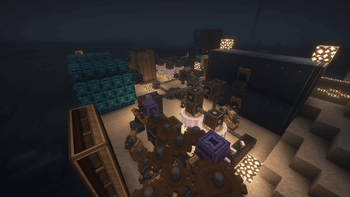

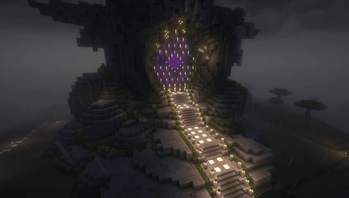
About this Modpack
🧭 Description
This modpack was built with multiplayer in mind — perfect for connecting with friends and exploring a wide range of content together! It features a carefully selected mix of mods including Create, Mekanism, Cataclysm, TACZ, Vampirism, Deeper and Darker, and Ad Astra, offering everything from automation and tech to magic, dungeons, and interdimensional and space exploration.
Although it's focused on being played with others through a server, you can also play it in single-player without issues. For the best single-player experience, we recommend disabling:
FancyMenuDrippy Loading Screen
To host your own server, you can set the desired IP address directly in the game via:
Main Menu > Options > Online > Change IP
⚠️ HOSTING A SERVER?
If you're planning to host a multiplayer server, make sure to use the server-optimized version of the modpack:
🛠️ 👉 Download Server Version Here
The client version is not designed for server use and may cause compatibility issues.
✨ Features
This modpack includes a variety of exciting mods that enhance different aspects of gameplay, offering automation, challenging bosses, expanded dimensions, and performance optimization:
- Create and Mekanism – Advanced automation and power systems
- Cataclysm – Intense boss battles and high-level combat
- Deeper and Darker – New dimensions full of secrets and challenges
- Ad Astra – Space travel and interdimensional exploration
- Embeddium – Boosts performance and reduces lag
- Oculus – Enables shaders for better visuals and immersion
Alongside these core features, you'll also find mods focused on decoration, exploration, and quality of life improvements. Whether you're optimizing your gameplay, enhancing the look of your world, or venturing into unknown dimensions, there’s something for every type of player.
🖥️ System Requirements
Tested on:
- CPU: AMD Ryzen 5 6600H
- RAM: 16GB
- GPU: RTX 3050
For smoother performance on lower-end systems, consider using additional optimization mods.
⚠️ Note: This is a client-side modpack. If you're setting up a server, please use the server-side version linked above.
🗺️ Map images are for illustrative purposes only and are not included in the pack.
Available Versions
How to Set Up a Hocraft Server
Order Server
Choose at least 6 GB RAM (8 GB recommended for Hocraft). Based on player count: per 5 players.
Install Modpack in Dashboard
Open the modpack browser in the dashboard, search for "Hocraft" and click "Install". The forge loader and Minecraft 1.20.1 are configured automatically.
Start Server & Play
Start the server – all mods are loaded automatically. Share the server IP with friends and play together!
Frequently Asked Questions
Hocraft server crashes or won't start – what to do?
Most common causes: insufficient RAM or wrong forge loader. Check latest.log for "OutOfMemoryError" → increase RAM to at least 8 GB. For "Mixin" or "ClassNotFoundException" errors: modpack version and loader don't match. With Mado Hosting, loader and Minecraft version are auto-configured on modpack install – preventing most startup issues.
How much RAM does a Hocraft server really need?
Minimum 6 GB, recommended 8 GB for stable performance. per 5 players. Important: Minecraft modpacks need more RAM than vanilla – plan extra per additional player. With Mado Hosting, you can scale RAM up live at any time without data loss (from €12/month).
Can I add custom mods to Hocraft without conflicts?
Yes, but check compatibility: only use mods for the same loader (forge) and same Minecraft version (1.20.1). Common issues: ID conflicts with recipe mods and incompatible coremod versions. The Mado dashboard mod browser only shows compatible mods and warns about known conflicts.
Hocraft server lagging – performance tips
1) Increase RAM to 8 GB+. 2) Reduce server view-distance to 8 (server.properties). 3) Pre-generate chunks with the "Chunky" plugin. 4) Use /spark profiler to check which mods consume the most tick time. With Mado Hosting, all servers run on NVMe SSDs with dedicated CPU cores – eliminating hardware as a bottleneck.
Similar Modpacks
![Cobblemon Official Modpack [Fabric]](https://cdn.modrinth.com/data/5FFgwNNP/e7f9ee2e9d361623847853fe2ddce42f519ee64f.png)
![COBBLEVERSE - Pokemon Adventure [Cobblemon]](https://cdn.modrinth.com/data/Jkb29YJU/581ecf54530972afb18a04660afd820f2f24f6c7.png)
![Better MC [FABRIC] - BMC2](https://cdn.modrinth.com/data/shFhR8Vx/a19c2bcb51d38f32f138d3607e91cb2b7b8e387f_96.webp)


![Better MC [FORGE] - BMC4](https://cdn.modrinth.com/data/4BV47HRn/7f5ef7cc61b2593609aabef3ed07a866a4f11b73_96.webp)
Rent Hocraft Server
Start your own server with automatic modpack installation.
Details
- License
- LicenseRef-All-Rights-Reserved
- Server-side
- Unsupported
- Client-side
- Required
Supported Versions
Start your Hocraft Server now
From €12.00/month with 8 GB RAM for the best performance.
Configure Server →