Infinite Horizons
Overhauls world generation with vast new horizons, diverse biomes, plants, and terrain
Screenshots
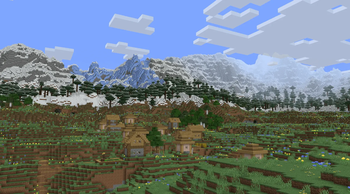
About this Modpack
Infinite Horizons 1.0.0 is a meticulously crafted, performance-first Minecraft modpack designed for players who want stunning visuals, expansive exploration, and buttery-smooth gameplay at high render distances.
Created by blissful.
Experience the Infinite
This pack transforms vanilla Minecraft into a breathtaking open-world adventure. With Terralith + Tectonic as the foundation, the Overworld feels truly alive — featuring dramatic mountain ranges, lush river valleys, intricate cave systems, and diverse, hand-crafted biomes that reward exploration. Enhanced by Voxy World Gen V2 and Additional Structures, the world feels vast, natural, and full of discovery.
Paired with the custom Bliss shader (a refined Chocapic13 edit), the visuals are absolutely gorgeous — dynamic lighting, realistic water, atmospheric effects, and vibrant colors that make every sunrise, forest, and mountain peak memorable.
Performance That Lets You Go Big
Infinite Horizons is heavily optimized to let you push your render distance far beyond vanilla limits while maintaining excellent performance:
- Sodium + Iris at the core with extensive tuning via Sodium Extra and Reese's Sodium Options.
- Advanced chunk loading and generation optimizations (C2ME, Noisium, Lithium, ModernFix, Ksyxis).
- Distant chunk rendering with Bobby.
- Intelligent culling (Entity Culling, More Culling), particle optimization (Particle Core), and rendering improvements (ImmediatelyFast, BadOptimizations).
- Memory and lag reduction through FerriteCore, ThreadTweak, and more.
The result? You can comfortably run 32+ chunk render distances with shaders on, while keeping high FPS and minimal stuttering — even during exploration or world generation.
Quality-of-Life & Immersion Features
- Bridging Mod — intuitive reach-around and slab bridging.
- Zoomify — smooth, customizable zooming.
- Do a Barrel Roll — enhanced elytra flight with banking and momentum.
- Not Enough Animations + Wavey Capes — fluid, natural player and item animations.
- AppleSkin — detailed hunger and saturation HUD.
- Custom high-resolution resource packs including Default HD 512x and stylish crosshairs.
- Pre-configured Chunky settings for world pre-generation.
Technical Highlights
- Minecraft 1.21.11 (Fabric)
- Carefully balanced config tweaks across all major performance and visual mods
- Optimized for both exploration and long-term play
- Clean, focused mod list prioritizing stability and beauty
Whether you're a explorer who loves wandering endless, beautiful terrain, a builder who wants smooth performance while working on large projects, or someone who simply wants Minecraft to look and feel as good as possible in 2026 — Infinite Horizons delivers.
Let the horizons be infinite.
— blissful
Available Versions
How to Set Up a Infinite Horizons Server
Order Server
Choose at least 6 GB RAM (8 GB recommended for Infinite Horizons). Based on player count: per 5 players.
Install Modpack in Dashboard
Open the modpack browser in the dashboard, search for "Infinite Horizons" and click "Install". The fabric loader and Minecraft 1.21.11 are configured automatically.
Start Server & Play
Start the server – all mods are loaded automatically. Share the server IP with friends and play together!
Frequently Asked Questions
Infinite Horizons server crashes or won't start – what to do?
Most common causes: insufficient RAM or wrong fabric loader. Check latest.log for "OutOfMemoryError" → increase RAM to at least 8 GB. For "Mixin" or "ClassNotFoundException" errors: modpack version and loader don't match. With Mado Hosting, loader and Minecraft version are auto-configured on modpack install – preventing most startup issues.
How much RAM does a Infinite Horizons server really need?
Minimum 6 GB, recommended 8 GB for stable performance. per 5 players. Important: Minecraft modpacks need more RAM than vanilla – plan extra per additional player. With Mado Hosting, you can scale RAM up live at any time without data loss (from €12/month).
Can I add custom mods to Infinite Horizons without conflicts?
Yes, but check compatibility: only use mods for the same loader (fabric) and same Minecraft version (1.21.11). Common issues: ID conflicts with recipe mods and incompatible coremod versions. The Mado dashboard mod browser only shows compatible mods and warns about known conflicts.
Infinite Horizons server lagging – performance tips
1) Increase RAM to 8 GB+. 2) Reduce server view-distance to 8 (server.properties). 3) Pre-generate chunks with the "Chunky" plugin. 4) Use /spark profiler to check which mods consume the most tick time. With Mado Hosting, all servers run on NVMe SSDs with dedicated CPU cores – eliminating hardware as a bottleneck.
Similar Modpacks
![Cobblemon Official Modpack [Fabric]](https://cdn.modrinth.com/data/5FFgwNNP/e7f9ee2e9d361623847853fe2ddce42f519ee64f.png)
![COBBLEVERSE - Pokemon Adventure [Cobblemon]](https://cdn.modrinth.com/data/Jkb29YJU/581ecf54530972afb18a04660afd820f2f24f6c7.png)
![Better MC [FABRIC] - BMC2](https://cdn.modrinth.com/data/shFhR8Vx/a19c2bcb51d38f32f138d3607e91cb2b7b8e387f_96.webp)


![Better MC [FORGE] - BMC4](https://cdn.modrinth.com/data/4BV47HRn/7f5ef7cc61b2593609aabef3ed07a866a4f11b73_96.webp)
Rent Infinite Horizons Server
Start your own server with automatic modpack installation.
Supported Versions
Start your Infinite Horizons Server now
From €12.00/month with 8 GB RAM for the best performance.
Configure Server →