
Humanity
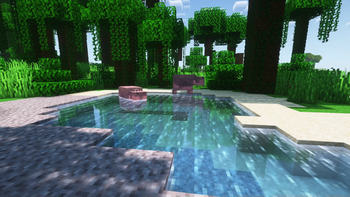
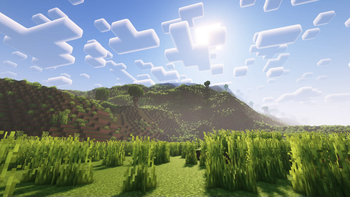
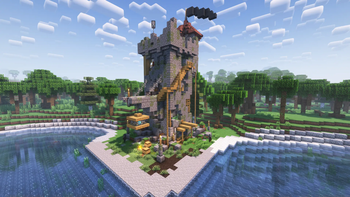
Humanity is a modpack aimed at creating a living Minecraft experience.
Screenshots
About this Modpack
Humanity
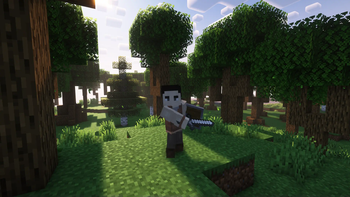
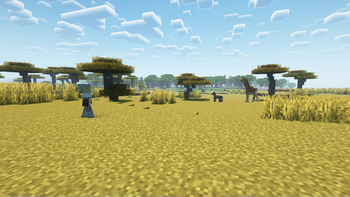
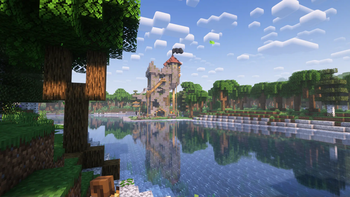
Humanity is a modpack aimed at creating a living Minecraft experience. Humanity adds quality-of-life features, visual improvements, more realistic world generation, new combat, human mobs, simple technology, and much more. The modpack is still in alpha, so things may be 100% complete nor stable. Some mods do have some conflicts; However, Humanity tries its best to sort these out through configuration options.
Performance
Testing with a Ryzen 5 1600, 32GB of RAM (~8GB allocated to Minecraft), and a NVIDIA GTX 1660ti, the modpack runs rather smoothly, even with shaders. That being said, as this is modded Minecraft, some issues may arise, however, it depends on the individual specifications of your computer. World generation is generally slower than the vanilla game, as Humanity uses multiple world-generation mods to create a visually appealing world. If the world generation is too heavy on your system, you can try disabling the Tectonic mod, which is used for the overall terrain shaping.
Mod Compatibility
Every mod included in Humanity generally works well together. Humanity uses a mod which enables the third-person view model in first person. This can cause some clipping with Better Combat, however, the modpack has been configured to reduce this as much as possible. Additionally, in the Minecraft Comes Alive character creation screen, it appears that skin color and type is not changeable; This is not the case and is just a visual bug in the menu, and your options will appear correct in game. If you find anything else that isn't working right, please let us know on our Discord server.
Attribution
All mods are linked back to their respective CurseForge page in the changelog. Permission has been received from both Continents and Moonlight to be used in this modpack.
Available Versions
How to Set Up a Humanity Server
Order Server
Choose at least 6 GB RAM (8 GB recommended for Humanity). Based on player count: per 5 players.
Install Modpack in Dashboard
Open the modpack browser in the dashboard, search for "Humanity" and click "Install". The quilt loader and Minecraft 1.19.2 are configured automatically.
Start Server & Play
Start the server – all mods are loaded automatically. Share the server IP with friends and play together!
Frequently Asked Questions
Humanity server crashes or won't start – what to do?
Most common causes: insufficient RAM or wrong quilt loader. Check latest.log for "OutOfMemoryError" → increase RAM to at least 8 GB. For "Mixin" or "ClassNotFoundException" errors: modpack version and loader don't match. With Mado Hosting, loader and Minecraft version are auto-configured on modpack install – preventing most startup issues.
How much RAM does a Humanity server really need?
Minimum 6 GB, recommended 8 GB for stable performance. per 5 players. Important: Minecraft modpacks need more RAM than vanilla – plan extra per additional player. With Mado Hosting, you can scale RAM up live at any time without data loss (from €12/month).
Can I add custom mods to Humanity without conflicts?
Yes, but check compatibility: only use mods for the same loader (quilt) and same Minecraft version (1.19.2). Common issues: ID conflicts with recipe mods and incompatible coremod versions. The Mado dashboard mod browser only shows compatible mods and warns about known conflicts.
Humanity server lagging – performance tips
1) Increase RAM to 8 GB+. 2) Reduce server view-distance to 8 (server.properties). 3) Pre-generate chunks with the "Chunky" plugin. 4) Use /spark profiler to check which mods consume the most tick time. With Mado Hosting, all servers run on NVMe SSDs with dedicated CPU cores – eliminating hardware as a bottleneck.
Similar Modpacks
![Cobblemon Official Modpack [Fabric]](https://cdn.modrinth.com/data/5FFgwNNP/e7f9ee2e9d361623847853fe2ddce42f519ee64f.png)
![COBBLEVERSE - Pokemon Adventure [Cobblemon]](https://cdn.modrinth.com/data/Jkb29YJU/581ecf54530972afb18a04660afd820f2f24f6c7.png)
![Better MC [FABRIC] - BMC2](https://cdn.modrinth.com/data/shFhR8Vx/a19c2bcb51d38f32f138d3607e91cb2b7b8e387f_96.webp)


![Better MC [FORGE] - BMC4](https://cdn.modrinth.com/data/4BV47HRn/7f5ef7cc61b2593609aabef3ed07a866a4f11b73_96.webp)
Rent Humanity Server
Start your own server with automatic modpack installation.
Details
- License
- BSD 3-Clause "New" or "Revised" License
- Server-side
- Required
- Client-side
- Required
Supported Versions
Start your Humanity Server now
From €12.00/month with 8 GB RAM for the best performance.
Configure Server →