
Ignacia SMP
Vanilla friendly Fabric Modpack made for designing in creative and building in survival
Screenshots
About this Modpack
Some mods will be updated later, they aren't available for 1.21.8 yet.
you can disable Distant Horizons, if it eats up your frames.
some included mods are disabled to increase performance, you can enable them if you wish
Ignacia SMP
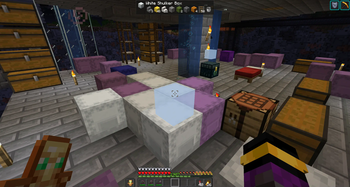
A vanilla friendly mod pack made for builders, content creators and redstone engineers playing on vanilla servers or in singleplayer. Especially made for designing builds in creative and then building them in survival on servers, like my community server, the Ignacia SMP (Join my discord for more info).
It features mods that make the game run a lot smoother and allows for the use of OptiFine features such as overlay textures, animated entitys, connected block textures, custom items, shaders and a zoom.
It's made for vanilla servers using simple voicechat, so you can communicate with nearby players if the mod is installed and set up on the server side. This also works with audioplayer if that mod is installed on the server.
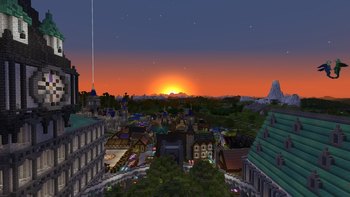
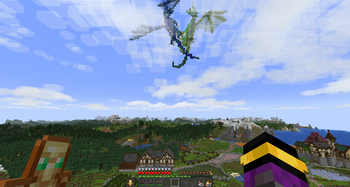
For an immersive feeling Distant Horizons creates LODs that allow you to have a much higher render distance than the server. If your hardware can't handle that mod there is still a world and minimap installed, so you never get lost again.
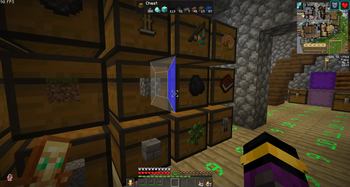
For all the builders and redstone people out there this modpack features Axiom, Litematica, Item Scroller and Tweakeroo, all of them have features that make building and designing structures, being it farms or fancy builds, a lot easier and comfortable. Build epic stuff with Axiom in singleplayer, scan it with Litematica and gather all the resources from the material list in survival on a server. Build the structure with the Easy Place mode and Tweakeroos Fast Block Placement in no time.
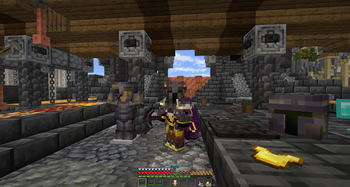
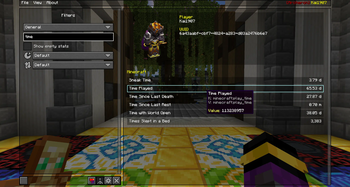
A never ending amount of qualitiy of life enhancing mods is available on modrinth and this pack features my favorite ones, e. g. Better Statistics Screen, Item Scroller and Controlling to keep your menus organised. Capes and Armored Elytra to render Elytras and Chestplates, that have been plated using Vanilla Tweaks "Armored Elytra" datapack and to show your OptiFine cape or others. Works well in Multiplayer!
To make Minecraft look more beautiful some mods tweak the look of the game while having a low performance impact. Better Clouds, Make Bubbles Pop, Not Enough Animations for example give the world a fresh overhaul, combined with the Fresh Animations Resource Pack Minecraft doesn't feel like a 10+ year old game at all.
All mods that add overlays to the GUI have hotkeys to toggle those GUIs, so the deault view isn't changed at all, unless you enable the overlays you like to see. Dynamic Crosshair removes the crosshair when you're not looking at a block or holding a tool.
There is enough overstimulation in our lifes already.
Featured Mods:
- Sodium, Lithium, Iris: Great performance and shader support
- Distant Horizons: Huge render distances with shaders
- Continuity, ETF & EMF, FPS Display and Zoomify as OptiFine replacer
- Simple Voice Chat: Talk to other nearby players and listen to custom music discs
- Xaero's World and Mini Map: For a better overview of the world and nearby mobs
- Litematica, Tweakeroo and Axiom: Building has never been easier
- Many little life enhancing tweaks: Autorun, Dynamic Crosshair, Freecam, Shuffle, ...
Settings & Hotkeys:
if you want to use your personal settings, copy the options.txt file from an other instance into this pack
- F4 - toggle perspective
- F - zoom
- F6 - secondary zoom
- Mouse Button 5 - swap item with offhand
- '#' - open command
- I - highlight players in spectator
- End - FPS Reducer GUI
- Pause - reduce FPS manually
- U - toggle Jade overlay
- Keypad 0 - open Jade GUI
- . - Voicechat GUI
- J - Xaeros Worldmap settings
- M - open worldmap
- +/- - minimap zoom
- < - enlarge minimap
- B - new waypoint
- P - toggle minimap
- O - Iris shader pack selection screen
- K - shaders toggle
- Y - Autorun
- X + C - Tweakeroo settings
- X + Alt - flexible block placement
- Alt - block rotation
- Cntl - block offset
- Caps lock - placement adjacent
- F5 - freecam
- G - gamma override, fullbright
- C - Hotbar Randomizer
- X + Alt - flexible block placement
- H + C - MiniHUD config
- H - MiniHUD rendering
- N - Litematica settings
- N + E - easyplace mode
- N + P - manage placements
- N + A - area selection box rendering
- N + R - all rendering
- N + L - material list
- N + C - config
- page up/down - next/previous layer when in single layer mode
- tool item: minecraft:blaze_rod
- R - Axiom toggle replace mode
- X - Axiom toggle Fast Place
- Ctrl + Z - undo
- Right Shift - open Editor Mode
- context menu - right alt
- F7 - Physics Settings
Featured resource packs:
Includes some of my packs, you can pick the ones you like. My packs are also available on Modrinth, if you want to download them.
- Kai's Minecraft Tweaks
- Better glass panes
- Minecraft Dungeons Pack
- Ignacia Pack
Recommended external packs
- Building with fWhip (only available for his Patreons)
- Additional Elytras
- Crops 3D
- My personal choice of Vanilla Tweaks
- Fresh Animations
- Fresh Moves
Shaderpacks worth checking out
Available Versions
How to Set Up a Ignacia SMP Server
Order Server
Choose at least 4 GB RAM (6 GB recommended for Ignacia SMP). Based on player count: per 8 players.
Install Modpack in Dashboard
Open the modpack browser in the dashboard, search for "Ignacia SMP" and click "Install". The fabric loader and Minecraft 1.21.11 are configured automatically.
Start Server & Play
Start the server – all mods are loaded automatically. Share the server IP with friends and play together!
Frequently Asked Questions
Ignacia SMP server crashes or won't start – what to do?
Most common causes: insufficient RAM or wrong fabric loader. Check latest.log for "OutOfMemoryError" → increase RAM to at least 6 GB. For "Mixin" or "ClassNotFoundException" errors: modpack version and loader don't match. With Mado Hosting, loader and Minecraft version are auto-configured on modpack install – preventing most startup issues.
How much RAM does a Ignacia SMP server really need?
Minimum 4 GB, recommended 6 GB for stable performance. per 8 players. Important: Minecraft modpacks need more RAM than vanilla – plan extra per additional player. With Mado Hosting, you can scale RAM up live at any time without data loss (from €8/month).
Can I add custom mods to Ignacia SMP without conflicts?
Yes, but check compatibility: only use mods for the same loader (fabric) and same Minecraft version (1.21.11). Common issues: ID conflicts with recipe mods and incompatible coremod versions. The Mado dashboard mod browser only shows compatible mods and warns about known conflicts.
Ignacia SMP server lagging – performance tips
1) Increase RAM to 6 GB+. 2) Reduce server view-distance to 8 (server.properties). 3) Pre-generate chunks with the "Chunky" plugin. 4) Use /spark profiler to check which mods consume the most tick time. With Mado Hosting, all servers run on NVMe SSDs with dedicated CPU cores – eliminating hardware as a bottleneck.
Similar Modpacks

![Cobblemon Official Modpack [Fabric]](https://cdn.modrinth.com/data/5FFgwNNP/e7f9ee2e9d361623847853fe2ddce42f519ee64f.png)
![COBBLEVERSE - Pokemon Adventure [Cobblemon]](https://cdn.modrinth.com/data/Jkb29YJU/581ecf54530972afb18a04660afd820f2f24f6c7.png)
![Better MC [FABRIC] - BMC2](https://cdn.modrinth.com/data/shFhR8Vx/a19c2bcb51d38f32f138d3607e91cb2b7b8e387f_96.webp)


Rent Ignacia SMP Server
Start your own server with automatic modpack installation.
Supported Versions
Start your Ignacia SMP Server now
From €8.00/month with 6 GB RAM for the best performance.
Configure Server →