
Immersive Mechanical Workshop
Immersive Mechanical Workshop brings you a unique experience
Screenshots
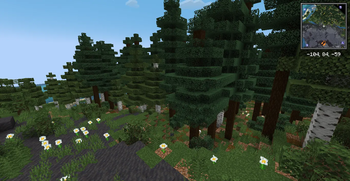
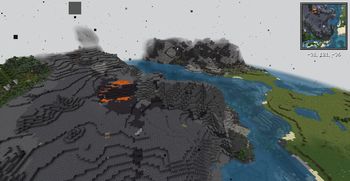
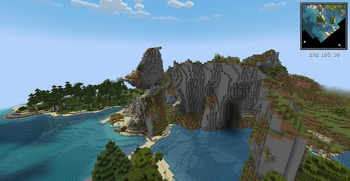
About this Modpack
Immersive Mechanical Workshop 项目介绍
Immersive Mechanical Workshop是一款为1.21.1版本打造的科技类模组整合包,基于NeoForge加载器开发,仅支持客户端运行。该整合包以Create机械动力模组为核心,深度整合多款优质附属模组、性能优化模组与功能增强模组,为玩家打造沉浸式的机械工业建造体验,让玩家在我的世界中体验从基础机械搭建到复杂工业自动化的完整乐趣。
整合包内置超40款精选模组,核心围绕Create生态展开,涵盖Create: Storage、Create: Copycats+、Create Ore Excavation等多款机械动力附属模组,丰富机械建造与自动化玩法;同时融入William Wythers' Overhauled Overworld模组优化主世界探索体验,搭配Jade、JEI等功能模组提升游戏操作便捷性。为保障游戏流畅度,整合包还嵌入Sodium、Lithium、FerriteCore、ModernFix等多款高性能优化模组,在丰富玩法的同时兼顾运行效率,此外还包含Mouse Tweaks、CustomSkinLoader等个性化与操作优化模组,全方位提升玩家的游戏体验。
Immersive Mechanical Workshop Project Introduction
Immersive Mechanical Workshop is a technology-focused modpack designed for Minecraft: Java Edition version 1.21.1, developed on the NeoForge loader and supporting only client-side operation. Created by GB233 and licensed under the MIT open-source agreement, this modpack centers on the Create mod, deeply integrating a variety of high-quality add-on mods, performance optimization mods and functional enhancement mods to deliver an immersive mechanical industrial building experience for players. It allows players to enjoy the complete fun from basic mechanical construction to complex industrial automation in Minecraft.
The modpack embeds more than 40 carefully selected mods, with the Create ecosystem at its core, including a number of Create add-on mods such as Create: Storage, Create: Copycats+ and Create Ore Excavation, which enrich the gameplay of mechanical construction and automation. Meanwhile, it integrates the William Wythers' Overhauled Overworld mod to optimize the overworld exploration experience, and is paired with functional mods like Jade and JEI to improve the convenience of game operation. To ensure smooth gameplay, the modpack also embeds a variety of high-performance optimization mods such as Sodium, Lithium, FerriteCore and ModernFix, which balance operational efficiency while enriching the gameplay. In addition, it includes personalized and operation optimization mods such as Mouse Tweaks and CustomSkinLoader to comprehensively enhance the player's gaming experience.
Available Versions
How to Set Up a Immersive Mechanical Workshop Server
Order Server
Choose at least 6 GB RAM (8 GB recommended for Immersive Mechanical Workshop). Based on player count: per 5 players.
Install Modpack in Dashboard
Open the modpack browser in the dashboard, search for "Immersive Mechanical Workshop" and click "Install". The neoforge loader and Minecraft 1.21.1 are configured automatically.
Start Server & Play
Start the server – all mods are loaded automatically. Share the server IP with friends and play together!
Frequently Asked Questions
Immersive Mechanical Workshop server crashes or won't start – what to do?
Most common causes: insufficient RAM or wrong neoforge loader. Check latest.log for "OutOfMemoryError" → increase RAM to at least 8 GB. For "Mixin" or "ClassNotFoundException" errors: modpack version and loader don't match. With Mado Hosting, loader and Minecraft version are auto-configured on modpack install – preventing most startup issues.
How much RAM does a Immersive Mechanical Workshop server really need?
Minimum 6 GB, recommended 8 GB for stable performance. per 5 players. Important: Minecraft modpacks need more RAM than vanilla – plan extra per additional player. With Mado Hosting, you can scale RAM up live at any time without data loss (from €12/month).
Can I add custom mods to Immersive Mechanical Workshop without conflicts?
Yes, but check compatibility: only use mods for the same loader (neoforge) and same Minecraft version (1.21.1). Common issues: ID conflicts with recipe mods and incompatible coremod versions. The Mado dashboard mod browser only shows compatible mods and warns about known conflicts.
Immersive Mechanical Workshop server lagging – performance tips
1) Increase RAM to 8 GB+. 2) Reduce server view-distance to 8 (server.properties). 3) Pre-generate chunks with the "Chunky" plugin. 4) Use /spark profiler to check which mods consume the most tick time. With Mado Hosting, all servers run on NVMe SSDs with dedicated CPU cores – eliminating hardware as a bottleneck.
Similar Modpacks


Rent Immersive Mechanical Workshop Server
Start your own server with automatic modpack installation.
Supported Versions
Start your Immersive Mechanical Workshop Server now
From €12.00/month with 8 GB RAM for the best performance.
Configure Server →