
Immersive Survival
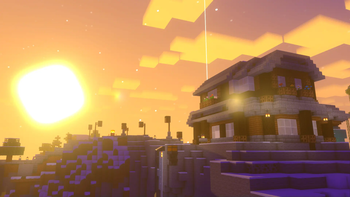
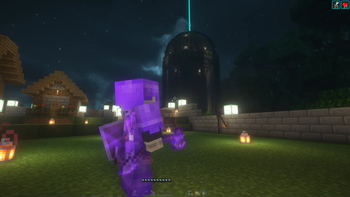
Immersive Survival is a vanilla+ pack that provides a unique experience using ambient and immersive cosmetics, effects, and sounds.
Screenshots
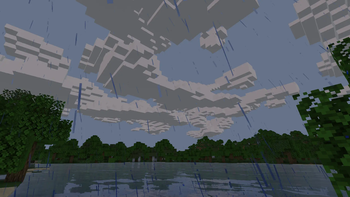

About this Modpack
Immersive Survival [No Longer Maintained]

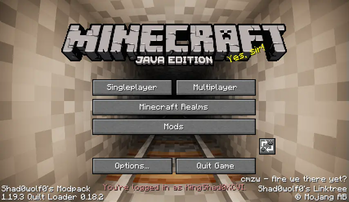
Immersive Survival is a vanilla+ pack that provides a unique experience using ambient and immersive cosmetics, effects, and sounds. The modpack is survival multiplayer friendly so it can be used on your friends Vanilla servers or on many servers that you choose (use at your own risk).
- This pack is probably heavy to run! You might expect bugs or performance issues!
Features
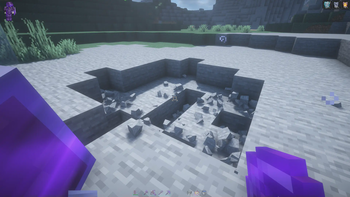
- Encounter many cosmetics that will change the way you see and feel about vanilla Minecraft. Most notable mods are the Physics Mod, Effective, Visuality, and CameraOverhaul!
- Best played with headphones! Experience ambient and immersive sounds from mods like AmbientSounds, Presence Footsteps, and Sound Physics Remastered!
- Catch the sight of unique world generation and structures from Stardust's and YUNG's mods!
- Optifine resource packs and shaders mostly compatible! Mods like Entity Texture Features, Entity Models Features, Continuity, Iris Shaders, and others are installed!
- Along side Optifine compatible mods, the Fresh Animations resource pack is included! Enable it to have mob animations!
- Use the World Host mod to let your friends join your singleplayer world using the same modpack without port forwarding!
- A modpack like this can be very laggy! Optimization is really important so performance mods like Sodium, MoreCulling, and ModernFix are included!
- Play now to explore more features!
Play it your own way!
Most mods are configurable through Mod Menu and keybinds.
- Enable the True Darkness mod to make it more terrifying! Disabled by default.
- Third-person experience has gotten quaility of life features like Shoulder Surfing Reloaded, Better Third Person, and Third Person Maps!
- Immersive elytra flight control with Do a Barrel Roll!
More Info
- Exordium hotbar, experience, health disabled by default to make Auto HUD work. If you want to enable those settings, you should disable Auto HUD.
Modlist and Credits and FAQ
- Complementary v4, Complementary Reimagined 2.0, Snowimagined, Rethinking Voxels are under the Complementary Agreement 1.3 license. Any problems with these shaderpacks should be reported to their respective authors.
Available Versions
How to Set Up a Immersive Survival Server
Order Server
Choose at least 6 GB RAM (8 GB recommended for Immersive Survival). Based on player count: per 5 players.
Install Modpack in Dashboard
Open the modpack browser in the dashboard, search for "Immersive Survival" and click "Install". The quilt loader and Minecraft 1.19.2 are configured automatically.
Start Server & Play
Start the server – all mods are loaded automatically. Share the server IP with friends and play together!
Frequently Asked Questions
Immersive Survival server crashes or won't start – what to do?
Most common causes: insufficient RAM or wrong quilt loader. Check latest.log for "OutOfMemoryError" → increase RAM to at least 8 GB. For "Mixin" or "ClassNotFoundException" errors: modpack version and loader don't match. With Mado Hosting, loader and Minecraft version are auto-configured on modpack install – preventing most startup issues.
How much RAM does a Immersive Survival server really need?
Minimum 6 GB, recommended 8 GB for stable performance. per 5 players. Important: Minecraft modpacks need more RAM than vanilla – plan extra per additional player. With Mado Hosting, you can scale RAM up live at any time without data loss (from €12/month).
Can I add custom mods to Immersive Survival without conflicts?
Yes, but check compatibility: only use mods for the same loader (quilt) and same Minecraft version (1.19.2). Common issues: ID conflicts with recipe mods and incompatible coremod versions. The Mado dashboard mod browser only shows compatible mods and warns about known conflicts.
Immersive Survival server lagging – performance tips
1) Increase RAM to 8 GB+. 2) Reduce server view-distance to 8 (server.properties). 3) Pre-generate chunks with the "Chunky" plugin. 4) Use /spark profiler to check which mods consume the most tick time. With Mado Hosting, all servers run on NVMe SSDs with dedicated CPU cores – eliminating hardware as a bottleneck.
Similar Modpacks
![Cobblemon Official Modpack [Fabric]](https://cdn.modrinth.com/data/5FFgwNNP/e7f9ee2e9d361623847853fe2ddce42f519ee64f.png)
![COBBLEVERSE - Pokemon Adventure [Cobblemon]](https://cdn.modrinth.com/data/Jkb29YJU/581ecf54530972afb18a04660afd820f2f24f6c7.png)
![Better MC [FABRIC] - BMC2](https://cdn.modrinth.com/data/shFhR8Vx/a19c2bcb51d38f32f138d3607e91cb2b7b8e387f_96.webp)


![Better MC [FORGE] - BMC4](https://cdn.modrinth.com/data/4BV47HRn/7f5ef7cc61b2593609aabef3ed07a866a4f11b73_96.webp)
Rent Immersive Survival Server
Start your own server with automatic modpack installation.
Supported Versions
Start your Immersive Survival Server now
From €12.00/month with 8 GB RAM for the best performance.
Configure Server →