
International Northern Network
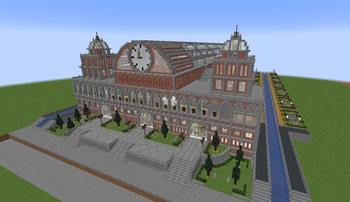
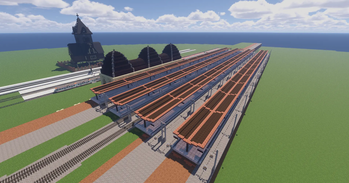
DE: 🚆 Realistischer Minecraft MTR Server mit Fokus auf Nahverkehr, Städtebau und gemeinsames Bauen auf dem Server des Internationalen Nordverbund (INV). EN: 🚆 Realistic Minecraft MTR server focused on public transport, urban development, and collaborati
Screenshots
About this Modpack
DE:
🚆 Internationaler Nordverbund (INV)
Du interessierst dich für realistischen Nahverkehr und möchtest in Minecraft mit der Mod MTR (Minecraft Transit Railway) mehr als nur einfache Strecken bauen? Dann bist du beim Internationalen Nordverbund (INV) genau richtig.
Unser Server verbindet detailreichen Städtebau mit einem durchdachten Verkehrsnetz aus U-Bahn, S-Bahn und Regionalzügen. Dabei legen wir Wert auf realistische Streckenführung, glaubwürdige Bahnhöfe und eine lebendige Spielwelt, die Stück für Stück gemeinsam entsteht.
Ob du lieber baust, planst oder selbst Züge fährst: Beim INV kannst du aktiv an einem wachsenden Projekt mitwirken, Ideen einbringen und zusammen mit anderen eine realistische Nahverkehrswelt in Minecraft erschaffen.
EN:
🚆 International Nordverbund (INV)
Are you interested in realistic public transport and want to build more than just simple railway lines in Minecraft using the MTR (Minecraft Transit Railway) mod? Then the International Nordverbund (INV) is the right place for you.
Our server combines detailed urban development with a well-designed transportation network featuring subways, suburban rail, and regional trains. We focus on realistic track layouts, believable stations, and a lively world that is gradually built together as a community.
Whether you prefer building, planning, or driving trains yourself: on the INV server, you can actively contribute to a growing project, share your ideas, and work together with others to create a realistic public transport world in Minecraft.
Available Versions
How to Set Up a International Northern Network Server
Order Server
Choose at least 6 GB RAM (8 GB recommended for International Northern Network). Based on player count: per 5 players.
Install Modpack in Dashboard
Open the modpack browser in the dashboard, search for "International Northern Network" and click "Install". The forge loader and Minecraft 1.20.1 are configured automatically.
Start Server & Play
Start the server – all mods are loaded automatically. Share the server IP with friends and play together!
Frequently Asked Questions
International Northern Network server crashes or won't start – what to do?
Most common causes: insufficient RAM or wrong forge loader. Check latest.log for "OutOfMemoryError" → increase RAM to at least 8 GB. For "Mixin" or "ClassNotFoundException" errors: modpack version and loader don't match. With Mado Hosting, loader and Minecraft version are auto-configured on modpack install – preventing most startup issues.
How much RAM does a International Northern Network server really need?
Minimum 6 GB, recommended 8 GB for stable performance. per 5 players. Important: Minecraft modpacks need more RAM than vanilla – plan extra per additional player. With Mado Hosting, you can scale RAM up live at any time without data loss (from €12/month).
Can I add custom mods to International Northern Network without conflicts?
Yes, but check compatibility: only use mods for the same loader (forge) and same Minecraft version (1.20.1). Common issues: ID conflicts with recipe mods and incompatible coremod versions. The Mado dashboard mod browser only shows compatible mods and warns about known conflicts.
International Northern Network server lagging – performance tips
1) Increase RAM to 8 GB+. 2) Reduce server view-distance to 8 (server.properties). 3) Pre-generate chunks with the "Chunky" plugin. 4) Use /spark profiler to check which mods consume the most tick time. With Mado Hosting, all servers run on NVMe SSDs with dedicated CPU cores – eliminating hardware as a bottleneck.
Similar Modpacks
![Cobblemon Official Modpack [Fabric]](https://cdn.modrinth.com/data/5FFgwNNP/e7f9ee2e9d361623847853fe2ddce42f519ee64f.png)
![COBBLEVERSE - Pokemon Adventure [Cobblemon]](https://cdn.modrinth.com/data/Jkb29YJU/581ecf54530972afb18a04660afd820f2f24f6c7.png)
![Better MC [FABRIC] - BMC2](https://cdn.modrinth.com/data/shFhR8Vx/a19c2bcb51d38f32f138d3607e91cb2b7b8e387f_96.webp)


![Better MC [FORGE] - BMC4](https://cdn.modrinth.com/data/4BV47HRn/7f5ef7cc61b2593609aabef3ed07a866a4f11b73_96.webp)
Rent International Northern Network Server
Start your own server with automatic modpack installation.
Supported Versions
Start your International Northern Network Server now
From €12.00/month with 8 GB RAM for the best performance.
Configure Server →