
Jagrav Vanilla
Optimizes the Game, gives a QOL Experience while giving good Visuals.
Screenshots

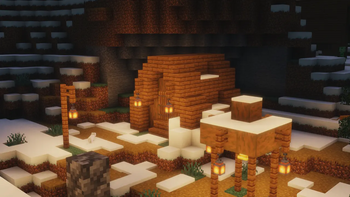




About this Modpack

What is Jagrav Vanilla
Jagrav Vanilla is a Vanilla+ modpack which offers a QOL while Offering a FPS boost. Jagrav Vanilla tries to Drastically improve Minecraft Vanilla's experience.
Key Features
- Improve FPS
- Give a better QOL experience
- Add Visual features which improve your Experience
How to Download?
- Firstly download the version of this modpack you want, for example 26.1.2
- After downloading go to this website https://fabulously-optimized.github.io/mrpack-to-zip/
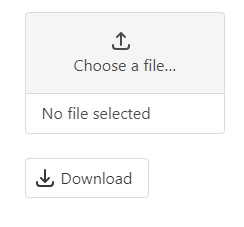
- Scroll all the way down and you will see a box like this Click on This!
- Click on that and select the .mrpack of the downloaded modpack and upload that there.
- Wait a bit and when it is done, simply download it.
- After downloading open file explorer and go to downloads section.
- Right click on the .zip file and click extratct here.
- Roughly three folders will appear mods, resourcepacks & shaderpacks.
- Locate your .minecraft folder and open mods folder there and put all of the mods which you extracted from the modpack do the same for resourcepacks and shaderpacks, if there is config and option.txt too then it is completely your own wish if you want to use them, to use them drag both of them into .minecraft folder and click Replace the files in Destination.
- Hope you understand all the steps. Have Fun!
Contents
- Mods
EMF
ETF
3d Skin Layers
Ambient Sounds
Appleskin
Better Advancements
Bobby
Cloth Config
C2me
Continuity
Creative Core
Cut Through
Dynamic FPS
Entity Culling
Fabric API
Fabric Language Kotlin
FerriteCore
Forge Config API Port
Fzzy Config
Immediatley Fast
Iris Shaders
LambDynamicLights
Lithium
Mod Menu
More Culling
Mouse Tweaks
No Chat Reports
Not Enough Animations
Particle Core
Particle Rain
Puzzels Lib
Reese's Sodium Options
Simple Voice Chat
Sodium
Sodium Extra
Sodium Shadowy Path Blocks
Text Placeholder API
Very Many Players
Xaero's Minimap
Xaero's Worldmap
YetAnotherConfigLib (YACL)
Zoomify (Zoom)
- Resourcepacks
Chat Reporting Helper
Default Dark Mode
Fast Better Grass
Fresh Animations
Fresh Animations Extension
Fresh Animations: Player Extension
Jones
Low Shield
Motschen's Better Leaves
New Glowing Ores
Not Much Pumpkin Blur
Pretty Transparent Fire
- Shaders
Complementary Shaders - Reimagined
MakeUp - Ultra Fast
Mellow
Photon Shaders
Contact: [email protected]
Available Versions
How to Set Up a Jagrav Vanilla Server
Order Server
Choose at least 6 GB RAM (8 GB recommended for Jagrav Vanilla). Based on player count: per 5 players.
Install Modpack in Dashboard
Open the modpack browser in the dashboard, search for "Jagrav Vanilla" and click "Install". The fabric loader and Minecraft 26.1.2 are configured automatically.
Start Server & Play
Start the server – all mods are loaded automatically. Share the server IP with friends and play together!
Frequently Asked Questions
Jagrav Vanilla server crashes or won't start – what to do?
Most common causes: insufficient RAM or wrong fabric loader. Check latest.log for "OutOfMemoryError" → increase RAM to at least 8 GB. For "Mixin" or "ClassNotFoundException" errors: modpack version and loader don't match. With Mado Hosting, loader and Minecraft version are auto-configured on modpack install – preventing most startup issues.
How much RAM does a Jagrav Vanilla server really need?
Minimum 6 GB, recommended 8 GB for stable performance. per 5 players. Important: Minecraft modpacks need more RAM than vanilla – plan extra per additional player. With Mado Hosting, you can scale RAM up live at any time without data loss (from €12/month).
Can I add custom mods to Jagrav Vanilla without conflicts?
Yes, but check compatibility: only use mods for the same loader (fabric) and same Minecraft version (26.1.2). Common issues: ID conflicts with recipe mods and incompatible coremod versions. The Mado dashboard mod browser only shows compatible mods and warns about known conflicts.
Jagrav Vanilla server lagging – performance tips
1) Increase RAM to 8 GB+. 2) Reduce server view-distance to 8 (server.properties). 3) Pre-generate chunks with the "Chunky" plugin. 4) Use /spark profiler to check which mods consume the most tick time. With Mado Hosting, all servers run on NVMe SSDs with dedicated CPU cores – eliminating hardware as a bottleneck.
Similar Modpacks
![Cobblemon Official Modpack [Fabric]](https://cdn.modrinth.com/data/5FFgwNNP/e7f9ee2e9d361623847853fe2ddce42f519ee64f.png)
![COBBLEVERSE - Pokemon Adventure [Cobblemon]](https://cdn.modrinth.com/data/Jkb29YJU/581ecf54530972afb18a04660afd820f2f24f6c7.png)
![Better MC [FABRIC] - BMC2](https://cdn.modrinth.com/data/shFhR8Vx/a19c2bcb51d38f32f138d3607e91cb2b7b8e387f_96.webp)


![Better MC [FORGE] - BMC4](https://cdn.modrinth.com/data/4BV47HRn/7f5ef7cc61b2593609aabef3ed07a866a4f11b73_96.webp)
Rent Jagrav Vanilla Server
Start your own server with automatic modpack installation.
Supported Versions
Start your Jagrav Vanilla Server now
From €12.00/month with 8 GB RAM for the best performance.
Configure Server →