
Jeff Stedi's Building Modpack
Jeff loves building forever and so do you
Screenshots

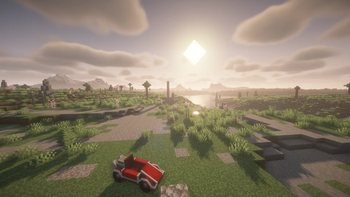
About this Modpack

If you want to just build big things with no requirement to explore more than how much exploration vanilla minecraft demands, this modpack is for you. This is a semi-curated selection of mods designed specifically to enchance the building and transport experience for players in a survival or creative environment. The goal is to allow for creative expression while retaining the original, vanilla, challenge level of the base game. Have fun!
This modpack is modified and vetted by a two-person team based on our ideal vision of a building experience. Any suggestions and modifications are welcome! (but are subject to the same considerations, sorry)
Have any questions? Want a specific mod added or modified? Found any bugs or bad interactions? Please raise an issue in our GitHub repository here!
Most Recent Changelog (V1.3.0)
+ Added Traveler's Backpack
+ Added Create Escalated
+ Added Exposure
+ Added Create Enchantment Industry
+ Added Creeper Firework (as a mod patch for preventing blocking destruction from creeper explosions; previously the workaround used was to disable mob griefing entirely)
- Removed Immersive Melodies (Extremely annoying and practically useless)
~ Updated several mods including Valkyrien Skies 2, Immersive Aircraft, Create Interactive and Immersive Paintings
Current Status:
As we were finalizing the modlist Create was finally updated to 6.0 on Fabric. Unfortunately, since it is newly updated, certain mods such as Steam n' Rails and VS2 are currently incompatible with it in its current form, so that major patch will have to wait until next time.
List of Mods (As of Latest Version)
- Valkyrien Skies 2 by Tri0de, Rubydesic
- Trowel by TheEnderCore, Astra
- Terralith by Stardust Labs
- Immersive Aircraft by Luke100000
- Create Enchantment Industry by MarbleGate, RaymondBlaze
- Indium by comp500
- Distant Horizons
- Sodium by JellySquid (jellysquid3)
- Immersive Paintings by Luke100000
- Traveler's Backpack by Tiviacz1337
- Create: Steam 'n' Rails by The Railways Team
- Create: Interactive by Tri0de
- Create: Copper and Zinc by robinfrt
- Handcrafted by Alex Nijjar, Kekie6
- Create: Escalated by rbasamoyai
- Resourceful Lib by ThatGravyBoat, Epic_Oreo
- Iris by coderbot, IMS212, Justsnoopy30, FoundationGames
- Enchanted Vertical Slabs by Enchanted_Games
- Dusty Decorations Refabricated by Mhaks, Flint Mischiff
- Forge Config API Port by Fuzs
- Just Enough Items by mezz
- Iris Flywheel Compat by Leon
- Architectury by shedaniel
- Flower Tweaks by aurum
- Tectonic by Apollo
- Cardinal Components API by UpcraftLP, Pyrofab
- VS Eureka Mod by ewoudje, Tri0de, Rubydesic
- Automobility by FoundationGames
- Immersive Machinery by Luke100000
- Cloth Config v11 by shedaniel
- Yuushya by Coco, Xiao2 or XiLaiTL, SQwatermark, XieZai, Hikari, LD_Anvil, Little Panda
- Fabric API by FabricMC
- Lithostitched by Apollo
- Fabric Language Kotlin by FabricMC
- Puzzles Lib by Fuzs
- Create by Fabricators of Create, Creators of Create
- Macaw's Furniture by Sketch Macaw & Peachy Macaw
- Polymorph by Illusive Soulworks
- Diagonal Fences by Fuzs, XFactHD
- Creeper Firework by MarbleGateKeeper
- Exposure by mortuusars
- Bad Packets by deirn
- Create: Copycats+ by Lysine, Bennyboy1695, Redcat_XVIII
- wthit by deirn, Nicholas "TehNut" Ignoffo, ProfMobius
Available Versions
How to Set Up a Jeff Stedi's Building Modpack Server
Order Server
Choose at least 4 GB RAM (6 GB recommended for Jeff Stedi's Building Modpack). Based on player count: per 8 players.
Install Modpack in Dashboard
Open the modpack browser in the dashboard, search for "Jeff Stedi's Building Modpack" and click "Install". The fabric loader and Minecraft 1.20.1 are configured automatically.
Start Server & Play
Start the server – all mods are loaded automatically. Share the server IP with friends and play together!
Frequently Asked Questions
Jeff Stedi's Building Modpack server crashes or won't start – what to do?
Most common causes: insufficient RAM or wrong fabric loader. Check latest.log for "OutOfMemoryError" → increase RAM to at least 6 GB. For "Mixin" or "ClassNotFoundException" errors: modpack version and loader don't match. With Mado Hosting, loader and Minecraft version are auto-configured on modpack install – preventing most startup issues.
How much RAM does a Jeff Stedi's Building Modpack server really need?
Minimum 4 GB, recommended 6 GB for stable performance. per 8 players. Important: Minecraft modpacks need more RAM than vanilla – plan extra per additional player. With Mado Hosting, you can scale RAM up live at any time without data loss (from €8/month).
Can I add custom mods to Jeff Stedi's Building Modpack without conflicts?
Yes, but check compatibility: only use mods for the same loader (fabric) and same Minecraft version (1.20.1). Common issues: ID conflicts with recipe mods and incompatible coremod versions. The Mado dashboard mod browser only shows compatible mods and warns about known conflicts.
Jeff Stedi's Building Modpack server lagging – performance tips
1) Increase RAM to 6 GB+. 2) Reduce server view-distance to 8 (server.properties). 3) Pre-generate chunks with the "Chunky" plugin. 4) Use /spark profiler to check which mods consume the most tick time. With Mado Hosting, all servers run on NVMe SSDs with dedicated CPU cores – eliminating hardware as a bottleneck.
Similar Modpacks

![Cobblemon Official Modpack [Fabric]](https://cdn.modrinth.com/data/5FFgwNNP/e7f9ee2e9d361623847853fe2ddce42f519ee64f.png)
![COBBLEVERSE - Pokemon Adventure [Cobblemon]](https://cdn.modrinth.com/data/Jkb29YJU/581ecf54530972afb18a04660afd820f2f24f6c7.png)
![Better MC [FABRIC] - BMC2](https://cdn.modrinth.com/data/shFhR8Vx/a19c2bcb51d38f32f138d3607e91cb2b7b8e387f_96.webp)


Rent Jeff Stedi's Building Modpack Server
Start your own server with automatic modpack installation.
Supported Versions
Start your Jeff Stedi's Building Modpack Server now
From €8.00/month with 6 GB RAM for the best performance.
Configure Server →