
Just Fantasy and Optimized
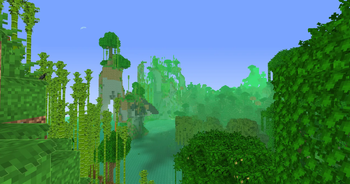
Just Fantasy and Optimized — a visual modpack. Just incredibly cool graphics and smooth FPS. Stylish, modern, optimized.
Screenshots
About this Modpack
English:
💎 Just Fantasy and Optimized
This is NOT a fantasy/magic modpack. The word "Fantasy" here means "fantastic graphics" — not dragons or spells. No magic, no new mechanics, no extra clutter. Just visuals and performance.
🎯 What does this modpack add?
This modpack turns vanilla Minecraft into a modern, vibrant, and smooth game. Everything runs on Fabric 1.21.11.
📦 Key mods included:
| Category | Mods |
|---|---|
| Graphics & Shaders | Iris Shaders, Sodium, Sodium Extra, Continuity (connected textures) |
| Lighting | LambDynamicLights (dynamic light from torches) |
| Optimization | EntityCulling, FerriteCore (less RAM usage), Krypton (faster networking) |
| Render Distance | Bobby (infinite render distance) |
| Visual Effects | Falling Leaves, Wakes (water trails), Better Smoke (fixed), Particular, Wavify, Explosive Enhancement, Cool Rain, Skyboxify, WaveyCapes, 3D Skin Layers |
| Animations & QoL | NotEnoughAnimations, Zoomify, Chat Heads, Dynamic FPS, Mod Menu |
| Maps | Xaero's Minimap + Xaero's World Map |
Total: Over 60 mods that change only visuals and performance. The gameplay remains completely vanilla.
🚀 Why should you download this?
| Reason | Why it matters |
|---|---|
| Beautiful | Shaders, shadows, particles, dynamic lighting — Minecraft looks like a modern AAA game |
| Fast | Tested on Intel Celeron N5095 with integrated graphics — stable 60 FPS |
| Honest | No magic, no new mobs, no new dimensions, no new crafting. Just what you see |
| Server-friendly | Client-side only — join any server without getting banned |
| Flexible | You can add any extra mods or resource packs yourself |
⚠️ Important info before downloading
| Item | Info |
|---|---|
| Minecraft version | 1.21.11 |
| Mod loader | Fabric |
| Recommended RAM | 4–6 GB allocated |
| Shaders | Not included by default. Add any compatible shader pack via Iris (e.g., Complementary, BSL, MakeUp) |
🔧 How to install
- Download the modpack
- Import into Prism Launcher, MultiMC, or any launcher with Fabric support
- Allocate 4–6 GB of RAM
- Launch and enjoy
RU:
💎 Just Fantasy and Optimized
Это не магическая сборка. Слово «Fantasy» здесь означает «фантастическая графика», а не драконы с заклинаниями. Никакой магии, новых механик или лишнего контента. Только визуал и производительность.
🎯 Что добавляет сборка?
Сборка превращает стандартный Minecraft в современную, сочную и плавную игру. Всё работает на Fabric под версию 1.21.11.
📦 Основные моды:
| Категория | Моды |
|---|---|
| Графика и шейдеры | Iris Shaders, Sodium, Sodium Extra, Continuity (связанные текстуры) |
| Освещение | LambDynamicLights (динамический свет от факелов) |
| Оптимизация | EntityCulling, FerriteCore (меньше RAM), Krypton (быстрый интернет) |
| Дальность прорисовки | Bobby (бесконечная дальность) |
| Визуальные эффекты | Falling Leaves, Wakes (следы на воде), Better Smoke (исправлен), Particular, Wavify, Explosive Enhancement, Cool Rain, Skyboxify, WaveyCapes, 3D Skin Layers |
| Анимации и удобство | NotEnoughAnimations, Zoomify, Chat Heads, Dynamic FPS, Mod Menu |
| Карты | Xaero's Minimap + Xaero's World Map |
Итого: более 60 модов, которые меняют только внешний вид и производительность. Геймплей остаётся ванильным.
🚀 Почему стоит скачать?
| Причина | Почему это круто |
|---|---|
| Красиво | Шейдеры, тени, частицы, динамический свет — игра выглядит как современная AAA-новинка |
| Быстро | Сборка тестировалась на Intel Celeron N5095 со встроенной графикой — выдаёт стабильные 60 FPS |
| Честно | Никакой магии, новых мобов, измерений или крафта. Только то, что вы видите |
| Сервер-френдли | Чисто клиентская сборка — можно заходить на любые серверы без банов |
| Гибко | Вы сами можете добавлять любые моды и ресурс-паки сверху |
⚠️ Важно знать перед скачиванием
| Пункт | Информация |
|---|---|
| Версия Minecraft | 1.21.11 |
| Загрузчик | Fabric |
| Рекомендуемая RAM | 4–6 ГБ (выделить) |
| Шейдеры | Не включены по умолчанию. Добавьте любой совместимый пакет через Iris (например, Complementary, BSL, MakeUp) |
🔧 Установка
- Скачайте сборку
- Импортируйте в Prism Launcher, MultiMC или любой лаунчер с поддержкой Fabric
- Выделите 4–6 ГБ оперативной памяти
- Запустите и наслаждайтесь
Available Versions
How to Set Up a Just Fantasy and Optimized Server
Order Server
Choose at least 6 GB RAM (8 GB recommended for Just Fantasy and Optimized). Based on player count: per 5 players.
Install Modpack in Dashboard
Open the modpack browser in the dashboard, search for "Just Fantasy and Optimized" and click "Install". The fabric loader and Minecraft 26.1.2 are configured automatically.
Start Server & Play
Start the server – all mods are loaded automatically. Share the server IP with friends and play together!
Frequently Asked Questions
Just Fantasy and Optimized server crashes or won't start – what to do?
Most common causes: insufficient RAM or wrong fabric loader. Check latest.log for "OutOfMemoryError" → increase RAM to at least 8 GB. For "Mixin" or "ClassNotFoundException" errors: modpack version and loader don't match. With Mado Hosting, loader and Minecraft version are auto-configured on modpack install – preventing most startup issues.
How much RAM does a Just Fantasy and Optimized server really need?
Minimum 6 GB, recommended 8 GB for stable performance. per 5 players. Important: Minecraft modpacks need more RAM than vanilla – plan extra per additional player. With Mado Hosting, you can scale RAM up live at any time without data loss (from €12/month).
Can I add custom mods to Just Fantasy and Optimized without conflicts?
Yes, but check compatibility: only use mods for the same loader (fabric) and same Minecraft version (26.1.2). Common issues: ID conflicts with recipe mods and incompatible coremod versions. The Mado dashboard mod browser only shows compatible mods and warns about known conflicts.
Just Fantasy and Optimized server lagging – performance tips
1) Increase RAM to 8 GB+. 2) Reduce server view-distance to 8 (server.properties). 3) Pre-generate chunks with the "Chunky" plugin. 4) Use /spark profiler to check which mods consume the most tick time. With Mado Hosting, all servers run on NVMe SSDs with dedicated CPU cores – eliminating hardware as a bottleneck.
Similar Modpacks
![Cobblemon Official Modpack [Fabric]](https://cdn.modrinth.com/data/5FFgwNNP/e7f9ee2e9d361623847853fe2ddce42f519ee64f.png)
![COBBLEVERSE - Pokemon Adventure [Cobblemon]](https://cdn.modrinth.com/data/Jkb29YJU/581ecf54530972afb18a04660afd820f2f24f6c7.png)
![Better MC [FABRIC] - BMC2](https://cdn.modrinth.com/data/shFhR8Vx/a19c2bcb51d38f32f138d3607e91cb2b7b8e387f_96.webp)


![Better MC [FORGE] - BMC4](https://cdn.modrinth.com/data/4BV47HRn/7f5ef7cc61b2593609aabef3ed07a866a4f11b73_96.webp)
Rent Just Fantasy and Optimized Server
Start your own server with automatic modpack installation.
Supported Versions
Start your Just Fantasy and Optimized Server now
From €12.00/month with 8 GB RAM for the best performance.
Configure Server →