
KelpCraft
250+ Mods including Cobblemon, Create, Mob and Biome overhaul/additions, RPG aspects, QoL, Stunning Visuals, and MORE!!
Screenshots
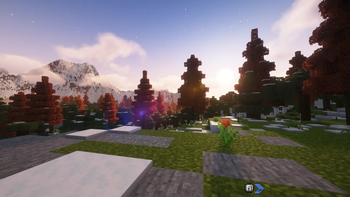
About this Modpack
KelpCraft 🌿
An expansive adventure and creativity-focused modpack for Fabric 1.20.1
Overview
Dive into a fully customized Minecraft experience with KelpCraft, a meticulously curated modpack featuring 250+ mods that transform every aspect of the game. Whether you're an adventurer, builder, Pokémon trainer, or tech enthusiast, KelpCraft offers a little something for everyone. With a mix of stunning visuals, immersive gameplay, and endless possibilities, this pack is designed for both solo and multiplayer fun.
Features
✨ Adventure & Exploration
Discover breathtaking worlds with mods like Terralith, Biomes O' Plenty, and Oh The Biomes You'll Go, combined with overhauled structures from YUNG’s Better Mods and When Dungeons Arise.
Battle challenging bosses and uncover hidden treasures with AdventureZ, DungeonZ, and Deeper and Darker.
⚙️ Create Your Way
Embrace your inner engineer with the Create mod and its addons like Steam 'n' Rails, Slice & Dice, and Big Cannons. Automate your world and push the limits of your imagination.
🎮 Cobblemon
Catch, train, and battle Pokémon in Minecraft with Cobblemon, along with sidemods like Cobblemon: Legends Untold and Cobblemon Industrialized to enhance your Pokémon journey.
🌍 RPG-Like Progression
Equip custom armor and weapons from Simply Swords, Immersive Armors, and Mythic Metals.
Upgrade your tools with Mythic Upgrades and Advanced Netherite.
👀 Stunning Visuals
Immerse yourself in a breathtaking world with Complementary Shaders, Falling Leaves, Presence Footsteps, and Fresh Animations.
Dynamic lighting, vibrant biomes, and reimagined entities bring the world to life.
🏡 Quality of Life Enhancements
Simplify crafting and gameplay with Jade, Traveler's Backpack, Inventory Profiles Next, and AppleSkin.
Manage your loot and builds with Lootr, Visual Workbench, and RightClickHarvest.
Why Choose KelpCraft?
KelpCraft offers a balanced blend of adventure, creativity, and performance. With an optimized setup for 280+ mods, it ensures smooth gameplay without sacrificing depth. Explore, automate, battle, and build in a world where every corner holds something new.
Key Mods Included
Adventure Mods: YUNG’s Better Dungeons, Better Strongholds, DungeonZ, AdventureZ, Illager Invasion
World & Biomes: Terralith, Tectonic, Biomes O' Plenty, Bumblezone
Pokémon Experience: Cobblemon, Cobblepedia, Fight or Flight, Spawn Notifications
Tech & Creativity: Create, Create Crafts & Additions, Create: Steam 'n' Rails, Alloy Forgery
Immersion: Presence Footsteps, Sound Physics Remastered, Better Combat
RPG Enhancements: Mythic Metals, Immersive Armors, Simply Swords, Deeper and Darker
Recommended Settings
RAM: Allocate 8–12GB for smooth performance.
Shaders: Use Iris Shaders with Complementary Shaders for the best visual experience.
Multiplayer Ready: Fully compatible with servers, optimized for Simple Voice Chat and Dynamic FPS.
Available Versions
How to Set Up a KelpCraft Server
Order Server
Choose at least 6 GB RAM (8 GB recommended for KelpCraft). Based on player count: per 5 players.
Install Modpack in Dashboard
Open the modpack browser in the dashboard, search for "KelpCraft" and click "Install". The fabric loader and Minecraft 1.20.1 are configured automatically.
Start Server & Play
Start the server – all mods are loaded automatically. Share the server IP with friends and play together!
Frequently Asked Questions
KelpCraft server crashes or won't start – what to do?
Most common causes: insufficient RAM or wrong fabric loader. Check latest.log for "OutOfMemoryError" → increase RAM to at least 8 GB. For "Mixin" or "ClassNotFoundException" errors: modpack version and loader don't match. With Mado Hosting, loader and Minecraft version are auto-configured on modpack install – preventing most startup issues.
How much RAM does a KelpCraft server really need?
Minimum 6 GB, recommended 8 GB for stable performance. per 5 players. Important: Minecraft modpacks need more RAM than vanilla – plan extra per additional player. With Mado Hosting, you can scale RAM up live at any time without data loss (from €12/month).
Can I add custom mods to KelpCraft without conflicts?
Yes, but check compatibility: only use mods for the same loader (fabric) and same Minecraft version (1.20.1). Common issues: ID conflicts with recipe mods and incompatible coremod versions. The Mado dashboard mod browser only shows compatible mods and warns about known conflicts.
KelpCraft server lagging – performance tips
1) Increase RAM to 8 GB+. 2) Reduce server view-distance to 8 (server.properties). 3) Pre-generate chunks with the "Chunky" plugin. 4) Use /spark profiler to check which mods consume the most tick time. With Mado Hosting, all servers run on NVMe SSDs with dedicated CPU cores – eliminating hardware as a bottleneck.
Similar Modpacks
![Cobblemon Official Modpack [Fabric]](https://cdn.modrinth.com/data/5FFgwNNP/e7f9ee2e9d361623847853fe2ddce42f519ee64f.png)
![COBBLEVERSE - Pokemon Adventure [Cobblemon]](https://cdn.modrinth.com/data/Jkb29YJU/581ecf54530972afb18a04660afd820f2f24f6c7.png)
![Better MC [FABRIC] - BMC2](https://cdn.modrinth.com/data/shFhR8Vx/a19c2bcb51d38f32f138d3607e91cb2b7b8e387f_96.webp)


![Better MC [FORGE] - BMC4](https://cdn.modrinth.com/data/4BV47HRn/7f5ef7cc61b2593609aabef3ed07a866a4f11b73_96.webp)
Rent KelpCraft Server
Start your own server with automatic modpack installation.
Supported Versions
Start your KelpCraft Server now
From €12.00/month with 8 GB RAM for the best performance.
Configure Server →