
KO Client
A Minecraft modpack emphasizing peak performance and convenience. Featuring mods like Sodium and Litematica for smooth gameplay and streamlined building. Enhanced visuals from shader packs. Perfect for builders, explorers, and adventurers
Screenshots
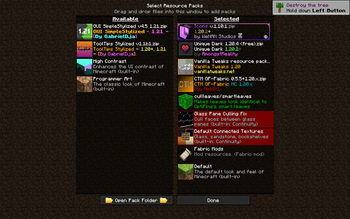
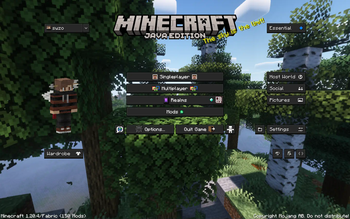
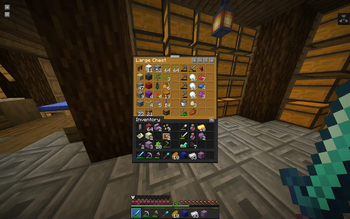
About this Modpack
KO Client: Optimize, Enhance, Conquer!
Welcome to KO Client, your ultimate Minecraft modpack designed to optimize performance, enhance convenience, and empower your gaming experience like never before. Crafted for both casual players, dedicated adventurers, and professional builders. KO Client brings together a suite of mods tailored to supercharge your gameplay.
New Additions:
- Inventory Profiles Next: Seamlessly organize and manage your inventory with customizable profiles tailored to your every adventure.
- 3D Skin Layers: Immerse yourself in a world of depth and detail with layered skins that bring your character to life like never before.
- Bobby: A Minecraft mod which allows for render distances greater than the server's view-distance setting.
- Chat Heads: Stay connected with friends and foes alike through dynamic chat heads, enhancing communication in-game with style and convenience.
- Concurrent Chunk Management Engine: Experience optimized performance like never before with streamlined chunk loading and rendering, ensuring smooth gameplay in any environment.
- ESSENTIAL Mod: A Minecraft mod which allows for render distances greater than the server's view-distance setting.
- LazyDFU: An optimization mod for Minecraft that defers unnecessary initialization work so that it is only performed if required.
- Litematica: Unleash your creativity with this powerful schematic mod, allowing you to visualize and replicate intricate builds with ease.
- MiniHUD: Stay informed with a compact heads-up display providing essential information at a glance, without cluttering your screen.
- Tweakeroo: Fine-tune your gameplay experience with a plethora of configurable tweaks and optimizations tailored to your preferences.
- MaLiLib: Lay the foundation for a more immersive gameplay experience with this library mod, providing essential resources for mod compatibility and performance enhancements.
- Shulker Box Tooltip: Allows you to see a preview window of a shulker box contents when hovering above it in an inventory.
Removed Mods (From Fabulously Optimised):
- Zoomify
- Main Menu Credits
- Controlify
Experience the Optifine-like Performance on Fabric:
KO Client now incorporates all the mods from Fabulously Optimized, bringing you as close to the Optifine experience on Fabric as possible. Dive into your Minecraft adventures with enhanced visuals, optimized performance, and a suite of new features designed to elevate your gameplay to new heights.
Embark on Your Ultimate Minecraft Journey:
With KO Client Modpack, embark on your ultimate Minecraft journey with confidence. Whether you're exploring vast landscapes, building intricate structures, or engaging in epic battles, KO Client is your trusted companion, delivering an unparalleled gaming experience with every step you take.
Available Versions
How to Set Up a KO Client Server
Order Server
Choose at least 6 GB RAM (8 GB recommended for KO Client). Based on player count: per 5 players.
Install Modpack in Dashboard
Open the modpack browser in the dashboard, search for "KO Client" and click "Install". The fabric loader and Minecraft 1.20.4 are configured automatically.
Start Server & Play
Start the server – all mods are loaded automatically. Share the server IP with friends and play together!
Frequently Asked Questions
KO Client server crashes or won't start – what to do?
Most common causes: insufficient RAM or wrong fabric loader. Check latest.log for "OutOfMemoryError" → increase RAM to at least 8 GB. For "Mixin" or "ClassNotFoundException" errors: modpack version and loader don't match. With Mado Hosting, loader and Minecraft version are auto-configured on modpack install – preventing most startup issues.
How much RAM does a KO Client server really need?
Minimum 6 GB, recommended 8 GB for stable performance. per 5 players. Important: Minecraft modpacks need more RAM than vanilla – plan extra per additional player. With Mado Hosting, you can scale RAM up live at any time without data loss (from €12/month).
Can I add custom mods to KO Client without conflicts?
Yes, but check compatibility: only use mods for the same loader (fabric) and same Minecraft version (1.20.4). Common issues: ID conflicts with recipe mods and incompatible coremod versions. The Mado dashboard mod browser only shows compatible mods and warns about known conflicts.
KO Client server lagging – performance tips
1) Increase RAM to 8 GB+. 2) Reduce server view-distance to 8 (server.properties). 3) Pre-generate chunks with the "Chunky" plugin. 4) Use /spark profiler to check which mods consume the most tick time. With Mado Hosting, all servers run on NVMe SSDs with dedicated CPU cores – eliminating hardware as a bottleneck.
Similar Modpacks

![Cobblemon Official Modpack [Fabric]](https://cdn.modrinth.com/data/5FFgwNNP/e7f9ee2e9d361623847853fe2ddce42f519ee64f.png)
![COBBLEVERSE - Pokemon Adventure [Cobblemon]](https://cdn.modrinth.com/data/Jkb29YJU/581ecf54530972afb18a04660afd820f2f24f6c7.png)
![Better MC [FABRIC] - BMC2](https://cdn.modrinth.com/data/shFhR8Vx/a19c2bcb51d38f32f138d3607e91cb2b7b8e387f_96.webp)


Rent KO Client Server
Start your own server with automatic modpack installation.
Supported Versions
Start your KO Client Server now
From €12.00/month with 8 GB RAM for the best performance.
Configure Server →