
Korner SMP
An Origins & Vanilla+ modpack made for smaller multiplayer servers.
Screenshots
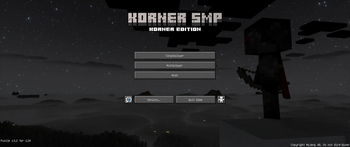
About this Modpack
What's this modpack about?
This is a modpack I originally made for my private SMP, it aims to be a vanilla+ experience along with the origins mod; keeping the gameplay mainly vanilla with some small tweaks. The modpack includes many optimisation mods to ensure it can run on nearly any modern computer, with some graphics mods for some eye-candy.
Use cases for this modpack
The Origins mod is the centerpiece of this modpack, as the mod works best on multiplayer servers with a small to medium group of friends. That is also the target audience of this mod; smaller community servers consisting of 3-20 players. A server can also be run with these same mods, though in that case I recommend adding more server-side optimisation mods
Included in the modpack are also building oriented mods such as Litematica and Axiom, which are disabled by default, but can be enabled in the Modrinth app. The point of them being included is to be used in a creative single-player world where you can plan the builds that you make on another world, whether it be a server or a single player survival world.
This modpack has a lot of features, but here's a summary of every important aspect:
Features
- Origins mod to allow players choosing their race.
- All vanilla structures remade via YUNG's improved structures
- The world generation is much larger and varied thanks to Tectonic and Terralith.
- Many features from newer versions are ported to this modpack's version (1.20.1), like autocrafters and tuff variants.
- Some other autocrafter types are also added from the the autocrafters mod
- The ender dragon fight remastered makes fighting the ender dragon much more epic and fun for many people to fight at once.
- Distant Horizons allows the player to see much farther than normal, which is also necessary to enjoy the new terrain generation to its fullest.
- QoL features such as Durability Viewer to allow monitoring tool and armor durability, AppleSkin to show saturation, disabled double tapping w to sprint, dynamic lights which actually produces light levels from held items and more.
- The friends and foes mod, which adds everything from all past mob- and feature votes that weren't added, like crabs and copper golems.
- Do a barrel roll - A fun mod that allows for realistic elytra flight, can be disabled at will.
- New Soul fire enchantments and tweaks to being set on fire by it.
- Better Ladders can be placed without a wall behind it
- Blastproof Netherite - Netherite items cannot be destroyed by explosions or the void
- F3 Menu is much cleaner
- What are they up to allows other players to see what you are doing in a menu like a chest or in your inventory.
- This modpack comes with many shaders already installed like Complementary Shaders and Rethinking Voxels
Available Versions
How to Set Up a Korner SMP Server
Order Server
Choose at least 6 GB RAM (8 GB recommended for Korner SMP). Based on player count: per 5 players.
Install Modpack in Dashboard
Open the modpack browser in the dashboard, search for "Korner SMP" and click "Install". The fabric loader and Minecraft 1.20.1 are configured automatically.
Start Server & Play
Start the server – all mods are loaded automatically. Share the server IP with friends and play together!
Frequently Asked Questions
Korner SMP server crashes or won't start – what to do?
Most common causes: insufficient RAM or wrong fabric loader. Check latest.log for "OutOfMemoryError" → increase RAM to at least 8 GB. For "Mixin" or "ClassNotFoundException" errors: modpack version and loader don't match. With Mado Hosting, loader and Minecraft version are auto-configured on modpack install – preventing most startup issues.
How much RAM does a Korner SMP server really need?
Minimum 6 GB, recommended 8 GB for stable performance. per 5 players. Important: Minecraft modpacks need more RAM than vanilla – plan extra per additional player. With Mado Hosting, you can scale RAM up live at any time without data loss (from €12/month).
Can I add custom mods to Korner SMP without conflicts?
Yes, but check compatibility: only use mods for the same loader (fabric) and same Minecraft version (1.20.1). Common issues: ID conflicts with recipe mods and incompatible coremod versions. The Mado dashboard mod browser only shows compatible mods and warns about known conflicts.
Korner SMP server lagging – performance tips
1) Increase RAM to 8 GB+. 2) Reduce server view-distance to 8 (server.properties). 3) Pre-generate chunks with the "Chunky" plugin. 4) Use /spark profiler to check which mods consume the most tick time. With Mado Hosting, all servers run on NVMe SSDs with dedicated CPU cores – eliminating hardware as a bottleneck.
Similar Modpacks
![Cobblemon Official Modpack [Fabric]](https://cdn.modrinth.com/data/5FFgwNNP/e7f9ee2e9d361623847853fe2ddce42f519ee64f.png)
![COBBLEVERSE - Pokemon Adventure [Cobblemon]](https://cdn.modrinth.com/data/Jkb29YJU/581ecf54530972afb18a04660afd820f2f24f6c7.png)
![Better MC [FABRIC] - BMC2](https://cdn.modrinth.com/data/shFhR8Vx/a19c2bcb51d38f32f138d3607e91cb2b7b8e387f_96.webp)


![Better MC [FORGE] - BMC4](https://cdn.modrinth.com/data/4BV47HRn/7f5ef7cc61b2593609aabef3ed07a866a4f11b73_96.webp)
Rent Korner SMP Server
Start your own server with automatic modpack installation.
Details
- License
- GNU Lesser General Public License v3.0 or later
- Server-side
- Required
- Client-side
- Required
Supported Versions
Start your Korner SMP Server now
From €12.00/month with 8 GB RAM for the best performance.
Configure Server →