
Kots's Divine Modpack
Just my Personal Minecraft Modpack aiming to overhaul dimensions in the game.
Screenshots
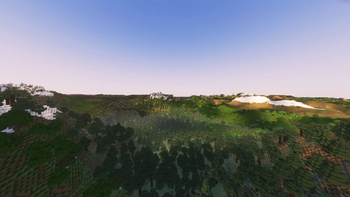

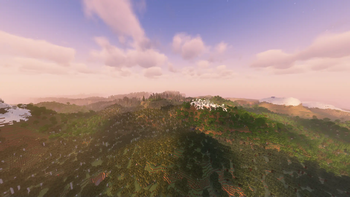
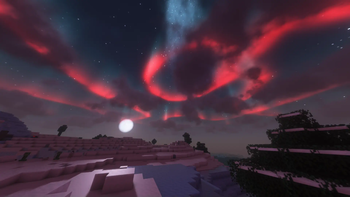
About this Modpack
This modpack aims to overhaul the dimensions in Minecraft, add "some" beauty to the world and add FPS. Mods that overhaul dimensions are:
I've also installed the YUNG's xxx structure overhaul mod collection to the overworld.
Most mods are QoL (Quality of Life) mods and add minor only things.
Due to the nature of the pack, it cannot be played on a server unless the server owner has installed server-side mods of the pack.
The pack features mods that may reduce your FPS like: Distant Horizons & Shaders. This in effect can make it near impossible to play on medium/lower-end PCs.
I advise playing on a high-end PC, however you can disable Distant Horizons and just use vanilla render distance as well as turn off shaders.
I recommend playing with Shader settings as much as you can to achieve the result you want as
Euphoria Patches to Complementary are actually something else...
Mod authors:
Ambient Sounds by creativemd
Apple Skin by squeek502
Architectury API by shedaniel (Patreon name)
BCLib by quiqueck (GitHub name)
BetterEnd by quiqueck (GitHub name)
BetterF3 by TreyRuffy
BetterNether by quiqueck (GitHub name)
Bookshelf by Darkhax
CICADA by enjarai
CIT Resewn by shsupercm
Capes by caelthecolher
Carry On by Tschipp
Chunky by pop4959
Cloth Config API by shedaniel
Complementary Shaders - Reimagined by EminGT
Concurrent Chunk Management Engine (Fabric) by ishland
Continuity by PepperCode1
Controlling by jaredlll08
CreativeCore by creativemd
Debugify by isxander
Distant Horizons by jeseibel
Do a Barrel Roll by enjarai
Dynamic Crosshair by Crendgrim
Dynamic FPS by juliand665
Enchantment Compability by Roundaround
Enchantment Descriptions by Darkhax
Enchantment Level Language Patch by teddyxlandlee
Enchantment Lore by supersayansubtlety
Enchantments-Plus by RoberHoueland
Enhanced Block Entities by FoundationGames
Entity Culling by tr7zw
Euphoria Patches by SpacEagle17
Even Better Enchants by mythitorium
Exordium by tr7zw
Fabric API by modmuss50
Fabric Language Kotlin by modmuss50
Fabrishot by ramidzkh
Falling Leaves by randommcsomethin
Fast Items by Noryea
FastQuit by contaria
FerriteCore by malte0811
Forge Config API Port by Fuzs
ImmediatelyFast by RaphiMC
Indium by comp500
InvMove by PieKing1215
Iris Shaders by coderbot
Krypton by astei
Language Reload by Jerozgen
Leaves Be Gone by Fuzs
Lithium by jellysquid3
Memory Leak Fix by FX
Mod Menu by TerraformersMC
Model Gap Fix by MehVahdJukaar
ModernFix by embeddedt
Motschen's Better Leaves by Motschen
Mouse Tweaks by YaLTeR
Noisium by Steveplays
Not Enough Animations by tr7zw
Noxesium by Aeltumn
Presence Footsteps by Sollace
Puzzles Lib by Fuzs
Reese's Sodium Options by FlashyReese
Roughly Enough Items (REI) by shedaniel
Searchables by jaredlll08
Shulker Box Tooltip by MisterPeModder
Simple Hotbar by AmongstReality
Skip Transitions by JavaChef
Sodium by jellysquid3
Sodium Extra by FlashyReese
Solas Shader by septonious
Sound Physics Remastered by henkelmax
Starlight (Fabric) by spottedleaf
Text Placeholder API by Patbox
Traveler's Titles by YUNG
Video Tape by Anthus
Visuality by PinkGoosik
Xaero's Minimap by thexaero
Xaero's World Map by thexaero
YUNG's API by YUNG
YUNG's Better Desert Temples by YUNG
YUNG's Better Dungeons by YUNG
YUNG's Better End Island by YUNG
YUNG's Better Jungle Temples by YUNG
YUNG's Better Mineshafts by YUNG
YUNG's Better Nether Fortresses by YUNG
YUNG's Better Ocean Monuments by YUNG
YUNG's Better Strongholds by YUNG
YUNG's Better Witch Huts by YUNG
YUNG's Bridges by YUNG
YUNG's Extras by YUNG
YUNG's Menu Tweaks by YUNG
YetAnotherConfigLib by isxander
You Were Slain by Superkat32
Zoomify by isxander
[EMF] Entity Model Features by Traben
[ETF] Entity Texture Features by Traben
oωo (owo-lib) by wisp-forest
qrafty's Japanese Villages by qrafty
Available Versions
How to Set Up a Kots's Divine Modpack Server
Order Server
Choose at least 6 GB RAM (8 GB recommended for Kots's Divine Modpack). Based on player count: per 5 players.
Install Modpack in Dashboard
Open the modpack browser in the dashboard, search for "Kots's Divine Modpack" and click "Install". The fabric loader and Minecraft 1.20.4 are configured automatically.
Start Server & Play
Start the server – all mods are loaded automatically. Share the server IP with friends and play together!
Frequently Asked Questions
Kots's Divine Modpack server crashes or won't start – what to do?
Most common causes: insufficient RAM or wrong fabric loader. Check latest.log for "OutOfMemoryError" → increase RAM to at least 8 GB. For "Mixin" or "ClassNotFoundException" errors: modpack version and loader don't match. With Mado Hosting, loader and Minecraft version are auto-configured on modpack install – preventing most startup issues.
How much RAM does a Kots's Divine Modpack server really need?
Minimum 6 GB, recommended 8 GB for stable performance. per 5 players. Important: Minecraft modpacks need more RAM than vanilla – plan extra per additional player. With Mado Hosting, you can scale RAM up live at any time without data loss (from €12/month).
Can I add custom mods to Kots's Divine Modpack without conflicts?
Yes, but check compatibility: only use mods for the same loader (fabric) and same Minecraft version (1.20.4). Common issues: ID conflicts with recipe mods and incompatible coremod versions. The Mado dashboard mod browser only shows compatible mods and warns about known conflicts.
Kots's Divine Modpack server lagging – performance tips
1) Increase RAM to 8 GB+. 2) Reduce server view-distance to 8 (server.properties). 3) Pre-generate chunks with the "Chunky" plugin. 4) Use /spark profiler to check which mods consume the most tick time. With Mado Hosting, all servers run on NVMe SSDs with dedicated CPU cores – eliminating hardware as a bottleneck.
Similar Modpacks
![Cobblemon Official Modpack [Fabric]](https://cdn.modrinth.com/data/5FFgwNNP/e7f9ee2e9d361623847853fe2ddce42f519ee64f.png)
![COBBLEVERSE - Pokemon Adventure [Cobblemon]](https://cdn.modrinth.com/data/Jkb29YJU/581ecf54530972afb18a04660afd820f2f24f6c7.png)
![Better MC [FABRIC] - BMC2](https://cdn.modrinth.com/data/shFhR8Vx/a19c2bcb51d38f32f138d3607e91cb2b7b8e387f_96.webp)


![Better MC [FORGE] - BMC4](https://cdn.modrinth.com/data/4BV47HRn/7f5ef7cc61b2593609aabef3ed07a866a4f11b73_96.webp)
Rent Kots's Divine Modpack Server
Start your own server with automatic modpack installation.
Supported Versions
Start your Kots's Divine Modpack Server now
From €12.00/month with 8 GB RAM for the best performance.
Configure Server →