
LazyTurtle:Lowest Imagined
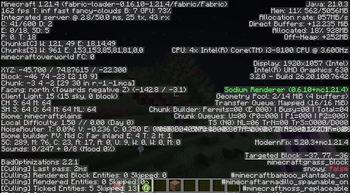
This modpack is designed to optimize performance, increasing FPS from 30 to at least 150, even on older hardware. Continuous improvements are being made to enhance stability, efficiency, and overall performance.
Screenshots

About this Modpack
LazyTurtle Series
Lowest Imagined

LazyTurtle:Lowest Imaginable
It is designed to deliver the highest possible FPS on low-end hardware by minimizing performance overhead. In testing, the average FPS increased from 35 to 180 around 200, with peaks reaching 210 FPS before thermal throttling. By removing unnecessary modifications and implementing key optimizations, this pack ensures stable and efficient performance.
Tested extensively on a low-end PC, LazyTurtle has proven to be a reliable solution for improving FPS. A support link is provided below for any issues, with direct assistance available via Discord. In addition to LazyTurtle, development is ongoing for other projects, including the LazyTurtle Series, the Superior Standalone mod and resource pack, and a dedicated website for future updates and downloads. These projects aim to further enhance gaming performance and Add new Exicting things. LazyTurtle is built for those seeking maximum FPS gains on limited hardware. Testing and feedback are encouraged to refine the project further.
What Makes LazyTurtle Special?
Extreme FPS Boost – Designed for low-end PCs struggling to run Minecraft smoothly.
Lightweight & Effective – Only includes essential performance mods, removing unnecessary overhead.
Tested & Verified – Proven to boost FPS significantly in real-world testing.
Community Support – Direct assistance available via Discord for issues and suggestions.
Included Mods
BELOW ARE THE INCLUDED MODSAlternate Current (Space Walker) - Improves redstone performance and logic handling.
BadOptimizations (thosea) - Removes unnecessary game calculations for better performance.
Better Grasiffy (UltimatChamp) - Enhances grass textures for a more seamless terrain look.
Cloth Config API (shedaniel) - Provides a configuration framework for other mods.
Clumps (Jaredlll08) - Takes all XP orbs and combines them into one for better performance.
Cull Leaves (Motschen) - Optimizes leaf rendering by making hidden leaves invisible.
Dynamic FPS (juliand665) - Lowers FPS when Minecraft is unfocused to save resources.
Enhanced Block Entites-Enhances Mostly chest To Improve Performance
Entity Culling (tr7zw) - Prevents rendering of unseen entities to improve performance.
Fabric API (modmuss50) - Essential library for running most Fabric mods.
Ferrite Core (malte0811) - Reduces memory usage by optimizing block and item storage.
Immediately Fast (RaphiMC) - Improves chunk rendering speed for better FPS.
Iris Shaders (coderbot) - Adds shader support with optimization improvements.
Ksyxis (VidTu) - Speeds up world loading.
Lithium (jellysquid3) - A general optimization mod that improves game performance.
Mod Menu (Prospector) - Adds a menu to manage and view installed Fabric mods.
More Culling (fx) - Further optimizes rendering by skipping unnecessary objects.
No Chat Reports (Aizistral) - Disables Mojang’s chat reporting system.
Sodium (jellysquid3) - A high-performance rendering engine for better FPS.
Noisium (Steveplays) - Optimizes world generation.
Additional Tips for Best Performance
- Lower Render Distance – Recommended for maximum FPS boost.
- Use "Cull Leaves" Resource Pack – Further optimizes performance.
- Adjust Settings – Disable unnecessary graphics options for even better FPS.
Need Help?
- Join Our Discord! – For support, suggestions, and updates on future LazyTurtle releases.
- Contact: Username: Cosmic/gbmguyoriginal (NOT on the server – DM directly for support!(The Server is still being made so i have given the link just follow it then dm that username!!))
Final Notes
- This modpack is made for players with low-end PCs or those who want pure performance.
- If you are not getting enough FPS, tweak your settings! Lowering render distance and disabling unnecessary effects can significantly improve performance.
- The pack is available for updates after and for 1.21.4 !!
- It has Config But may be just a little may be that it may be broken!
Available Versions
How to Set Up a LazyTurtle:Lowest Imagined Server
Order Server
Choose at least 6 GB RAM (8 GB recommended for LazyTurtle:Lowest Imagined). Based on player count: per 5 players.
Install Modpack in Dashboard
Open the modpack browser in the dashboard, search for "LazyTurtle:Lowest Imagined" and click "Install". The fabric loader and Minecraft 1.21.4 are configured automatically.
Start Server & Play
Start the server – all mods are loaded automatically. Share the server IP with friends and play together!
Frequently Asked Questions
LazyTurtle:Lowest Imagined server crashes or won't start – what to do?
Most common causes: insufficient RAM or wrong fabric loader. Check latest.log for "OutOfMemoryError" → increase RAM to at least 8 GB. For "Mixin" or "ClassNotFoundException" errors: modpack version and loader don't match. With Mado Hosting, loader and Minecraft version are auto-configured on modpack install – preventing most startup issues.
How much RAM does a LazyTurtle:Lowest Imagined server really need?
Minimum 6 GB, recommended 8 GB for stable performance. per 5 players. Important: Minecraft modpacks need more RAM than vanilla – plan extra per additional player. With Mado Hosting, you can scale RAM up live at any time without data loss (from €12/month).
Can I add custom mods to LazyTurtle:Lowest Imagined without conflicts?
Yes, but check compatibility: only use mods for the same loader (fabric) and same Minecraft version (1.21.4). Common issues: ID conflicts with recipe mods and incompatible coremod versions. The Mado dashboard mod browser only shows compatible mods and warns about known conflicts.
LazyTurtle:Lowest Imagined server lagging – performance tips
1) Increase RAM to 8 GB+. 2) Reduce server view-distance to 8 (server.properties). 3) Pre-generate chunks with the "Chunky" plugin. 4) Use /spark profiler to check which mods consume the most tick time. With Mado Hosting, all servers run on NVMe SSDs with dedicated CPU cores – eliminating hardware as a bottleneck.
Similar Modpacks

![Cobblemon Official Modpack [Fabric]](https://cdn.modrinth.com/data/5FFgwNNP/e7f9ee2e9d361623847853fe2ddce42f519ee64f.png)
![COBBLEVERSE - Pokemon Adventure [Cobblemon]](https://cdn.modrinth.com/data/Jkb29YJU/581ecf54530972afb18a04660afd820f2f24f6c7.png)
![Better MC [FABRIC] - BMC2](https://cdn.modrinth.com/data/shFhR8Vx/a19c2bcb51d38f32f138d3607e91cb2b7b8e387f_96.webp)


Rent LazyTurtle:Lowest Imagined Server
Start your own server with automatic modpack installation.
Supported Versions
Start your LazyTurtle:Lowest Imagined Server now
From €12.00/month with 8 GB RAM for the best performance.
Configure Server →