
Cobblemon: Legends Lugia
Legends Lugia is a modpack compilation for Cobblemon, setup for the Vervara Network
Screenshots

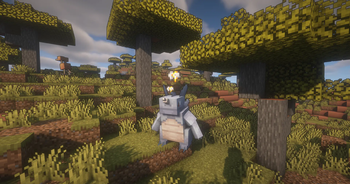
About this Modpack
What is Cobblemon: Legends Lugia:
Cobblemon: Legends Lugia is a modpack developed for the Minecraft server of the same name. It is designed to offer some Minecraft optimization, remain relatively light weight, and add fun!
The intention of the modpack is to create an experience similar to the Legends Arceus game, within a new setting in Minecraft. Ready to experience the Johto Region like never before? We call it Kansai!
Legends Arceus Inspired Features:
Pokémon behaviors. Pokémon can spawn into the world as either skittish, neutral, or even territorial and aggressive.
Mass Outbreaks. These events feature large groups of wild Pokémon and can include almost every Pokémon that can be found in the Kansai Region.
Special regional forms! The Kansai Region has been rumored to be the home of several elusive new Pokémon species.
- The Legends Lugia team recommends to run the modpack with a minimum of 3.0 GB of memory.
Legends Lugia Features So Far:
- Battles using the Pokémon Showdown! engine for competitive battle mechanics.
- Plenty of new and revamped structures dot the landscape making the world ripe for exploration, can you find them all as you go on your pokémon journey?
- Some Legends Arceus-style mechanics, such as move relearning, physically running from battle, and evolving your Pokémon when you decide.
- Toggle free-movement during battles. You can build, mine, or fight mobs while in Pokémon battles!
- Apricorn trees in 7 colors. Harvest Apricorns by right-clicking them, and each harvest has a chance to also drop a seed that can grow a new tree.
- Evolution stones can be found anywhere underground, with different stones located in different biomes. They're more common near the surface.
- Loaded with all the create essentials to bring a new sense of tech and wonder to an otherwise standard cobblemon experience (Including trains)
- And many more Q.O.L. mods to improve your overall experience and performance, Farmers Delight and Sodium to name a few.
- Alas you may rest easy as there are no more pesky tutorial pop-ups.
Credits to all respective mod developers and their products.
Available Versions
How to Set Up a Cobblemon: Legends Lugia Server
Order Server
Choose at least 6 GB RAM (8 GB recommended for Cobblemon: Legends Lugia). Based on player count: per 5 players.
Install Modpack in Dashboard
Open the modpack browser in the dashboard, search for "Cobblemon: Legends Lugia" and click "Install". The fabric loader and Minecraft 1.20.1 are configured automatically.
Start Server & Play
Start the server – all mods are loaded automatically. Share the server IP with friends and play together!
Frequently Asked Questions
Cobblemon: Legends Lugia server crashes or won't start – what to do?
Most common causes: insufficient RAM or wrong fabric loader. Check latest.log for "OutOfMemoryError" → increase RAM to at least 8 GB. For "Mixin" or "ClassNotFoundException" errors: modpack version and loader don't match. With Mado Hosting, loader and Minecraft version are auto-configured on modpack install – preventing most startup issues.
How much RAM does a Cobblemon: Legends Lugia server really need?
Minimum 6 GB, recommended 8 GB for stable performance. per 5 players. Important: Minecraft modpacks need more RAM than vanilla – plan extra per additional player. With Mado Hosting, you can scale RAM up live at any time without data loss (from €12/month).
Can I add custom mods to Cobblemon: Legends Lugia without conflicts?
Yes, but check compatibility: only use mods for the same loader (fabric) and same Minecraft version (1.20.1). Common issues: ID conflicts with recipe mods and incompatible coremod versions. The Mado dashboard mod browser only shows compatible mods and warns about known conflicts.
Cobblemon: Legends Lugia server lagging – performance tips
1) Increase RAM to 8 GB+. 2) Reduce server view-distance to 8 (server.properties). 3) Pre-generate chunks with the "Chunky" plugin. 4) Use /spark profiler to check which mods consume the most tick time. With Mado Hosting, all servers run on NVMe SSDs with dedicated CPU cores – eliminating hardware as a bottleneck.
Similar Modpacks
![Cobblemon Official Modpack [Fabric]](https://cdn.modrinth.com/data/5FFgwNNP/e7f9ee2e9d361623847853fe2ddce42f519ee64f.png)
![COBBLEVERSE - Pokemon Adventure [Cobblemon]](https://cdn.modrinth.com/data/Jkb29YJU/581ecf54530972afb18a04660afd820f2f24f6c7.png)
![Better MC [FABRIC] - BMC2](https://cdn.modrinth.com/data/shFhR8Vx/a19c2bcb51d38f32f138d3607e91cb2b7b8e387f_96.webp)


![Better MC [FORGE] - BMC4](https://cdn.modrinth.com/data/4BV47HRn/7f5ef7cc61b2593609aabef3ed07a866a4f11b73_96.webp)
Rent Cobblemon: Legends Lugia Server
Start your own server with automatic modpack installation.
Supported Versions
Start your Cobblemon: Legends Lugia Server now
From €12.00/month with 8 GB RAM for the best performance.
Configure Server →