
Lekkerman Clientside
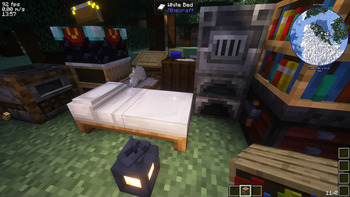
Client-side modpack, with which you can join vanilla servers. Improves immersion and has many quality-of-life mods.
Screenshots

About this Modpack
A nice modpack for joining vanilla servers.
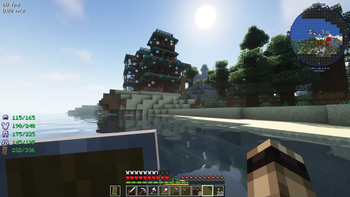
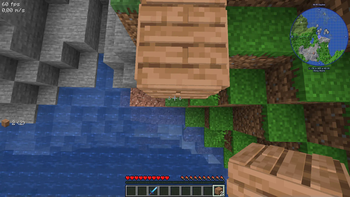
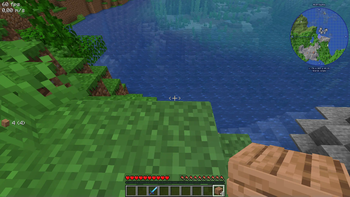
Adds a map, graphical and sound upgrades, HUD improvements, performance increasing mods and quality-of-life mods.
Version 1.21.11:
Extra features worth mentioning:
(Some of these might be considered cheating on some servers, but they'll work fine on a private vanilla server.)
- Invite friends to your single-player world via Essential.
- Litematica: Build with schematics, if you want.
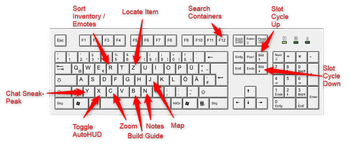
- Minimap (Press "m" to toggle and "j" for map interface).
- Custom notes per world (press "n").
- Middle click in a container to sort the items.
- Click through signs on chests.
- Zoom with "c".
- Non-cheat Freecam with "F4".
- View long distances with Distant Horizons.
- R-Click armor item in inventory to equip them, or sneak + r-click to swap armor with armor stand.
- Scroll inventory column with "Alt".
- Search full chest history (~/^)
- Emote each other (b) even without Emotecraft installed on the server.
- Smart Item Swapping with "r".
- Jump over fences and gates.
- Options to stack inventory to nearby chests that have matching items.
Mods:
- 3d-Skin-Layers
- AchievementStyle
- Anti Item Break
- AppleSkin
- Architectury
- Armor Quick Swap
- Armor Statues
- Atmosfera
- Bad Packets
- BadOptimizations
- Balm
- Beautified Chat Client
- Better Advancements
- Better Statistics Screen
- BetterShields
- Borderless Fullscreen
- Bridging Mod
- Chat Heads
- Cherished Worlds
- Chest Tracker (Unofficial port)
- ClickThrough Plus
- ClientSort
- Cloth Config v20
- Clumps
- Cold Breath
- Collective
- Completionist's Index
- Concurrent Chunk Management Engine
- Continuity
- Controlling
- CoolRain
- Cosy Critters & Creepy Crawlies
- Crafting Tweaks
- CreativeCore
- Cull Leaves
- Daily Dad
- Default Options
- Detail Armor Bar Reconstructed
- Distant Horizons
- Don't Hide My Items!
- DualBar
- Effect Insights
- EffectTimerPlus
- Emotecraft
- Enchantment Insights
- Entity Model Features
- Entity Texture Features
- EntityCulling
- Explosive Enhancement
- Fabric API
- Fabric Language Kotlin
- Falling Leaves
- FancyToasts
- FerriteCore
- Forge Config API Port
- Fzzy Config
- GUI Clock
- GUI Followers
- Held Item Tooltips
- Hide Experimental Warning
- HotbarAPI
- ImmediatelyFast
- Improved Sign Editing
- Inline Tooltips
- Inventory Essentials
- Iris
- Item Descriptions
- ItemSwapper
- Jade
- Journeymap
- Jump Over Fences
- Just Enough Book
- Just Enough Items
- LegacyFreecam
- LibJF
- Litematic Downloader
- Litematica
- Lithium
- M.R.U
- MaLiLib
- Mod Menu
- Monsters in the Closet
- More Culling
- Natural Waters
- No Resource Pack Warnings
- Noisium
- NotEnoughAnimations
- Notes
- Now Playing
- Omega Mute
- Online Emotes
- Pack/Rule Menus
- Paper Doll
- Particle Effects
- Particular Reforged
- Pick Up Notifier
- Ping Wheel
- Placeholder API
- Player Animation Library
- Pro Placer
- Punchy
- Puzzles Lib
- Random World Names
- Reese's Sodium Options
- Replanter Plus
- Resource Pack Options
- Resourcify
- ScalableLux
- Searchables
- Shulker Box Tooltip
- Simple Datapacks
- Simple Modpack Update Checker
- Slot Cycler
- Smooth Scroll
- Sodium
- Sodium Extra
- Sound Physics Remastered
- Sounds
- SplashFox
- Stack to Nearby Chests
- Stonecutter GUI Remastered
- Stylish Effects
- Subtle Effects
- Swinging Lanterns
- TCDCommons API
- TrialSpawnerTimer
- UltraLib
- Visual Keymap
- Visuality
- WI Zoom
- WaveyCapes
- WaxedIcons
- Where Did I Die?
- YDM's Weapon Master
- YetAnotherConfigLib
- essential-container
- uku's Armor HUD
- ukulib
Resource Packs:
These are all loaded (their latest versions) via Resclone during startup.
To change this, edit the config/resclone/config.json file.
- Actually 3D Blocks & Items!
- Armored Legacy
- Better Clearer Glass
- Better Lanterns
- Chat Reporting Helper
- Cubic Leaves
- Detailed Animations
- Sus Sand
- Better Boss Bars
- Extra Text Icons
- Fresh Animations
- Fresh Animations Details
- Fresh Animations Spiders
- Fresh Animations Quivers
- Fresh Animations Emissive
- Fresh Animations Creepers
- Fresh Buckets
- Fresh Food
- Unique Goat Horns
- Cookie Clicker Menu Sounds
Shaders:
- Complimentary Unbound
Data Packs:
They are inside the datapacks folder.
- Deadly Deadly Dungeon
- Fast Path
- Gamingbarn's Guns
- Haul
- Jake's Build Tools
- Sunken Spires
- Structory
- Structory Towers
- Very Simple Gravestones
- William Wythers' Overhauled Overworld (Datapack)
Version 1.21.10:
Extra features worth mentioning:
- Litematica: Build with schematics, if you want. (Press "u" to download schematics)
- R-Click armor item in inventory to equip them.
- Minimap (Press "m" to toggle and "j" for map interface).
- Middle click in a container to sort the items.
- Click through signs on chests.
- Zoom with "c".
- Non-cheat Freecam with "v".
- Scroll inventory column with "Alt".
- Invite friends to single player worlds.
- Nice datapacks to choose from, including structures, world-gen and Jake's Build Tools.
- Built-in Minesweeper game for more fun semi-afk sessions.
Mods:
- 3d-Skin-Layers
- AchievementStyle
- AmbientSounds
- Anti Item Break
- AppleSkin
- Armor Swapper
- Bad Packets
- BadOptimizations
- Balm
- Beautified Chat Client
- Better "Add Server"
- BetterShields
- Borderless Fullscreen
- Bridging Mod
- Camera Enhancements
- Chat Heads
- Cherished Worlds
- ClickThrough Plus
- ClientSort
- Cloth Config v20
- Clumps
- Cold Breath
- Collective
- Completionist's Index
- Controlling
- Crafting Tweaks
- CreativeCore
- CullLeaves
- Custom Player Animations
- Daily Dad
- Day Counter Enhanced
- Default Options
- Detail Armor Bar Reconstructed
- Distant Horizons
- Don't Hide My Items!
- DualBar
- Dynamic FPS
- Effect Insights
- EffectTimerPlus
- Emotecraft
- Enchantment Insights
- Entity Model Features
- Entity Texture Features
- EntityCulling
- Explosive Enhancement
- Fabric API
- Fabric Language Kotlin
- Falling Leaves
- Fancy Door Animations
- FancyToasts
- FerriteCore
- Forge Config API Port
- GUI Clock
- GUI Followers
- Held Item Tooltips
- Hide Experimental Warning
- HotbarAPI
- ImmediatelyFast
- Improved Sign Editing
- Inline Tooltips
- Inventory Essentials
- Iris
- Item Descriptions
- ItemPhysicLite
- Jade
- Journeymap
- Just Enough Book
- Just Enough Items
- Litematic Downloader
- Litematica
- Lithium
- M.R.U
- MaLiLib
- Minesweeper in game
- Mod Menu
- Monsters in the Closet
- More Culling
- Natural Waters
- No Resource Pack Warnings
- NotEnoughAnimations
- Notes
- Now Playing
- Pack/Rule Menus
- Paper Doll
- Particle Effects
- Particular Reforged
- Pick Up Notifier
- Ping Wheel
- Placeholder API
- Player Animation Library
- PrickleMC
- Pro Placer
- Puzzles Lib
- Random World Names
- Reese's Sodium Options
- Resourcify
- ScalableLux
- Searchables
- Shulker Box Tooltip
- Simple Datapacks
- Simple Modpack Update Checker
- Slot Cycler
- Smooth Scroll
- Sodium
- Sodium Extra
- Sound Physics Remastered
- Sounds
- Stack to Nearby Chests
- Stonecutter GUI Remastered
- Stylish Effects
- TrialSpawnerTimer
- UltraLib
- VisualKeys
- Visuality
- WCIFS
- WI Zoom
- WaxedIcons
- Where Did I Die?
- World Play Time
- YDM's Weapon Master
- YetAnotherConfigLib
- essential-container
- uku's Armor HUD
- ukulib
Resource Packs:
See datapacks section below as well - for their resource packs (if applicable) were also added.
- 3D crops Revamped
- Actually 3D Furnaces
- Actually 3D Workbenches
- Better Clearer Glass
- Better Fresher 3D Books
- Better Low Shield
- Better Boss Bars
- Canoe boats
- Chat Reporting Helper
- Cubic Leaves
- Extra Text Icons
- Fresh Animations
- Fresh Animations: Details
- Fresh Animations: Emissive
- Fresh Animations: Spiders
- Fresh Animations: Quivers
- Fresh Animations: Creepers
- Fresh Buckets
- Fresh Food
- Lively Turtle Helmet
- Low On Fire
- Minecraft Music Remastered
- Mickey Joe's Flowers
- Potions 3D Fusion
- Ray's Better Mace
- Sus Blocks
- Unique Goat Horns
- Sky's 3D Bars
- Cookie Clicker Menu Sounds
- Ray's 3D Ladders
- Ray's 3D Rails
Shaders:
- Complimentary Unbound
Data Packs:
They are inside the datapacks folder - copy them from there into your world's datapacks folder.
- Deadly Deadly Dungeon
- Fast Path
- Gamingbarn's Guns
- Haul
- Jake's Build Tools
- Sunken Spires
- Structory
- Structory Towers
- Very Simple Gravestones
- William Wythers' Overhauled Overworld (Datapack)
Version 1.21.9:
Features worth mentioning:
- Litematica: Build with schematics, if you want.
- R-Click armor item in inventory to equip them.
- Minimap (Press "j" for map interface).
- Middle click in a container to sort the items.
- Click through signs on chests.
- Zoom with "c".
- Non-cheat Freecam with "v".
- Scroll inventory column with "Alt".
- Invite friends to single player worlds.
Mods:
- AchievementStyle
- AmbientSounds
- Anti Item Break
- Armor Swapper
- Bad Packets
- BadOptimizations
- Balm
- Beautified Chat Client
- BetterShields
- Borderless Fullscreen
- Camera Enhancements
- Chat Heads
- ClickThrough Plus
- ClientSort
- Cloth Config v20
- Clumps
- Cold Breath
- Collective
- Completionist's Index
- Controlling
- Crafting Tweaks
- CreativeCore
- Default Options
- Detail Armor Bar Reconstructed
- Don't Hide My Items!
- DualBar
- Dynamic FPS
- EffectTimerPlus
- Enchantment Descriptions Java
- Enchantment Level Cap Indicator
- Fabric API
- Fabric Language Kotlin
- Falling Leaves
- FerriteCore
- Forge Config API Port
- GUI Clock
- GUI Followers
- Held Item Tooltips
- HotbarAPI
- ImmediatelyFast
- Improved Sign Editing
- Inventory Essentials
- Iris
- Item Descriptions
- ItemPhysicLite
- Jade
- Journeymap
- Just Enough Book
- Litematica
- Lithium
- M.R.U
- MaLiLib
- Mod Menu
- Now Playing
- One Click Join
- Paper Doll
- Particle Effects
- Particular Reforged
- Pick Up Notifier
- Ping Wheel
- Placeholder API
- Pro Placer
- Puzzles Lib
- Raise Sound Limit Simplified
- Random World Names
- Reese's Sodium Options
- Resourcify
- ScalableLux
- Searchables
- Shulker Box Tooltip
- Simple Modpack Update Checker
- Slot Cycler
- Sodium
- Sodium Extra
- Sound Physics Remastered
- Sounds
- Stonecutter GUI Remastered
- UltraLib
- VisualKeys
- Visuality
- WCIFS
- WI Zoom
- WaxedIcons
- Where Did I Die?
- YDM's Weapon Master
- YetAnotherConfigLib
- essential-container
- uku's Armor HUD
- ukulib
Resource Packs:
- Better Clearer Glass
- Better Fresher 3D Books
- Better Low Shield
- Better Boss Bars
- Chat Reporting Helper
- 3D crops Revamped
- Fresh Buckets
- Fresh Food
- Fresh Music Discs
- Low On Fire
- Minecraft Music Remastered
- Mickey Joe's Flowers
- Potions 3D Fusion
- Ray's Better Mace
- Sus Blocks
- Unique Goat Horns
- Sky's 3D Bars
- Cookie Clicker Menu Sounds
- Ray's 3D Ladders
- Ray's 3D Rails
- Actually 3D Workbenches
Shaders:
- Complimentary Unbound
Version 1.21.8:
Built on Fabulously OptimizedMods:
- AmbientSounds
- Amecs
- Animatica
- AppleSkin
- Architectury
- Auto Third Person
- Balm
- Better Mount HUD
- Better Third Person
- BetterF3
- BetterGrassify
- BetterShields
- Bridging Mod
- Capes
- Chat Heads
- Cherished Worlds
- ClickThrough Plus
- ClientSort
- Cloth Config v19
- Clumps
- Collective
- Continuity
- Controlify
- Controlling
- Crafting Tweaks
- CreativeCore
- Cubes Without Borders
- Debugify
- Distant Horizons
- Durability Tooltip
- Dynamic FPS
- EnchantmentDescriptions
- Entity Model Features
- Entity Texture Features
- EntityCulling
- Explosive Enhancement
- Fabric API
- Fabric Language Kotlin
- Fabrishot
- FastQuit
- FerriteCore
- Forge Config API Port
- Freecam
- Frostbyte's Improved Inventory
- Fzzy Config
- GUI Followers
- Hold My Items
- ImmediatelyFast
- Inventory Essentials
- Iris
- Item Descriptions
- Journeymap
- Just Enough Breeding
- LambDynamicLights
- Language Reload
- Lithium
- M.R.U
- Main Menu Credits
- MixinTrace
- Mod Menu
- Model Gap Fix
- More Chat History
- More Culling
- Mouse Tweaks
- No Chat Reports
- Notes
- OptiGUI
- Optiboxes
- Paginated Advancements
- Paper Doll
- Particle Rain
- Pick Up Notifier
- Presence Footsteps
- PrickleMC
- Puzzle
- Puzzles Lib
- Reese's Sodium Options
- Remove Reloading Screen
- Resourcify
- Roughly Enough Items
- Searchables
- Sheep Squeak
- Slot Cycler
- Sodium
- Sodium Extra
- Sound Physics Perfected
- Sounds
- Stack to Nearby Chests
- Stonecutter GUI Remastered
- Subtle Effects
- SuperMartijn642's Config Library
- Visuality
- World Play Time
- YOSBR
- YetAnotherConfigLib
- Zoomify
- e4mc
- ukulib
Resource Packs:
- Fresh Moves
- Armory Conglomery
- Better Fresher 3D Books
- Boss Refreshed
- Fresh Flowers and Plants
- Fresh Food
- Fresh Music Discs
- Fresh Ores and Ingots
- Fresh Paintings
- Fresh Skeleton Physics
- Fresh Animations
- Sus Blocks
- Cookie Clicker Menu Sounds
- Ray's 3D Ladders
- Ray's 3D Rails
- Beach Background
Shaders:
- Complimentary Unbound
Version 1.20.4:
Social:
- Essential (Invite friends into your single player world / emotes / cosmetics / etc.)
- Chat heads
- Daily dad
- More chat history
- No Chat Reports
Inventory/Storage/Crafting:
- Chest Tracker
- Searchables
- Click Through
- Crafting Tweaks
- EMI
- EMI Trades
- Equipment Compare
- Inventory Essentials
- Stack to nearby chests
- Mouse Wheelie
- Inventory Profiles Next
- Simple Shulker Preview
- Shulker Box Tooltip
Building:
- Bridging Mod
- Build Guide
HUD/GUI:
- Appleskin
- Autohud
- Better Mount HUD
- Idwtialsimmoedm
- Jade
- Simple HUD Enhanced
- Splashfox
- GUI Followers
- Main Menu Credits
- Paginated Advancements & Custom Frames
- Frostbyte's Improved Inventory
- BetterShields
- BactroMod
- Stonecutter GUI Remastered
- Blur
Navigation:
- Journeymap
- Zoomify
Movement:
- ThirdPersonBoating
Sound:
- Ambient Sounds
- Presence Footsteps
- Sheep Squeak
- Sound Physics Remastered
- Realistic Combat Soundpack
- Dynamic Surroundings: Fabric Edition
- Adventure Redefined
Graphics:
- Fresh Animations
- Capes
- Wavey Capes
- Better Zombies
- [EMF] Entity Model Features
- [ETF] Entity Texture Features
- Continuity
- Explosive Enhancement
- Falling Leaves
- Indium
- Interactic
- Iris Shaders
- Visuality
- FabricSkyboxes
- FabricSkyBoxes Interop
- Model Gap Fix
- OptiGUI
- Nautilus3D
- Limited Life Armor
- Wakes
- Better Clouds
- Better Beds
- Serious Player Animations
- Player Animator
- Make Bubbles Pop
- Not Enough Animations
Performance:
- Dynamic FPS
- Entity Culling
- Fast Quit
- Ferrite Core
- Immediately Fast
- Lithium
- ModernFix
- More Culling
- Reeses Sodium Options
- Sodium
- Sodium Extra
- Remove Reloading Screen
Management:
- Amecs
- Antighost
- Better F3
- Better Statistics Screen
- Cherished Worlds
- Continue Button
- Language Reload
- Mod Menu
- MixinTrace
- Notes
- Borderless Mining
- Controlify
- Debugify
- Fabrishot
- Your Options Shall Be Respected (YOSBR)
- Modpack Update Checker
- Death Log
Shaders:
- Complementary Shaders - Unbound + Euphoria Patches
Dependancies:
- Balm
- Cloth Config
- Collective
- CreativeCore
- Fabric API
- Fabric Language Kotlin
- Forge Config API Port
- Iceberg
- M.R.U
- Owo-Lib
- Yet another config lib
- Puzzle
- UkuLib
- libIPN
Version 1.19.3:
Social mods:
- Essential (Invite friends into your single player world, cosmetics, zoom, etc.)
- More chat history
- Daily dad
- Stendhal (fancy in-game text edits)
- Craft Presence
- Chat Heads
Inventory/Storage/Crafting Mods:
- EMI & EMI Trades
- Inventory Profiles Next
- Stack to nearby chests
- Click Through (click through signs on chests)
- Recipe Book is pain (recipe book re-arranged similar to creative mode)
- Idwtialsimmoedm & Enchanting Table Descriptions (Shows enchantment descriptions)
- Crafting Tweaks (r-click full stack, clearing, etc.)
- Item Swapper (Press "r" to switch to similar items, like tools/weapons)
- Adaptive tooltips
Building Mods:
- Bridging Mod (place blocks beneath/behind a block)
HUD Mods:
- Detail Armor Bar
- Simple HUD Utilities
- Jade (Shows what you're looking at)
Navigation Mods:
- Journeymap
Movement Mods:
- Camera Overhaul
Sound Mods:
- Jingle (hear when loading is done)
- Presence Footsteps
- Auditory
Graphics:
- Distant Horizons, for far viewing distances... or Shaders, if shaders are preferred.
- Classic 3D Resource Pack
- Visuality
- Interactic
- Super fancy coulds (when not using shaders)
- Explosive Enhancement
- Falling Leaves
- Biome Particle Weather
Management:
- Cherished Worlds (Favorite/pin/bookmark worlds)
- Advancement Info (More details about your advancements)
- Notebook (Accessible in your menu, for taking notes)
- Language Reload (Change Language in-game)
- Better Statistics Screen
- Better F3
Shaders (to choose from):
- BSL
- Contemporary
(Logo design by Freepik.)
Available Versions
How to Set Up a Lekkerman Clientside Server
Order Server
Choose at least 4 GB RAM (6 GB recommended for Lekkerman Clientside). Based on player count: per 8 players.
Install Modpack in Dashboard
Open the modpack browser in the dashboard, search for "Lekkerman Clientside" and click "Install". The fabric loader and Minecraft 1.21.11 are configured automatically.
Start Server & Play
Start the server – all mods are loaded automatically. Share the server IP with friends and play together!
Frequently Asked Questions
Lekkerman Clientside server crashes or won't start – what to do?
Most common causes: insufficient RAM or wrong fabric loader. Check latest.log for "OutOfMemoryError" → increase RAM to at least 6 GB. For "Mixin" or "ClassNotFoundException" errors: modpack version and loader don't match. With Mado Hosting, loader and Minecraft version are auto-configured on modpack install – preventing most startup issues.
How much RAM does a Lekkerman Clientside server really need?
Minimum 4 GB, recommended 6 GB for stable performance. per 8 players. Important: Minecraft modpacks need more RAM than vanilla – plan extra per additional player. With Mado Hosting, you can scale RAM up live at any time without data loss (from €8/month).
Can I add custom mods to Lekkerman Clientside without conflicts?
Yes, but check compatibility: only use mods for the same loader (fabric) and same Minecraft version (1.21.11). Common issues: ID conflicts with recipe mods and incompatible coremod versions. The Mado dashboard mod browser only shows compatible mods and warns about known conflicts.
Lekkerman Clientside server lagging – performance tips
1) Increase RAM to 6 GB+. 2) Reduce server view-distance to 8 (server.properties). 3) Pre-generate chunks with the "Chunky" plugin. 4) Use /spark profiler to check which mods consume the most tick time. With Mado Hosting, all servers run on NVMe SSDs with dedicated CPU cores – eliminating hardware as a bottleneck.
Rent Lekkerman Clientside Server
Start your own server with automatic modpack installation.
Supported Versions
Start your Lekkerman Clientside Server now
From €8.00/month with 6 GB RAM for the best performance.
Configure Server →