
LG Optimized
Small modpack focused on optimizing performance while also adding a few quality of life mods.
Screenshots
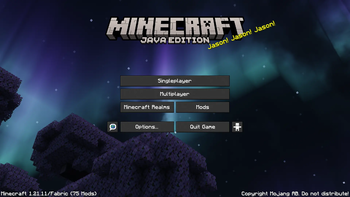
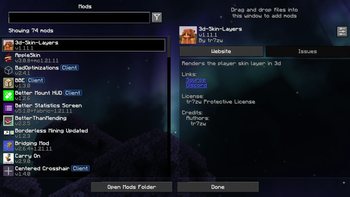
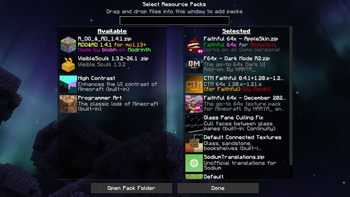
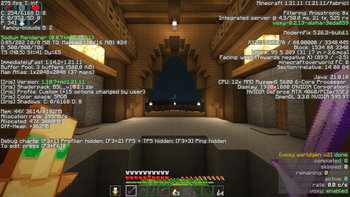
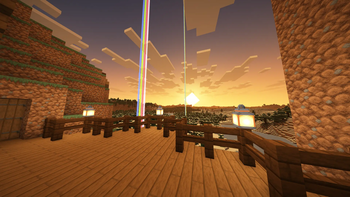
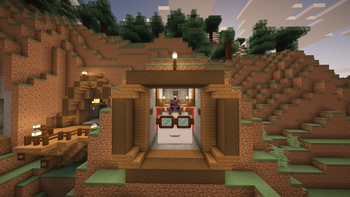
About this Modpack
This modpack bundles up the most popular optimization mods, focusing on improving performance and the FPS count.
There are also a few vanilla-friendly and quality of life mods that add or rework some game mechanics to improve the singleplayer experience. A few examples are:
RightClickHarvest for harvesting and replanting crops with ease;
FallingTree for cutting down trees faster;
Easy Anvils for better combining of enchanted weapons, tools and books;
and many more.
It also includes Voxy (with Voxy WorldGen), Faithful 64x (with Connected Textures, AppleSkin and Dark Mode UI add-ons) and BSL Shaders (with a custom preset) for a better visual experience.
You should be able to join any vanilla servers without any issues, given the server is compatible with the modpack's Minecraft version. Some mods may need to be installed on the server side to work on multiplayer.
MODS LIST:
Attention! Some of these mods (e.g. Inventory Profiles Next, Client Tweaks) have custom settings and keybinds set by me. It is strongly encouraged to tweak them so they better fit your playstyle and needs.
Optimization
- BadOptimizations
- Better Block Entities
- Clumps
- C2ME
- Dynamic FPS
- Entity Culling
- Fast Noise
- FastQuit
- FerriteCore
- ImmediatelyFast
- Language Reload
- Lithium
- ModernFix
- More Culling
- Reese's Sodium Options
- Remove Reloading Screen
- ScalableLux
- ServerCore
- Sodium
- Sodium Extra
Shaders and Lighting
- Iris Shaders
- LambDynamicLights
Level of Detail
- Voxy
- Voxy WorldGen
Quality of Life
- Better Than Mending
- Bridging Mod
- Client Tweaks
- Cubes Without Borders
- Debugify
- Default Options
- Elytra/Chestplate Swapper
- FallingTree
- Gravestones
- Inventory Profiles Next
- Leaf Me Alone
- No Chat Reports
- No Resource Pack Warnings
- RightClickHarvest
- Zoomify
UI
- AppleSkin
- Better Mount HUD
- Better Statistics Screen
- Centered Crosshair
- Cherished Worlds
- Controlling
- Elytra Pitch
- Jade
- JEI
- Mod Menu
- Stylish Effects
Maps
- Xaero's Minimap
- Xaero's World Map
- XaeroPlus
Game Mechanics
- Easy Anvils
- Easy Magic
- Easy Shulker Boxes
- Expanded Armor Enchanting
- Expanded Bow Enchanting
Villagers
- Infinite Trading
- Trade Cycling
- Visible Traders
Item Frames
- ClickThrough Plus
- Invisible Frames
Visuals
- 3D Skin Layers
- Continuity
- Elytra Physics
- Not Enough Animations
- Wavey Capes
RESOURCE PACKS LIST:
- Faithful 64x
- CTM Faithful
- Faithful Java 64x - Dark Mode UI
- Faithful 64x for AppleSkin
- Translations for Sodium
- Rainbow Diamond Ores & Ancient Debris
- Visible Sculk
SHADER PACKS LIST:
- BSL Shaders
Available Versions
How to Set Up a LG Optimized Server
Order Server
Choose at least 4 GB RAM (6 GB recommended for LG Optimized). Based on player count: per 8 players.
Install Modpack in Dashboard
Open the modpack browser in the dashboard, search for "LG Optimized" and click "Install". The fabric loader and Minecraft 26.1.2 are configured automatically.
Start Server & Play
Start the server – all mods are loaded automatically. Share the server IP with friends and play together!
Frequently Asked Questions
LG Optimized server crashes or won't start – what to do?
Most common causes: insufficient RAM or wrong fabric loader. Check latest.log for "OutOfMemoryError" → increase RAM to at least 6 GB. For "Mixin" or "ClassNotFoundException" errors: modpack version and loader don't match. With Mado Hosting, loader and Minecraft version are auto-configured on modpack install – preventing most startup issues.
How much RAM does a LG Optimized server really need?
Minimum 4 GB, recommended 6 GB for stable performance. per 8 players. Important: Minecraft modpacks need more RAM than vanilla – plan extra per additional player. With Mado Hosting, you can scale RAM up live at any time without data loss (from €8/month).
Can I add custom mods to LG Optimized without conflicts?
Yes, but check compatibility: only use mods for the same loader (fabric) and same Minecraft version (26.1.2). Common issues: ID conflicts with recipe mods and incompatible coremod versions. The Mado dashboard mod browser only shows compatible mods and warns about known conflicts.
LG Optimized server lagging – performance tips
1) Increase RAM to 6 GB+. 2) Reduce server view-distance to 8 (server.properties). 3) Pre-generate chunks with the "Chunky" plugin. 4) Use /spark profiler to check which mods consume the most tick time. With Mado Hosting, all servers run on NVMe SSDs with dedicated CPU cores – eliminating hardware as a bottleneck.
Similar Modpacks

![Cobblemon Official Modpack [Fabric]](https://cdn.modrinth.com/data/5FFgwNNP/e7f9ee2e9d361623847853fe2ddce42f519ee64f.png)
![COBBLEVERSE - Pokemon Adventure [Cobblemon]](https://cdn.modrinth.com/data/Jkb29YJU/581ecf54530972afb18a04660afd820f2f24f6c7.png)
![Better MC [FABRIC] - BMC2](https://cdn.modrinth.com/data/shFhR8Vx/a19c2bcb51d38f32f138d3607e91cb2b7b8e387f_96.webp)


Rent LG Optimized Server
Start your own server with automatic modpack installation.
Supported Versions
Start your LG Optimized Server now
From €8.00/month with 6 GB RAM for the best performance.
Configure Server →